



Need Starlink Installation or Network Optimization?
We help homes, offices, apartments, and businesses with Starlink installation, WiFi coverage improvement, and professional setup in Kenya.
Request Installation Chat on WhatsApp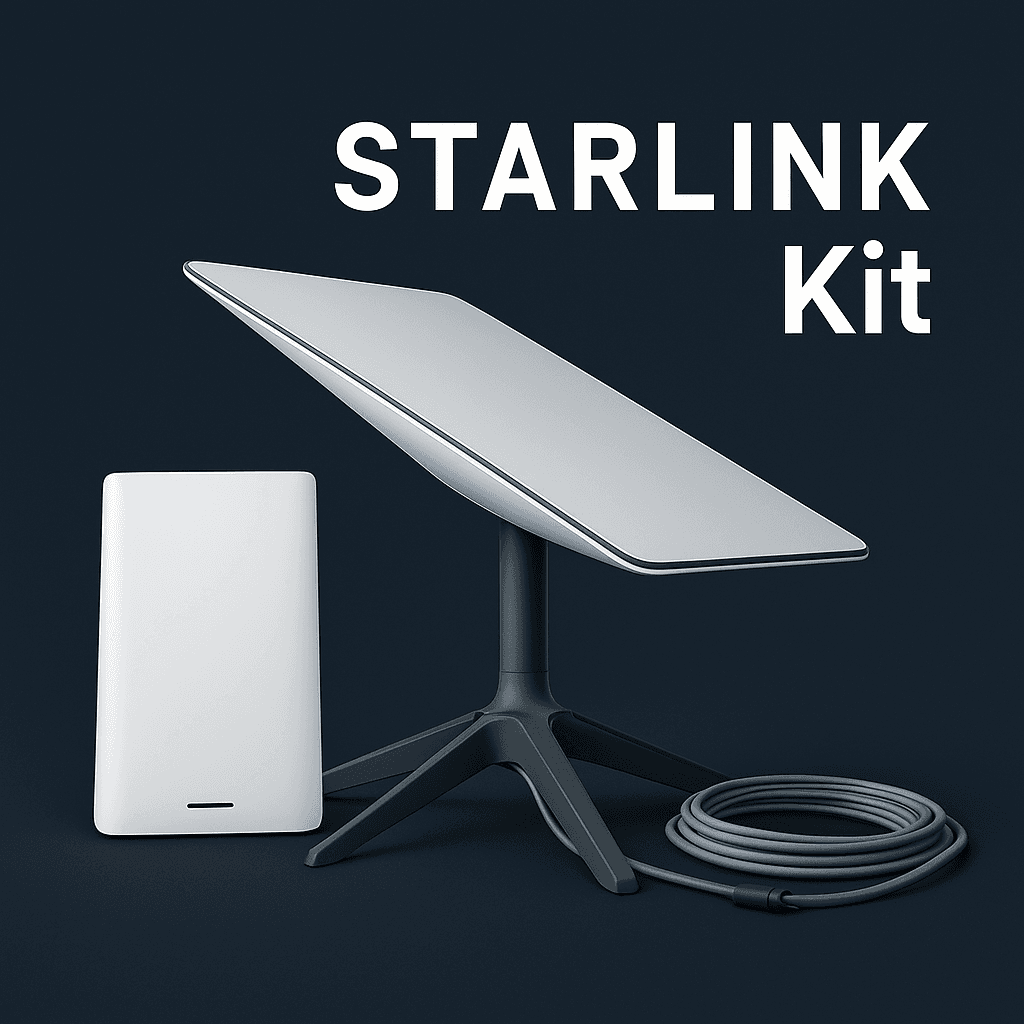
Starlink Dish Kit | High-Speed Satellite Internet Hardware for Home & Business
Looking for reliable, fast, and easy-to-install satellite internet? The Starlink Dish Kit provides everything you need to access Starlink’s next-generation high-speed internet anywhere — homes, businesses, rural areas, and remote sites.
Talk to Spacekits
Need Starlink help for your home or business?
Talk to Spacekits before you buy or book installation. We help with kit supply, mounting, activation, router placement, WiFi coverage, and written quotes.
What Is a Starlink Dish Kit?
A Starlink dish kit is the complete hardware package offered by SpaceX to connect users to the Starlink satellite network. It includes a high-performance satellite dish (“Dishy”), mounted cables, WiFi router, and all installation accessories. The kit is designed for plug-and-play setup, making it ideal even for non-technical users.
Key Features of the Starlink Dish Kit
1. High-Performance Satellite Dish
Automatically aligns with Starlink satellites
High throughput for streaming, online gaming, and remote work
Reliable performance in rural and off-grid locations
2. Dual-Band WiFi Router
Wide coverage and strong signal
Supports multiple devices at once
Easy setup via the Starlink app
3. Quick Mounting Hardware
Lightweight and weatherproof
Suitable for roofs, walls, and open space setups
4. Fast Setup
Simple plug-and-play design
App-guided installation and diagnostics
Why Choose the Starlink Dish Kit?
✔ Ultra-Fast Speeds: 50–220+ Mbps
✔ Low Latency: Ideal for calls, cloud work, and gaming
✔ Reliable in Remote Areas: Works where fiber and 4G/5G fail
✔ Portable: Great for rural homes, field operations, camping, and travel
Whether you’re upgrading your home internet or deploying connectivity for a business, the Starlink dish kit ensures fast, reliable, and secure satellite internet anywhere.
What’s Included in the Starlink Dish Kit?
Starlink satellite dish
Mounting tripod or pipe adapter
WiFi router
Power supply
50–75 ft Starlink cable
Installation guide
Benefits of Using a Starlink Dish Kit
1. Internet Anywhere — No Fiber Required
The Starlink dish kit solves connectivity challenges in rural and underserved regions where fiber, DSL, or mobile networks are unreliable or unavailable. As long as you have a clear view of the sky, you can enjoy stable and fast internet.
2. Easy DIY Installation
You don’t need professional technicians or complicated tools. The kit comes with:
Pre-configured hardware
Step-by-step app setup
Automatic dish alignment
This ensures even beginners can complete the setup within minutes.
3. Excellent for Remote Work
With growing demand for remote jobs and online businesses, the Starlink dish kit supports:
Crystal-clear Zoom and Teams calls
Cloud-based software
High-speed file transfers
VPN access
4. Reliable for Businesses & Field Operations
Companies in construction, mining, farming, logistics, security, and remote offices rely on Starlink for:
24/7 connectivity
GPS tracking and communication
CCTV streaming
Data-intensive operations
Who Should Buy a Starlink Dish Kit?
✔ Rural homeowners
✔ Remote workers
✔ Outdoor enthusiasts (camping, RV trips)
✔ Rural businesses and offices
✔ Schools and clinics in remote areas
✔ Construction sites & field teams
✔ Internet backup for enterprises
If you need consistent high-speed internet without depending on fiber or mobile networks, a Starlink dish kit is a perfect solution.
Starlink Dish Kit Specifications
Dish
Motorized or standard version depending on model
Weather-resistant and snow-melting capability
High throughput design
Router
WiFi 5 or WiFi 6 depending on model
Long-range coverage
Secure encryption
App-based controls
Network Speeds
50 Mbps to 220+ Mbps download
10–25 Mbps upload
20–60 ms latency
How Much Does a Starlink Dish Kit Cost?
Pricing varies by region, but most kits include the dish, router, and mounting accessories with one-time hardware cost plus a monthly subscription.
If you want, I can generate Starlink dish kit prices in Kenya, US, UK, or any other region.Why the Starlink Dish Kit Is Trending Worldwide
Expanding satellite coverage globally
Affordable compared to traditional satellite internet
Improved speeds with new satellites
Ideal for modern digital lifestyles
The Starlink dish kit is not just hardware—it’s a complete connectivity solution.
How to Install a Starlink Dish Kit (Step-by-Step Guide)
Setting up your Starlink dish kit is fast and beginner-friendly. Here’s a simple installation guide you can use on your website or product page:
1. Unbox the Starlink Dish Kit
Inside the package you’ll find:
Everything is plug-and-play.
2. Choose the Best Installation Location
Select a spot with:
A clear, unobstructed view of the sky
No trees or tall buildings blocking the dish
A stable surface for the tripod
Use the Starlink app’s obstruction tool to check for blind spots.
3. Mount the Dish
Place the dish on the tripod or your preferred mount:
Roof
Wall
Pole
Open yard space
The dish automatically aligns itself toward Starlink satellites.
4. Connect the Cables
Plug the dish cable into the router
Connect the power supply
Wait for the router to boot
The LED indicator will show connectivity status.
5. Configure Via the Starlink App
Download the Starlink app and follow on-screen instructions to:
Name your network
Set your WiFi password
Run connectivity tests
Your Starlink dish kit should now be online.
Maintenance Tips for Your Starlink Dish Kit
To keep the kit delivering top performance, follow these simple tips:
1. Keep the Dish Clean
Remove dust, leaves, or snow from the surface to prevent signal interference.
2. Check for Obstructions
Seasonal changes can introduce new obstacles like growing trees.
3. Secure the Mount
Ensure the tripod or roof mount is tight and stable, especially in windy regions.
4. Use Surge Protection
A voltage protector reduces the risk of damage from power fluctuations.
5. Update the App
Starlink frequently releases performance enhancements and bug fixes.
Starlink Dish Kit for Kenya, Africa, and Global Users
Starlink is rapidly expanding across Africa, including:
Kenya
Uganda
Tanzania
Rwanda
South Africa
Nigeria
Ghana
A Starlink dish kit is especially beneficial in areas with inconsistent fiber or mobile networks, offering:
Reliable home internet
Improved business connectivity
Better online learning for students
Enhanced remote work and freelancing opportunities
If you want, I can tailor this section to Kenya-specific pricing, availability, installation tips, or reseller information.
Testimonials: What Users Say About the Starlink Dish Kit
⭐ “Finally, reliable internet in rural areas!”
Starlink solved the problem of poor connectivity where fiber was unavailable.
⭐ “Perfect for working from home in remote locations.”
Video calls, cloud tools, and streaming all work without interruptions.
⭐ “Easy to install and very stable even during bad weather.”
The dish remains connected thanks to Starlink’s robust satellite network.
Add your own customer reviews for even stronger SEO performance.
Frequently Asked Questions (FAQ) About the Starlink Dish Kit
1. What comes in the Starlink dish kit?
The kit includes the Starlink satellite dish, WiFi router, mounting stand, power supply, and a long high-speed Starlink cable for installation.
2. How long does it take to set up a Starlink dish kit?
Most users complete installation in 10–20 minutes using the Starlink mobile app, which guides you through alignment and network setup.
3. Does the Starlink dish kit work in bad weather?
Yes. The dish is designed to handle rain, dust, wind, and snow. It also has a built-in snow-melt function to prevent signal interference.
4. Can I move my Starlink dish kit to another location?
Depending on your Starlink service plan, you can relocate or use it on the go. Standard and mobility versions support travel and roaming.
5. Do I need a technician to install it?
No. The Starlink dish kit is completely beginner-friendly. You can mount it on the ground, rooftop, or pole without professional help.
Need Starlink Installation or Network Optimization?
We help homes, offices, apartments, and businesses with Starlink installation, WiFi coverage improvement, and professional setup in Kenya.
Request Installation Chat on WhatsApp