
Need Starlink Installation or Network Optimization?
We help homes, offices, apartments, and businesses with Starlink installation, WiFi coverage improvement, and professional setup in Kenya.
Request Installation Chat on WhatsApp
A Starlink mounting stand is one of the most important accessories you need if you want your Starlink internet to perform well. Many people buy a Starlink kit, place the dish on the ground, balcony, or roof, and expect strong internet immediately. Sometimes it works, but in many homes and businesses across Kenya, poor mounting causes unstable internet, slow speeds, frequent drops, and obstruction warnings.
Talk to Spacekits
Need Starlink help for your home or business?
Talk to Spacekits before you buy or book installation. We help with kit supply, mounting, activation, router placement, WiFi coverage, and written quotes.
Starlink works best when the dish has a clear view of the sky. Starlink’s own installation guidance says your Starlink needs a clear sky view because trees, roofs, poles, branches, or nearby structures can interrupt the connection between the dish and satellites. The Starlink app also includes an obstruction tool to help users choose a suitable installation point.
That is why a strong and correctly installed Starlink mounting stand matters. It helps raise the Starlink dish above common obstructions, keeps it stable during wind and rain, and gives your internet system a more permanent and professional setup.
At Spacekits.co.ke, we help homes, offices, schools, shops, farms, hotels, rental apartments, and businesses across Kenya choose and install the right Starlink mounting stand. Whether you need a rooftop stand, wall mount, pole mount, balcony stand, or custom elevated stand, the goal is simple: better Starlink signal, better stability, and better internet performance.
What Is a Starlink Mounting Stand?
A Starlink mounting stand is a support structure used to hold your Starlink dish in the best position for satellite connection. It can be installed on a roof, wall, pole, ground area, balcony, or other elevated position depending on your building and surroundings.
The stand keeps the Starlink dish secure and properly positioned. It also helps protect the dish from unnecessary movement, accidental falls, water pooling, roof obstruction, and signal blockage.
The basic stand that comes with some Starlink kits is useful for testing or temporary placement, but it is not always ideal for permanent installation. Starlink’s mount guidance explains that the included mount is generally for ground-level installation or quick setup, while permanent installations often require elevated mounting on a roof, pole, or wall.
This is where a proper Starlink mounting stand becomes important.
A good mounting stand should be:
- Strong enough to hold the dish securely.
- High enough to reduce obstructions.
- Weather-resistant.
- Properly fixed to the roof, wall, or pole.
- Compatible with your Starlink model.
- Installed in a location with a clear sky view.
- Safe for your building structure.
- Neatly fitted with proper cable routing.
When installed correctly, a Starlink mounting stand can make a big difference in internet reliability.
Why You Need a Starlink Mounting Stand
Many Starlink users in Kenya face performance issues not because Starlink is weak, but because the dish is poorly positioned. Starlink is a satellite internet system. Unlike ordinary fiber or wireless internet, it needs to communicate with satellites moving overhead. If the dish is blocked, even partly, your internet can become unstable.
A proper Starlink mounting stand helps solve this problem.
1. It Gives the Dish a Clear View of the Sky
The biggest reason to install a Starlink mounting stand is to give your dish a better sky view. Trees, roofing sheets, nearby houses, water tanks, tall walls, and electric poles can all interfere with Starlink performance.
In Nairobi, Kiambu, Nakuru, Kisumu, Mombasa, Eldoret, Meru, Machakos, Kajiado, and other parts of Kenya, many homes have surrounding structures that can block the dish. A raised stand helps position the dish above these obstacles.
2. It Reduces Internet Drops
If your Starlink dish is placed too low, it may keep losing connection whenever satellites move behind an obstruction. This can cause buffering during video calls, slow downloads, lagging during online gaming, and interruptions when streaming.
A strong mounting stand helps keep the dish in a better position, reducing unnecessary disconnections.
3. It Makes the Installation Permanent
The temporary Starlink stand is good for testing, but for long-term use, you need a secure installation. A proper mounting stand keeps your Starlink dish fixed in place and reduces the risk of accidental movement.
This is especially important for homes with children, businesses, schools, hotels, farms, and rental properties where equipment should be safely installed.
4. It Protects the Dish from Damage
When the dish is placed on the ground, it can easily be knocked, stepped on, moved, stolen, or exposed to unnecessary water and dust. A mounting stand lifts the dish and keeps it in a safer location.
5. It Improves Professional Appearance
A well-installed Starlink mounting stand makes your setup look clean and professional. For businesses, offices, hotels, lodges, and institutions, this matters because exposed cables and poorly placed equipment can look disorganized.
Best Places to Install a Starlink Mounting Stand
The best place to install your Starlink mounting stand depends on your property, roof type, surrounding trees, nearby buildings, and cable route.
Before installation, it is important to check for obstructions using the Starlink app. Starlink recommends using the obstruction tool to identify a suitable location before mounting the dish permanently.
Here are the most common locations.
1. Rooftop Starlink Mounting Stand
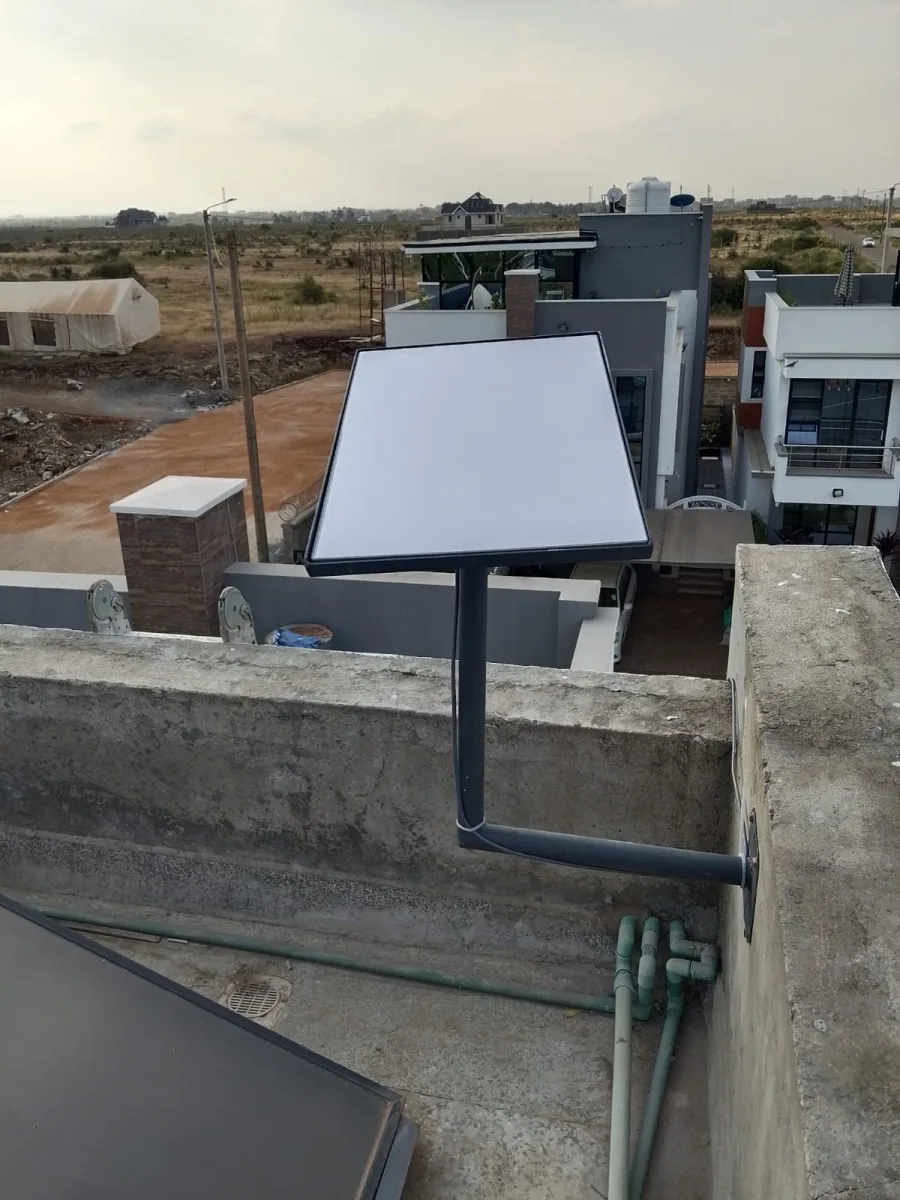
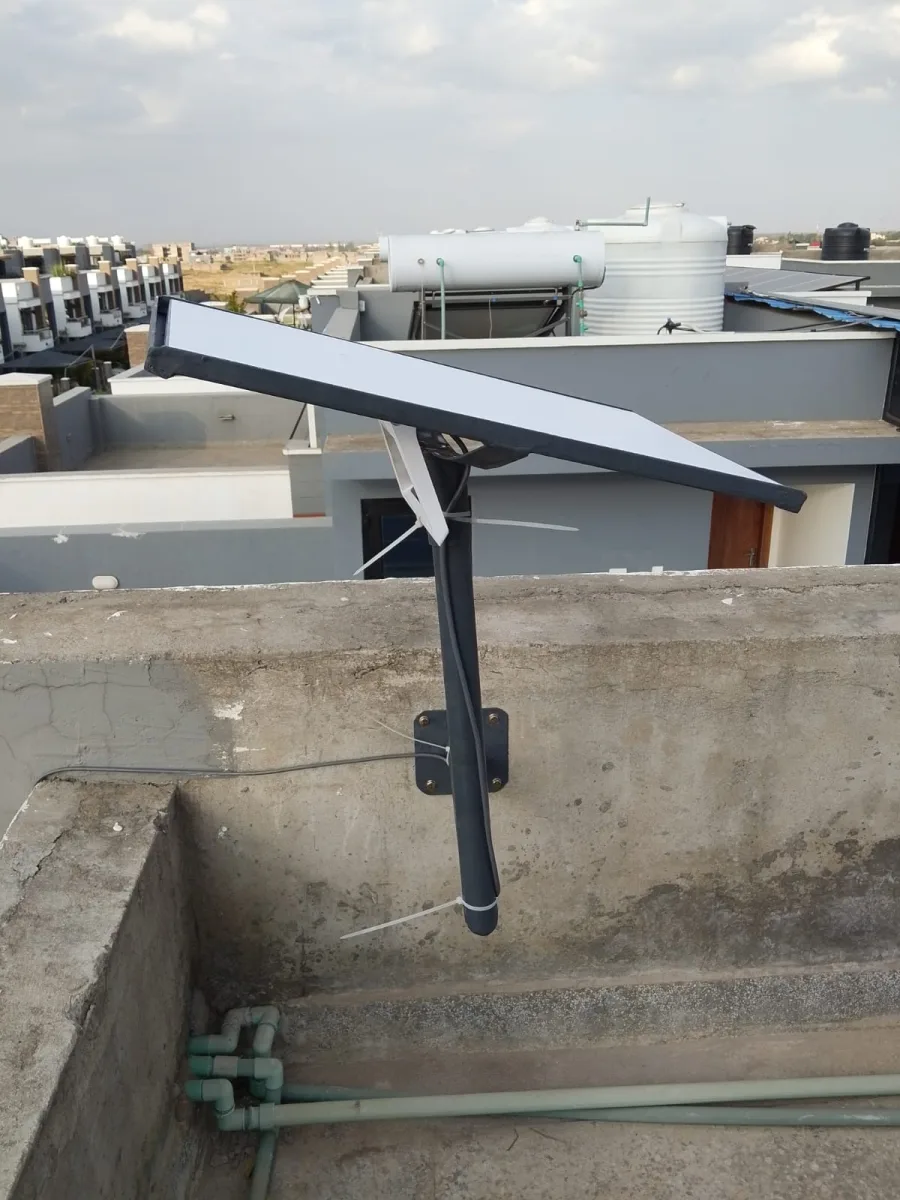
A rooftop mounting stand is one of the best options for many Kenyan homes and businesses. Roofs usually provide a higher position, which helps the dish get a clearer sky view.
This option is suitable for:
- Residential homes.
- Apartments.
- Office buildings.
- Schools.
- Hotels and lodges.
- Shops and commercial buildings.
- Rural homes with trees nearby.
A rooftop stand should be installed carefully to avoid roof leaks, weak fixing points, or poor cable routing. The stand must be firm enough to withstand wind and rain.
2. Wall-Mounted Starlink Stand
A wall mount is ideal when the roof is not suitable or when you want to attach the dish to a strong external wall. This can work well for buildings with flat walls, gables, or strong fascia areas.
Starlink wall mount guidance highlights the need to select a suitable location and maintain clearance from nearby structures.
Wall-mounted stands are good for:
- Houses with strong external walls.
- Townhouses.
- Apartments.
- Offices.
- Buildings where roof drilling is not preferred.
- Locations where a wall gives better sky exposure.
3. Pole Mounting Stand
A pole mount is useful when you need to raise the dish higher than the roof or place it away from the building. This option is common in rural areas, farms, schools, lodges, and compounds with many trees.
A pole-mounted Starlink stand can help avoid obstruction from trees, iron sheets, roof edges, and neighboring buildings.
It is ideal for:
- Farms.
- Rural homes.
- Schools.
- Large compounds.
- Hotels and camps.
- Remote business sites.
- Construction sites.
4. Ground Pole Stand
A ground pole stand is installed directly into the ground, usually with a strong base. This is useful when the roof is not safe or when the dish needs to be positioned in an open area away from the house.
This setup should be done professionally because the pole must be firm, upright, and protected from movement.
5. Balcony Starlink Mounting Stand
For apartment users, a balcony stand can work if the balcony has a clear sky view. However, this option depends heavily on the direction of the balcony and surrounding obstructions.
If your balcony is blocked by another building, a higher rooftop or wall mount may be better.
Types of Starlink Mounting Stands Available in Kenya
There are different types of Starlink mounting stands depending on your installation needs.
1. Standard Starlink Mounting Stand
This is a basic stand used to hold the dish in a stable position. It may be used for simple rooftop, balcony, or flat surface installations. However, the installer must confirm that the location has minimal obstruction.
2. Starlink Roof Mount Stand
A roof mount stand is designed for mounting the dish on a roof. It may be fixed to roofing timber, metal frames, concrete, or other strong points depending on the building.
This is one of the most requested Starlink mounting solutions in Kenya because many homes and offices get better sky view from the roof.
3. Starlink Pole Mount Stand
A pole mount stand raises the dish higher using a vertical pole. It is useful where the roof is too low or trees are nearby.
For best results, the pole should be firm, rust-resistant, and well-supported. Poor pole installation can cause shaking, especially during strong wind.
4. Starlink Wall Mount Stand
A wall mount stand is fixed to a vertical wall. It is a good option where roof access is difficult or where a wall offers better positioning.
This type of stand must be fixed to a strong wall to avoid loosening over time.
5. Custom Starlink Mounting Stand
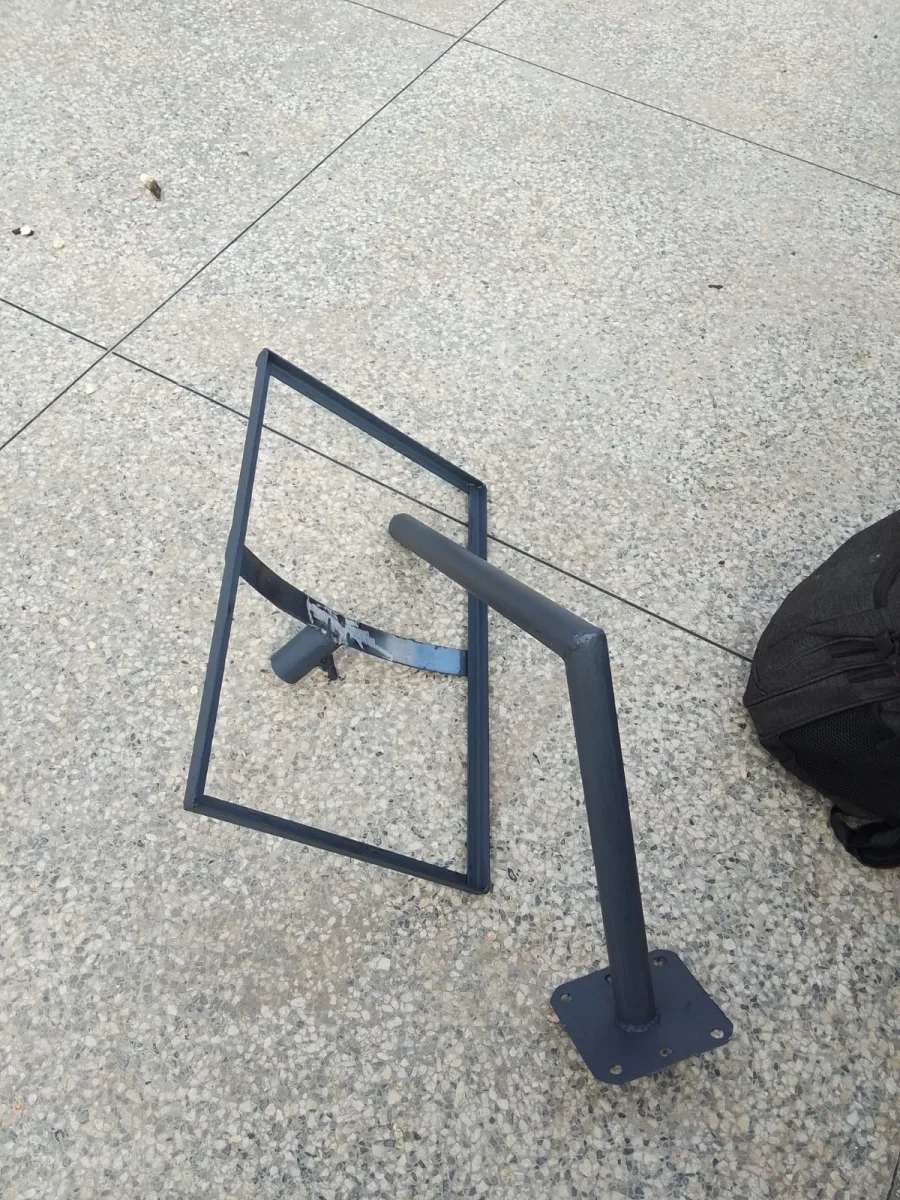
Some homes and businesses need a custom stand because the building design is unique. For example, you may need a taller stand, an extended arm, a reinforced pole, or a special bracket for a mabati roof.
At Spacekits.co.ke, custom mounting can be recommended after checking your site and identifying the best position for the Starlink dish.
How a Starlink Mounting Stand Improves Internet Performance
A Starlink mounting stand does not directly increase your internet package speed, but it helps your Starlink dish perform better by reducing obstruction and movement.
Starlink internet depends on a stable connection between the dish and satellites. If the dish is blocked by trees or buildings, performance drops. If the dish moves due to weak installation, the connection can also become unstable.
A good stand helps by:
- Raising the dish above obstacles.
- Keeping the dish steady.
- Reducing signal interruption.
- Improving consistency.
- Protecting cables from damage.
- Making the installation safer.
- Supporting long-term use.
This is why many Starlink users experience better reliability after moving the dish from the ground to a proper rooftop, pole, or wall mounting stand.
Signs You Need a Better Starlink Mounting Stand
You may need a new or improved Starlink mounting stand if you notice any of these problems:
1. Your Starlink App Shows Obstruction Warnings
If the app keeps showing obstruction issues, your dish may be too low or badly positioned.
2. Internet Keeps Disconnecting
Frequent drops can happen when trees, buildings, or roof edges block the dish.
3. Dish Is Placed on the Ground
Ground placement is usually temporary. For permanent use, elevated mounting is often better.
4. Dish Moves During Wind
If your dish shakes or changes position during wind, you need a stronger stand.
5. Cables Are Exposed or Poorly Routed
A good mounting installation should include neat cable management to protect the cable from damage.
6. You Have Trees Around Your Home
Trees are one of the most common causes of Starlink obstruction. A taller mounting stand may help.
7. You Are Installing Starlink for Business Use
Businesses need stable internet. A proper mounting stand helps reduce avoidable downtime.
Starlink Mounting Stand for Homes in Kenya
For home users, a Starlink mounting stand can make your internet more dependable for everyday use.
Many Kenyan homes now use Starlink for:
- Streaming movies.
- Online learning.
- Remote work.
- Video calls.
- Smart TVs.
- Online gaming.
- CCTV monitoring.
- Home Wi-Fi.
- Family internet sharing.
If the dish is badly mounted, the whole household may experience slow or unstable internet. A properly installed mounting stand helps the dish stay in the best position.
For residential homes, the best option is usually a roof mount, wall mount, or short pole mount. The correct choice depends on your roof type, compound, and sky visibility.
Starlink Mounting Stand for Businesses
Businesses need reliable internet for daily operations. A poor Starlink setup can affect payments, communication, customer service, CCTV, online systems, bookings, and staff productivity.
A proper Starlink mounting stand is important for:
- Offices.
- Shops.
- Restaurants.
- Hotels.
- Schools.
- Clinics.
- Cyber cafes.
- Warehouses.
- Churches.
- Construction sites.
- Farms.
- Lodges and camps.
- Property management offices.
For business use, the installation should be more professional. The stand should be strong, cables should be protected, and the router placement should be planned carefully.
At Spacekits.co.ke, we help businesses install Starlink in a way that supports stable internet across the building.
Starlink Mounting Stand for Rural Areas
Starlink is very useful in rural and remote areas of Kenya where fiber internet may not be available. However, rural areas often have trees, tall vegetation, uneven roofs, and open wind exposure.
A strong mounting stand is especially important in rural installations.
Common rural Starlink mounting options include:
- Tall pole stands.
- Ground pole mounts.
- Roof-mounted poles.
- Custom elevated stands.
- Reinforced metal stands.
For farms, lodges, schools, and remote offices, the mounting stand should be strong enough for long-term outdoor exposure.
What to Consider Before Buying a Starlink Mounting Stand
Before buying a Starlink mounting stand, consider the following factors.
1. Your Starlink Model
Different Starlink models may require different adapters or mounting styles. Before installation, confirm whether your kit is compatible with the stand.
2. Roof Type
Kenyan homes use different roofing materials, including mabati, tiles, concrete, shingles, and flat roofs. The mounting method should match the roof type.
3. Height Needed
If there are many obstructions, you may need a taller stand or pole mount.
4. Wind Exposure
In open areas, the stand must be strong enough to resist wind movement.
5. Cable Length
The dish must be mounted in a location where the cable can reach the router safely. Poor cable routing can cause future problems.
6. Safety
Roof work can be risky. Professional installation is recommended, especially for high roofs or complex mounting.
7. Future Maintenance
The stand should allow safe access if the dish needs inspection, cleaning, or adjustment.
Professional Starlink Mounting Stand Installation in Kenya
Installing a Starlink mounting stand may look simple, but small mistakes can lead to poor performance or damage.
Professional installation helps with:
- Site survey.
- Obstruction checking.
- Choosing the best mounting point.
- Proper stand selection.
- Secure fixing.
- Cable routing.
- Router positioning.
- Wi-Fi coverage planning.
- Testing and setup.
- Neat finishing.
At Spacekits.co.ke, we provide Starlink installation services across Kenya. Spacekits is based in Nairobi and offers Starlink kits, installation, mounting, and support services in Kenya.
Whether you already have a Starlink kit or you want to buy one, Spacekits can help you choose the right mounting stand and install it properly.
Why Choose Spacekits for Starlink Mounting Stand Installation?
Choosing the right installer matters. A poorly mounted Starlink dish can cost you more later through repairs, poor performance, roof damage, cable problems, or repeat installation.
Here is why customers choose Spacekits.co.ke.
1. We Understand Starlink Installations in Kenya
Kenyan homes and businesses have different roofing styles, building layouts, and environmental conditions. We help choose a mounting solution that fits your specific location.
2. We Offer Mounting and Installation Support
We do not only sell accessories. We help with proper installation so your Starlink system works as expected.
3. We Serve Homes and Businesses
Whether you need Starlink for a home, office, school, hotel, farm, or shop, we can guide you on the best mounting option.
4. We Help Reduce Obstruction Problems
We help identify a good location where the dish can get a clear view of the sky.
5. We Provide Clean and Professional Setup
A good installation should not leave hanging cables, loose stands, or unsafe roof fittings. Spacekits focuses on neat and secure installation.
Starlink Mounting Stand Price in Kenya
The price of a Starlink mounting stand in Kenya depends on several factors:
- Type of stand.
- Height of the stand.
- Material used.
- Roof type.
- Installation complexity.
- Location.
- Cable routing needs.
- Whether additional brackets or adapters are required.
A simple mounting stand may cost less than a tall custom pole mount. A rooftop installation may also differ from a wall or ground pole installation.
For the best price, contact Spacekits.co.ke for a quote based on your location and installation needs.
You can request a quote if you need:
- Starlink roof mounting stand.
- Starlink pole mount.
- Starlink wall mount.
- Starlink balcony stand.
- Starlink installation in Kenya.
- Starlink relocation.
- Starlink cable routing.
- Starlink router setup.
- Starlink business installation.
DIY vs Professional Starlink Mounting Stand Installation
Some users can install Starlink by themselves, especially for temporary testing. However, permanent mounting is different.
DIY Installation May Work If:
- You have a clear open space.
- The dish is not being mounted high.
- You understand safe drilling and fixing.
- You know how to use the Starlink app.
- You can route the cable safely.
Professional Installation Is Better If:
- You need roof installation.
- You have trees or buildings nearby.
- You need a tall pole.
- You are installing for business.
- You want neat cabling.
- You are unsure about obstruction.
- You want a long-term setup.
- You want to avoid roof damage.
For most homes and businesses in Kenya, professional installation is the safer and better option.
Common Mistakes When Installing a Starlink Mounting Stand
Avoid these mistakes when setting up your Starlink.
1. Installing the Dish Too Low
Low placement may cause obstruction from roofs, walls, trees, and nearby buildings.
2. Ignoring the Obstruction Tool
The Starlink app helps identify obstruction issues. Skipping this step can lead to poor performance.
3. Using a Weak Stand
A weak stand can shake, bend, rust, or fail during strong wind.
4. Poor Cable Management
Exposed or hanging cables can be damaged by rain, sun, people, or animals.
5. Mounting on a Weak Roof Area
Not every roof section is strong enough. Professional installers know how to choose secure fixing points.
6. Placing the Router Poorly
Even if the dish is well-mounted, poor router placement can reduce Wi-Fi coverage inside the house or office.
7. Not Planning for Future Maintenance
The dish should be installed in a way that allows safe access if support is needed later.
Starlink Mounting Stand for Mabati Roofs
Many homes in Kenya have mabati roofing. A Starlink mounting stand can be installed on a mabati roof, but care is needed.
The installer should consider:
- Strong support points under the mabati.
- Proper sealing to prevent leaks.
- Wind movement.
- Rust protection.
- Cable entry point.
- Roof angle.
- Safety during installation.
A professional installer can help prevent common problems such as leaking roofs, loose screws, shaking stands, or poor positioning.
Starlink Mounting Stand for Flat Roofs
Flat roofs can be good for Starlink installation if they offer a clear sky view. A flat roof may allow easier access and more flexible placement.
However, the stand must still be secured properly. If the area is windy, the stand should not be left loose or unstable.
Flat roof installations may use:
- Weighted base stands.
- Fixed pole mounts.
- Wall-edge mounts.
- Custom fabricated stands.
- Short elevated stands.
The best option depends on your building and safety requirements.
Starlink Mounting Stand for Apartment Buildings
Apartment users may face more mounting challenges because they may not have full roof access. In such cases, the installer can assess whether a balcony, wall, or rooftop shared area is suitable.
Before installation in an apartment, consider:
- Landlord approval.
- Building management rules.
- Cable routing.
- Balcony direction.
- Nearby buildings.
- Roof access.
- Safety.
- Theft prevention.
A professional installer can help recommend the best mounting option without damaging the property.
Starlink Mounting Stand for Schools and Institutions
Schools, colleges, churches, clinics, and institutions need stable internet for many users. For such setups, the mounting stand should be strong, elevated, and professionally installed.
A school may also need proper router placement, mesh Wi-Fi, access points, or network cabling to distribute internet across classrooms, offices, or hostels.
Spacekits can help institutions install Starlink and plan the internal network setup.
Starlink Mounting Stand for Hotels, Lodges, and Camps
Hotels and lodges need reliable internet for guests, booking systems, staff communication, and payments. In remote areas, Starlink can be a strong option, but installation quality matters.
For hotels and lodges, the mounting stand should be:
- Strong.
- High enough.
- Weather-resistant.
- Neatly installed.
- Secure from tampering.
- Positioned for best performance.
Additional networking may be needed to distribute Wi-Fi across rooms, reception, restaurant areas, and outdoor spaces.
Starlink Mounting Stand Maintenance Tips
After installing your Starlink mounting stand, basic maintenance can help keep the setup reliable.
Check the Stand Occasionally
Look for looseness, rust, bending, or movement.
Keep the Dish Area Clear
Trim nearby branches if they start blocking the dish.
Protect the Cable
Ensure the cable is not cut, crushed, exposed, or hanging dangerously.
Avoid Moving the Dish Unnecessarily
Once the dish is installed in a good location, avoid shifting it without checking obstructions again.
Call an Installer If You Notice Problems
If your internet starts dropping or the dish appears unstable, contact a technician.
How to Book Starlink Mounting Stand Installation with Spacekits
Booking with Spacekits is simple.
Visit spacekits.co.ke and request help with:
- Starlink mounting stand.
- Starlink installation.
- Starlink kit purchase.
- Starlink relocation.
- Starlink roof mount.
- Starlink pole mount.
- Starlink wall mount.
- Starlink router setup.
- Starlink Wi-Fi extension.
- Starlink business setup.
You can contact Spacekits for a quote and installation support in Nairobi and other counties across Kenya.
Frequently Asked Questions About Starlink Mounting Stand
1. What is the best Starlink mounting stand?
The best Starlink mounting stand depends on your location. If your roof gives a clear sky view, a roof mount may be best. If you have trees or nearby buildings, a pole mount may work better.
2. Do I need a mounting stand for Starlink?
Yes, in many cases you need a proper mounting stand for permanent installation. The basic stand may work for temporary testing, but a strong roof, wall, or pole mount is usually better for long-term use.
3. Can I install Starlink on the ground?
You can place Starlink on the ground for testing, but it may be affected by obstructions, movement, water, people, pets, or theft. A raised mounting stand is better for permanent use.
4. Can Spacekits install a Starlink mounting stand?
Yes. Spacekits.co.ke provides Starlink mounting and installation support in Kenya.
5. Can a Starlink mounting stand improve speed?
A mounting stand does not change your Starlink package speed directly, but it can improve reliability by reducing obstruction and keeping the dish stable.
6. What causes Starlink obstruction?
Common causes include trees, buildings, roof edges, poles, water tanks, branches, and walls.
7. Can Starlink be mounted on a mabati roof?
Yes, but it should be done carefully to avoid leaks, weak fixing, or unstable installation.
8. How high should a Starlink mounting stand be?
The height depends on nearby obstructions. Some homes only need a short roof stand, while others need a taller pole mount.
9. Can Starlink be installed on an apartment balcony?
Yes, but only if the balcony has a clear sky view. If blocked by other buildings, roof mounting may be better.
10. Where can I buy a Starlink mounting stand in Kenya?
You can contact Spacekits.co.ke for Starlink mounting stands, accessories, and installation support in Kenya.
Conclusion: Get the Right Starlink Mounting Stand from Spacekits
A Starlink mounting stand is not just an accessory. It is a key part of a reliable Starlink installation. If your dish is placed in the wrong location, your internet may keep dropping even when your Starlink kit is working properly.
The right stand helps your dish get a clear sky view, stay firm during wind and rain, and serve your home or business more reliably.
For professional Starlink mounting stand installation in Kenya, contact Spacekits.co.ke today. Whether you need a roof mount, wall mount, pole mount, balcony stand, or custom Starlink mounting solution, Spacekits can help you install your Starlink the right way.
Call/WhatsApp: +254725345345
Website: https://spacekits.co.ke
Email: support@spacekits.co.ke
Need Starlink Installation or Network Optimization?
We help homes, offices, apartments, and businesses with Starlink installation, WiFi coverage improvement, and professional setup in Kenya.
Request Installation Chat on WhatsApp