Need Starlink Installation or Network Optimization?
We help homes, offices, apartments, and businesses with Starlink installation, WiFi coverage improvement, and professional setup in Kenya.
Request Installation Chat on WhatsApp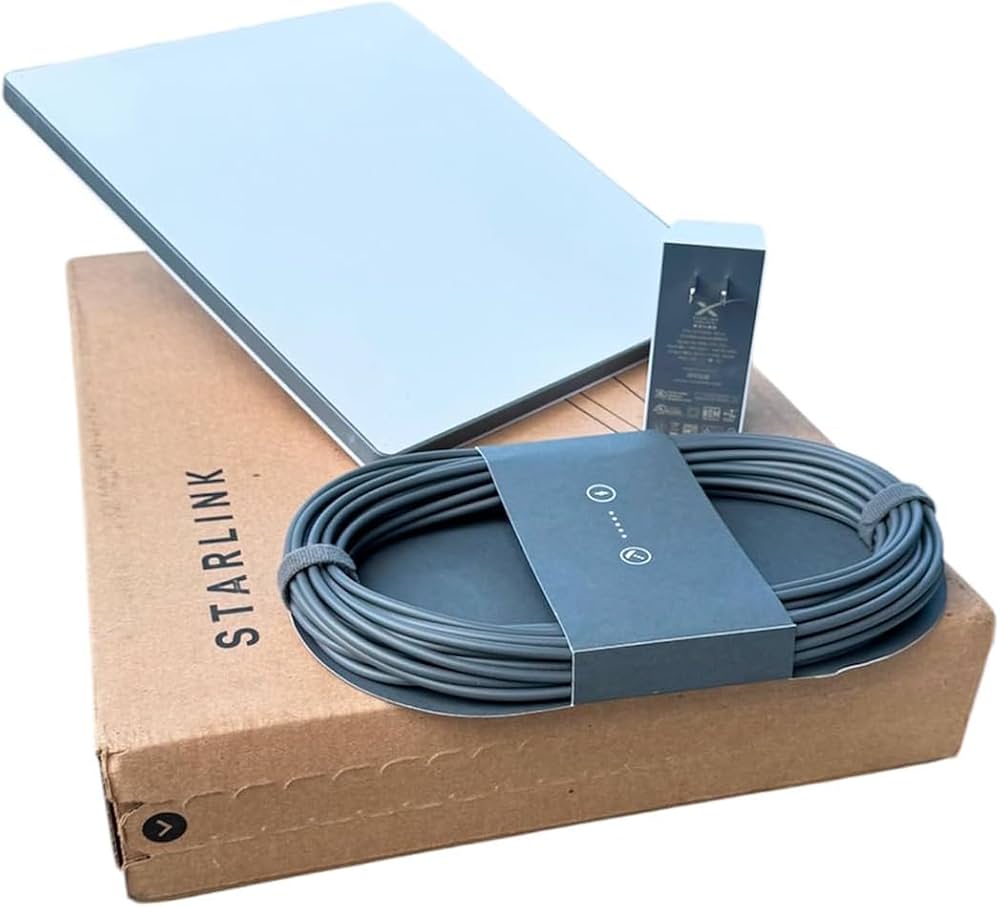
How Does Starlink Work? A Complete Guide to Space-Based Internet
Starlink has quickly become one of the most talked-about internet services in the world. But how does Starlink work, and why is it different from traditional internet providers? In this guide, we’ll break down everything you need to know—without the technical jargon.
⭐ What Is Starlink?
Starlink is a satellite internet service developed by SpaceX, designed to provide high-speed internet access across the globe—especially in remote and underserved areas. Unlike traditional internet that relies on cables, Starlink connects you through a network of satellites in low Earth orbit (LEO).
How Starlink Works: The Basic Concept
At its core, Starlink works by using:
✅ 1. Satellites in Low Earth Orbit (LEO)
Starlink satellites orbit much closer to Earth than traditional satellites, typically around 340–1,200 km above the surface. This low orbit reduces signal delay, resulting in faster speeds.
✅ 2. A User Terminal (Dish)
Users receive internet using a special Starlink dish. This dish communicates directly with the satellites overhead and provides Wi-Fi to your home or business.
✅ 3. Ground Stations
These are Earth-based stations that connect the Starlink network to the traditional internet infrastructure.
Step-by-Step: How Starlink Internet Reaches Your Home
Step 1: The Dish Connects to Satellites
Your Starlink dish automatically finds and locks onto the nearest satellite overhead.
Step 2: Satellites Communicate with Each Other
Starlink satellites can communicate with each other using laser links, which allow data to travel across the network quickly.
Step 3: Data Travels to Ground Stations
When the satellite receives your request (like loading a website), it sends the data to the nearest ground station.
Step 4: Ground Stations Connect to the Internet
Ground stations route your data into the normal internet infrastructure, then send the response back through the satellite network.
Step 5: Your Dish Receives the Data
The satellite sends the data back to your dish, and you get internet on your devices.
Why Starlink Is Faster Than Traditional Satellite Internet
Traditional satellite internet uses satellites in geostationary orbit, about 35,000 km above Earth. That distance creates a noticeable delay, called latency.
Starlink uses LEO satellites, which are much closer—meaning:
Lower latency
Faster response times
Better streaming and gaming performance
Starlink Network: How It Covers the Whole World
Starlink’s strength comes from its constellation—a huge network of satellites working together. As more satellites are launched, the coverage becomes more reliable and consistent.
The satellites are constantly moving, but your dish tracks them automatically. This ensures continuous internet access even as satellites pass out of range.
What You Need to Use Starlink
To get Starlink internet, you need:
✔️ Starlink Kit
Includes:
Starlink dish
Router
Power supply
Mounting equipment
✔️ Clear View of the Sky
For best performance, the dish needs a clear line of sight to the sky without trees or buildings blocking it.
✔️ Starlink App
The Starlink app helps you:
Set up your dish
Check signal strength
Test speed
Monitor coverage
Starlink Performance: Speed and Latency
Starlink can offer:
⚡ Speeds up to 100–200 Mbps
Depending on location, network congestion, and weather.
⏱️ Latency as low as 20–40 ms
This is excellent compared to traditional satellite internet.
️ The Future of Starlink
Starlink continues to evolve with:
More satellites being launched regularly
Better hardware and dish upgrades
Faster speeds and lower latency
Expanded global coverage
Conclusion: How Does Starlink Work?
Starlink works by using a network of low Earth orbit satellites to deliver fast, reliable internet to even the most remote locations. The system uses a specialized dish, advanced satellite technology, and ground stations to connect you to the global internet—without relying on cables.
How Does Starlink Work? A Complete 2026 Guide to Satellite Internet
Starlink has revolutionized internet access worldwide, especially for remote and underserved areas. But the big question many people ask is:
How does Starlink work?
In this guide, we’ll break down everything—from how the satellites operate to how your dish connects and delivers fast internet. By the end of this article, you’ll understand the technology, performance, costs, and why Starlink is considered a game-changer.
⭐ What Is Starlink?
Starlink is a satellite internet service developed by SpaceX, the aerospace company founded by Elon Musk. Unlike traditional internet providers that rely on fiber cables or cell towers, Starlink delivers internet through a network of satellites orbiting the Earth.
The service is designed to bring high-speed internet to places where traditional broadband is either unavailable or unreliable.
The Basic Concept: How Starlink Works
At its core, Starlink operates through three main components:
1. Satellites in Low Earth Orbit (LEO)
Starlink satellites orbit much closer to Earth than traditional satellites. While older satellite systems orbit at about 35,000 km above Earth, Starlink satellites orbit at roughly 340–1,200 km.
This reduces latency and improves speed, making Starlink one of the fastest satellite internet services available.
2. The Starlink Dish
The user terminal—commonly referred to as the “dish”—connects directly to the satellites. It automatically tracks the satellites overhead, ensuring continuous internet coverage.
3. Ground Stations
These are Earth-based stations that connect the Starlink satellite network to the global internet infrastructure. Ground stations act as the bridge between satellites and the traditional internet.
Step-by-Step: How Starlink Works in Practice
Let’s walk through the process from a user perspective:
Step 1: The Dish Connects to the Satellite
Once installed, the Starlink dish automatically searches for nearby satellites in the sky. It aligns itself using motors and starts receiving signals.
Step 2: Data Travels Between Satellites
Starlink satellites communicate with each other using laser links (in many cases), allowing data to travel quickly across long distances without needing multiple ground stations.
Step 3: Satellites Send Data to Ground Stations
When you request a webpage or stream a video, the satellite sends your data to the nearest ground station.
Step 4: Ground Stations Connect to the Internet
The ground station then routes the data through fiber-optic cables into the global internet network.
Step 5: Data Returns to the User
The requested information is sent back through the same route—ground station → satellite → user dish—so you can access it instantly.
Why Starlink Is Faster Than Traditional Satellite Internet
Traditional satellite internet systems use satellites in geostationary orbit, located about 35,000 km above Earth. Because of this distance, the signal experiences a delay, known as latency.
Starlink solves this problem by using satellites in low Earth orbit, drastically reducing the distance the signal travels. This leads to:
Lower latency
Faster response time
Better performance for streaming and gaming
⚙️ What Makes Starlink Different?
1. Low Latency
Latency is one of the biggest issues with traditional satellite internet. Starlink reduces this significantly due to its low orbit satellites.
2. Global Coverage
With thousands of satellites planned, Starlink aims to provide global coverage—even in areas where traditional ISPs cannot reach.
3. Constant Improvements
Starlink continuously updates its technology, including improved dish hardware, better software, and more satellites.
️ Starlink Satellite Network Explained
Starlink is not just one satellite—it’s a constellation of satellites working together. This is what makes the service reliable and scalable.
How the Constellation Works
The satellites are arranged in multiple orbital shells. As one satellite moves out of range, another moves into position, ensuring constant coverage.
Laser Inter-Satellite Links
One of Starlink’s innovations is using laser links to transmit data between satellites. This reduces the need for ground stations and increases speed.
Starlink Dish: The User Terminal
What’s in the Starlink Kit?
A typical Starlink kit includes:
Starlink Dish
Wi-Fi Router
Power Adapter
Mounting Hardware
Cables
How the Dish Works
The dish is an advanced phased-array antenna that can electronically steer the signal. It constantly tracks satellites and maintains the strongest connection.
Dish Installation
Installation is simple and can be done in a few steps:
Mount the dish in a clear area.
Connect it to the router and power.
Use the Starlink app to complete setup.
Starlink App: Setup & Management
Starlink offers a user-friendly app for both Android and iOS. The app helps you:
Check signal strength
Test internet speed
Monitor connection quality
Check for obstructions
Update firmware
Starlink Performance: Speed, Latency & Reliability
⭐ Speed
Starlink offers download speeds typically between 100 Mbps to 200 Mbps, depending on your location and network congestion.
⭐ Latency
Starlink latency is usually around 20–40 ms, which is impressive for satellite internet.
⭐ Reliability
Starlink performs best with a clear view of the sky. Weather conditions can affect performance, but the system is designed to be robust and reliable.
️ Does Weather Affect Starlink?
Yes, weather can impact satellite internet performance. Heavy rain, snow, or thick cloud cover may reduce signal strength. However, Starlink is designed to handle adverse weather conditions better than traditional satellite internet.
Starlink vs Traditional Internet
Here’s how Starlink compares to common internet options:
| Internet Type | Speed | Latency | Coverage | Best For |
|---|---|---|---|---|
| Fiber | Up to 1 Gbps+ | 1–10 ms | Urban | High-speed streaming & gaming |
| DSL | 10–50 Mbps | 20–50 ms | Suburban | Basic browsing |
| Cable | 50–300 Mbps | 10–30 ms | Urban | Streaming |
| Starlink | 100–200 Mbps | 20–40 ms | Global | Remote areas |
How Much Does Starlink Cost?
Starlink pricing varies by country, but typically includes:
One-time hardware cost (dish + router)
Monthly subscription fee
Prices can vary depending on location and subscription plan.
Who Should Use Starlink?
Starlink is ideal for:
Rural homes with no fiber access
Remote businesses and farms
RV travelers and boat owners
Areas with unreliable internet infrastructure
Potential Limitations of Starlink
While Starlink is impressive, there are some limitations:
1. Obstructions
Trees, buildings, or mountains can block the signal.
2. Congestion
In highly populated areas, the network can become congested during peak times.
3. Initial Hardware Cost
The upfront cost for the dish and router can be higher than other options.
The Future of Starlink
Starlink is still expanding rapidly. The future includes:
More satellites for better coverage
Improved speeds and lower latency
Wider global availability
Advanced services like Starlink Mobility
FAQ: How Does Starlink Work?
Q1: How does Starlink provide internet without cables?
Starlink uses satellites in low Earth orbit to beam internet directly to your dish, which then connects to your home router.
Q2: Do I need a clear view of the sky for Starlink?
Yes, the dish requires a clear view of the sky to connect to satellites effectively.
Q3: Is Starlink faster than traditional satellite internet?
Yes, because Starlink satellites orbit closer to Earth, which reduces latency and improves speed.
Q4: Can Starlink be used anywhere in the world?
Starlink aims for global coverage, but availability may vary depending on country regulations and satellite deployment.
Q5: How much does Starlink cost?
Cost includes a one-time hardware fee and monthly subscription. Prices vary by region.
⭐ Conclusion: How Does Starlink Work?
Starlink works by using a network of low Earth orbit satellites to deliver high-speed internet directly to users, bypassing traditional infrastructure. The system relies on advanced technology, including laser links, phased-array antennas, and a global satellite constellation, to provide fast and reliable internet—especially in remote areas.
If you live in a rural area or need reliable internet where traditional ISPs can’t reach, Starlink is a powerful solution.
Need Starlink Installation or Network Optimization?
We help homes, offices, apartments, and businesses with Starlink installation, WiFi coverage improvement, and professional setup in Kenya.
Request Installation Chat on WhatsApp