Need Starlink Installation or Network Optimization?
We help homes, offices, apartments, and businesses with Starlink installation, WiFi coverage improvement, and professional setup in Kenya.
Request Installation Chat on WhatsApp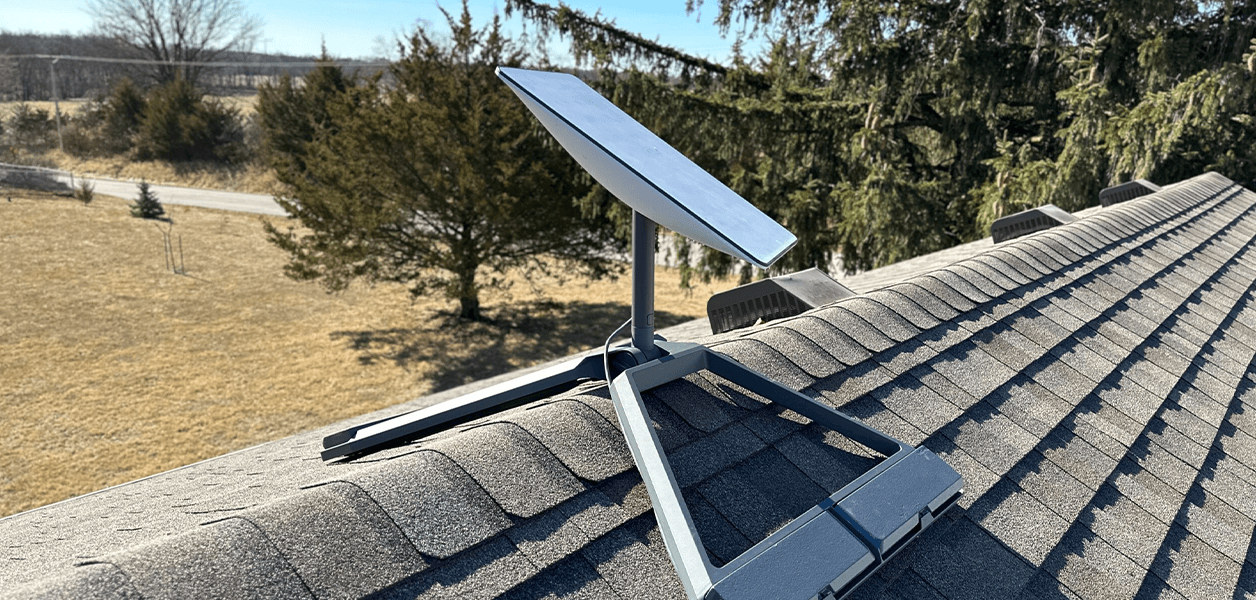
Complete Guide to Starlink Installation in Kenya
Starlink installation has become a game-changer for individuals and businesses looking for reliable, high-speed internet in Kenya. As satellite internet technology advances, setting up Starlink offers fast connectivity even in remote areas where traditional ISPs struggle. This guide covers everything you need to know about Starlink installation, from equipment requirements to professional setup services.
What is Starlink?
Starlink is a satellite internet service developed by SpaceX, providing high-speed broadband connectivity via a network of low-Earth orbit (LEO) satellites. Unlike traditional internet services that rely on fiber or mobile networks, Starlink uses satellites to deliver internet directly to users, making it ideal for rural and underserved areas in Kenya.
Benefits of Starlink Installation
High-Speed Internet Anywhere
With Starlink, you can enjoy download speeds ranging from 50 Mbps to 250 Mbps, depending on your location and network congestion.Low Latency Connection
Starlink satellites are in low-Earth orbit, offering lower latency (20–40 ms) compared to conventional satellite internet, making it suitable for video calls, online gaming, and remote work.Reliable in Remote Areas
Starlink installation bypasses terrestrial network limitations, providing consistent connectivity in rural towns, farms, lodges, and even mobile setups like boats and RVs.Ease of Scalability
Whether for a small household or a large business, Starlink can scale easily without complex wiring or infrastructure upgrades.
Starlink Installation Requirements
To successfully complete your Starlink installation in Kenya, you need the following:
Starlink Kit: Includes the satellite dish (Dishy McFlatface), router, power supply, and mounting tripod.
Clear View of the Sky: The dish requires unobstructed access to the sky to connect with satellites.
Power Source: Stable electricity to power the dish and router.
Compatible Mounting Surface: Can be a roof, pole, or tripod mount for mobile setups.
Step-by-Step Starlink Installation
Unbox and Inspect the Equipment
Check the Starlink kit for any damage and ensure all components are present.Select an Optimal Location
Place the dish in an open area free of trees, buildings, or tall structures. Higher elevation improves connectivity.Mount the Dish
Use the provided tripod or rooftop mount. Secure it firmly to withstand wind and weather.Connect the Power and Router
Attach the power cable to the dish and connect the router for Wi-Fi distribution.Download the Starlink App
Available for Android and iOS, the app helps locate satellites, optimize dish placement, and monitor signal strength.Activate Your Service
Follow in-app prompts to activate Starlink. The system automatically aligns the dish to connect to satellites.Test Your Connection
Run a speed test and verify network stability. Adjust the dish if necessary to maximize performance.
Professional Starlink Installation Services in Kenya
While many users opt for self-installation, professional Starlink installation services can save time and ensure optimal performance. Certified installers can:
Determine the best dish location using advanced site surveys.
Handle rooftop or pole mounting safely.
Optimize Wi-Fi network coverage for large homes or offices.
Provide ongoing maintenance and troubleshooting support.
Hiring a professional is especially recommended for commercial setups, lodges, schools, or government institutions in Kenya.
Starlink Installation Costs in Kenya
The cost of Starlink installation varies depending on the kit, mounting requirements, and whether professional installation is used. On average:
Starlink Kit: Approximately $599 (~KSh 100,000)
Monthly Subscription: $110 (~KSh 18,500)
Professional Installation: KSh 5,000–15,000 depending on complexity
Investing in professional setup can ensure faster activation, better reliability, and fewer disruptions.
Common Challenges During Starlink Installation
Obstructions: Trees, buildings, or hills can block satellite signals.
Weather Conditions: Heavy rain or storms may temporarily reduce performance.
Power Outages: Requires a stable power source or backup solution for continuous connectivity.
Tips for Optimizing Your Starlink Connection
Keep the dish updated with firmware via the Starlink app.
Regularly clear snow, leaves, or debris from the dish.
Use Ethernet connection for devices requiring ultra-stable speeds.
Position the dish where it receives direct, unobstructed sky view.
Why Starlink Installation is Ideal for Kenya
Kenya is experiencing rapid digitization, with growing demand for reliable internet in rural and urban areas. Starlink installation bridges the digital gap, providing:
Fast internet to remote farms and tourist lodges.
Connectivity for businesses relying on cloud services.
Access to education and telehealth services in underserved regions.
With Starlink, residents and businesses in Kenya can access global digital opportunities without waiting for fiber-optic expansion.
Conclusion
Starlink installation is a transformative solution for high-speed, reliable internet in Kenya. Whether self-installing or hiring professional services, it provides unmatched connectivity for homes, businesses, and remote locations. By choosing Starlink, you’re investing in a future-proof internet solution that brings global connectivity to your doorstep.
Advanced Starlink Installation Options
For users looking to maximize performance or integrate Starlink into more complex setups, there are several advanced installation options:
Pole or Wall Mount Installation
Ideal for rooftop setups where a tripod is not feasible.
Provides increased stability during windy conditions.
Professional installers often use adjustable mounts to ensure optimal satellite alignment.
Mobile Starlink Installation
Perfect for RVs, boats, or remote field sites.
Allows relocation without losing connectivity.
Requires securing the dish with specialized brackets or mounts for mobility.
Dual-Band Wi-Fi and Mesh Network Integration
Extends internet coverage across large properties.
Supports multiple devices without compromising speed.
Can integrate with existing network infrastructure for offices or hotels.
Backup Power Solutions
Using solar panels or UPS systems ensures uninterrupted Starlink service during power outages.
Critical for remote businesses, schools, and healthcare centers.
How to Choose the Right Starlink Installer
When selecting a professional installer in Kenya, consider:
Experience and Certifications – Check if they have prior experience with Starlink installations.
Customer Reviews – Look for positive feedback from homes or businesses in similar locations.
Pricing Transparency – Ensure all costs, including mounting and labor, are clearly outlined.
After-Sales Support – Professional installers should provide troubleshooting and maintenance support.
Starlink Installation Timeline
Typical Starlink installation takes:
Self-Installation: 30 minutes to 1 hour, depending on dish location and mounting.
Professional Installation: 1–2 hours, including site survey, mount setup, alignment, and testing.
Professional services can also expedite activation, especially in rural areas where signal optimization may take longer.
Frequently Asked Questions About Starlink Installation
Q1: Can I install Starlink myself in Kenya?
Yes. Starlink is designed for easy self-installation with the included app guiding you through dish alignment. However, professional installation can ensure optimal performance.
Q2: What tools are needed for Starlink installation?
No special tools are required for the standard tripod mount. For pole or roof mounts, basic hand tools like drills, wrenches, and ladders may be necessary.
Q3: Is Starlink suitable for rural areas?
Absolutely. Starlink is ideal for areas without fiber or reliable mobile internet, providing fast and stable connectivity.
Q4: How do I maintain my Starlink dish?
Keep it clean from debris, snow, or dust. Regularly check for firmware updates in the Starlink app.
Q5: Can multiple users share the same Starlink connection?
Yes. The router supports multiple devices, and you can also use mesh networks to extend coverage for larger homes or offices.
Tips for Reducing Installation Costs
DIY Setup: Opt for the self-installation kit if your location is straightforward.
Combine Orders: Bulk installation for businesses or multiple households can reduce per-unit costs.
Local Mounting Materials: Use locally sourced poles or mounts to save on shipping expensive mounts.
Off-Peak Installation: Some installers may offer lower rates during weekdays or off-peak seasons.
Starlink Installation Success Stories in Kenya
Several businesses and individuals in Kenya have benefited from Starlink:
Remote Lodges in Maasai Mara – Enable online booking systems and guest Wi-Fi.
Farms in Rift Valley – Improve access to market information and agricultural resources.
Schools in Rural Counties – Facilitate e-learning and access to global educational resources.
Corporate Offices in Nairobi Suburbs – Reliable backup for fiber internet during outages.
These examples show how Starlink installation can transform connectivity, productivity, and access to digital services in Kenya.
Conclusion: Why Starlink Installation is Worth It
Investing in Starlink installation in Kenya ensures:
Reliable high-speed internet regardless of location
Low latency suitable for business, education, and entertainment
Scalable and mobile options for growing households and enterprises
Long-term connectivity solution that bypasses traditional ISP limitations
Whether self-installing or hiring professionals, Starlink empowers users with consistent and fast internet, bridging Kenya’s digital divide.
Need Starlink Installation or Network Optimization?
We help homes, offices, apartments, and businesses with Starlink installation, WiFi coverage improvement, and professional setup in Kenya.
Request Installation Chat on WhatsApp