



Need Starlink Installation or Network Optimization?
We help homes, offices, apartments, and businesses with Starlink installation, WiFi coverage improvement, and professional setup in Kenya.
Request Installation Chat on WhatsAppGiving visitors the main WiFi password becomes difficult to control when guests change, staff members leave or a short-stay property receives a new booking. A separate guest network creates a clearer access path without requiring another internet subscription. The router must support the required features, match the property’s workflow and remain under the owner’s administration after testing.
Talk to Spacekits
Need Starlink help for your home or business?
Talk to Spacekits before you buy or book installation. We help with kit supply, mounting, activation, router placement, WiFi coverage, and written quotes.
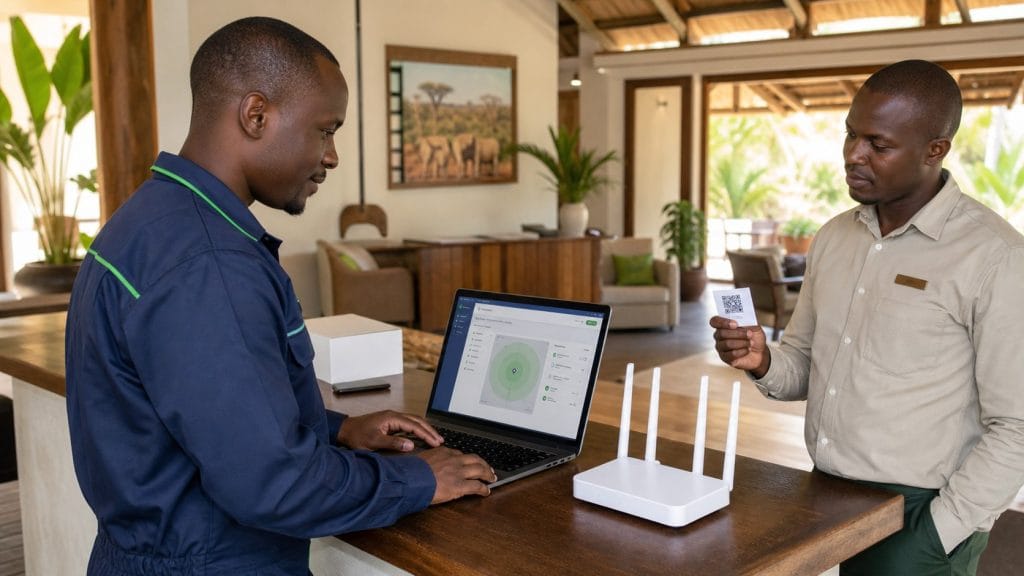
SpaceKits offers guest WiFi router configuration in Kenya for customer-supplied, compatible routers and controllers. The service can suit an Airbnb, guest house, lodge, café, reception area, clinic waiting room, small office or other site that wants a distinct wireless network for visitors. It is a configuration and handover service: no fixed electrical work, structural network installation or equipment-supply promise is included.
Planning Starlink for a hospitality property? Review the existing Starlink for Airbnb and lodges page. Businesses can also use the Starlink for offices in Kenya guide before requesting configuration help.
What the guest WiFi configuration service covers
The agreed scope can include:
- reviewing the make, model, firmware state and available guest-network features of the customer’s router or controller;
- creating or refining a separate guest SSID and an appropriate network name;
- setting a guest password and producing a QR code for simpler connection;
- enabling client isolation or a comparable guest-separation feature where the equipment supports it;
- applying supported bandwidth limits, schedules or device policies agreed with the client;
- checking connection, internet access, basic separation and expected policy behaviour on test devices; and
- handing over administrator access, a settings summary and a simple method for changing guest credentials.
Feature names differ between manufacturers. “Guest network,” “client isolation,” “access control,” “rate limit” and “portal” can mean different things on different products. SpaceKits first confirms what the supplied equipment can actually do. A requested control is not promised until it is visible, supported and testable on the specific router or controller.
Who may need a separate guest network?
An Airbnb host may want a password that can be changed between bookings without disrupting smart TVs or the host’s own devices. A lodge may want an easy QR sign at reception while retaining a different staff SSID. An office may need visitor internet in the waiting area without distributing the staff WiFi credentials. A café or shared workspace may want reasonable bandwidth policies so one download does not consume the available connection.
Configuration is based on the actual user count, premises and operating routine rather than a standard template. It can document limitations of the current equipment, but does not include mesh expansion, access-point installation or structured cabling.
Customer-supplied equipment and access requirements
The router or controller must be supplied by the customer and compatible with the requested settings. Before booking, share the exact manufacturer and model, a photograph of its label with private identifiers obscured, and a screenshot or description of the current administration interface. State whether the device belongs to the customer, the internet provider or a managed IT company. Provider-managed equipment may restrict configuration or reset custom settings after an update.
The client must have authorised administrator access. SpaceKits will not bypass a password, defeat an account lock or control equipment without the owner’s permission. If credentials are unknown, use the documented recovery route. A factory reset is not assumed because it can remove working settings and requires separate approval.
For broader activation and router questions, see Starlink setup support in Kenya.
Information to send when requesting a quote
Useful booking information includes:
- town or area and the type of property;
- internet source and whether it is already working;
- router or controller make and model;
- approximate number of guests and their usual activities;
- rooms or guest areas that should receive the SSID;
- whether staff, owner and guest networks already exist;
- requested isolation, bandwidth, schedule or password-change policies;
- who currently controls the administrator account; and
- whether configuration can be completed at the site or through an approved remote session.
Do not send a permanent administrator password in an open message. A temporary credential or supervised sign-in can be arranged for the approved work, followed by a client-controlled password change during handover.
How guest WiFi setup is completed
1. Scope and compatibility review
SpaceKits checks the desired guest workflow against the supplied router or controller. This identifies unsupported features before settings are changed. The review also records which working configuration must be preserved and whether another provider controls the device.
2. Configuration backup where supported
If the platform provides a documented export, the current configuration can be saved before changes. Otherwise, key settings are recorded. Restoration still depends on the model, firmware and vendor behaviour.
3. Guest SSID and credential setup
The guest network receives an agreed name and credential. Names should help a visitor choose the correct network without exposing unnecessary private information. The password should be practical to enter while avoiding obvious property names, phone numbers or simple number sequences.
A QR code can encode the agreed SSID and password for display at reception or inside a guest-information folder. Anyone who can view or photograph that QR code may use the credential, so the client should decide where it is displayed and how often it changes.
4. Isolation and policy settings
Where supported, client isolation is enabled and tested so guest devices do not readily communicate with each other. The available equipment may also provide network separation from another SSID. These controls reduce casual cross-device visibility, but this service is not a cybersecurity audit, compliance assessment or managed monitoring service.
Bandwidth policies reflect the available connection and property needs. Supported per-device or network limits may distribute capacity, while schedules can close access outside operating hours. Limits should still support the guest experience the client intends to provide.
5. Connection and behaviour testing
Testing uses representative phones or laptops supplied or approved for the session. Checks can cover joining by typed password and QR code, reaching the internet, receiving an address, policy behaviour, isolation where supported and reconnecting after a restart. Tests record what worked at that time; they do not guarantee future internet speed, uninterrupted service or wireless coverage in every position.
6. Administrator handover
The client receives the agreed SSID, the QR asset, a summary of configured controls and instructions for changing the guest password. Administrator ownership remains with the client. Any temporary technician access should be removed or changed, and remote access should remain disabled unless the client has a documented reason to keep it.
Testing guest access without promising internet performance
WiFi configuration and internet capacity are related but different. A correctly configured SSID cannot fix congestion at the provider, an obstructed Starlink connection, radio interference, thick walls or a weak signal far from the router. Speed also changes with time, device capability, distance and the number of active users.
The handover records observations at agreed test locations. A coverage problem can be documented for separate assessment, but this service does not include access points, mesh nodes, fibre, structured cabling or point-to-point links.
What affects the configuration quote?
The quotation depends on the router or controller platform, the number of SSIDs, the requested policies, whether settings are currently documented, the availability of authorised admin access, the number of test areas and whether attendance is required. A simple supported guest SSID on one router is different from reviewing an unfamiliar controller with several existing networks and rules.
The written quote identifies the equipment, settings, test method, handover items, assumptions and exclusions. Hardware, subscriptions, captive portals and third-party licences are separate unless expressly listed.
What this service does not include
Guest WiFi router configuration does not include:
- supplying or promising stock of routers, controllers or other equipment;
- Starlink dish mounting, activation or physical relocation;
- mesh or access-point installation and WiFi-extension construction;
- structured, Ethernet or fibre cabling;
- point-to-point wireless links between buildings;
- socket, distribution-board, earthing, wiring, solar, inverter or other fixed electrical work;
- CCTV, access-control or other security-system work;
- password bypass, unauthorised access, penetration testing or continuous monitoring; or
- guaranteed speed, coverage, uptime or a particular search ranking.
If a supplied device is faulty, unsupported, locked by another provider or unable to deliver the requested feature, SpaceKits will document the limitation before proposing a separately approved next step.
Request guest WiFi router configuration
Use the SpaceKits contact page to share the location, property type, router model, current internet source, expected guest count and preferred access rules. Mention whether you want a QR credential, client isolation, bandwidth limits or scheduled access. SpaceKits will review compatibility and respond with the practical scope and quote inputs before a booking is confirmed.
Frequently asked questions
1. Can SpaceKits configure guest WiFi on any router?
No. The customer-supplied router or controller must support a guest SSID and the requested controls. SpaceKits checks the exact model and accessible features before confirming scope.
2. Will guest devices be completely separated from every other device?
Client isolation and network-separation features can be enabled where supported and tested. Behaviour varies by equipment, and the service does not replace a formal cybersecurity or compliance review.
3. Can you create a QR code for Airbnb or lodge guests?
Yes. A QR credential can be prepared for the agreed SSID and password. The property owner controls where it is displayed and when the credential is changed.
4. Can bandwidth be limited for each guest?
It depends on the router or controller. Where supported, SpaceKits can apply agreed per-device or guest-network limits and test their behaviour on representative devices.
5. Do I need to share my permanent administrator password?
No. Use an authorised temporary credential or supervised sign-in where possible. During handover, remove temporary access and retain administrator control under the client’s account.
6. Does this service improve WiFi coverage in every room?
No. It configures the supplied equipment. Coverage problems caused by distance, walls, interference or layout require a separate assessment and may need a separately scoped solution.
7. Can the configuration be completed remotely?
Sometimes. Remote work depends on authorised access, a working internet connection, the equipment platform and someone at the property who can perform connection tests. Site attendance may be recommended when those conditions are not met.
8. What should I send before requesting a quote?
Send the location, property type, router or controller model, expected user count, current SSIDs, desired guest rules and confirmation that authorised administrator access is available. Do not send permanent passwords through the enquiry form.
Need Starlink Installation or Network Optimization?
We help homes, offices, apartments, and businesses with Starlink installation, WiFi coverage improvement, and professional setup in Kenya.
Request Installation Chat on WhatsApp