
Need Starlink Installation or Network Optimization?
We help homes, offices, apartments, and businesses with Starlink installation, WiFi coverage improvement, and professional setup in Kenya.
Request Installation Chat on WhatsApp
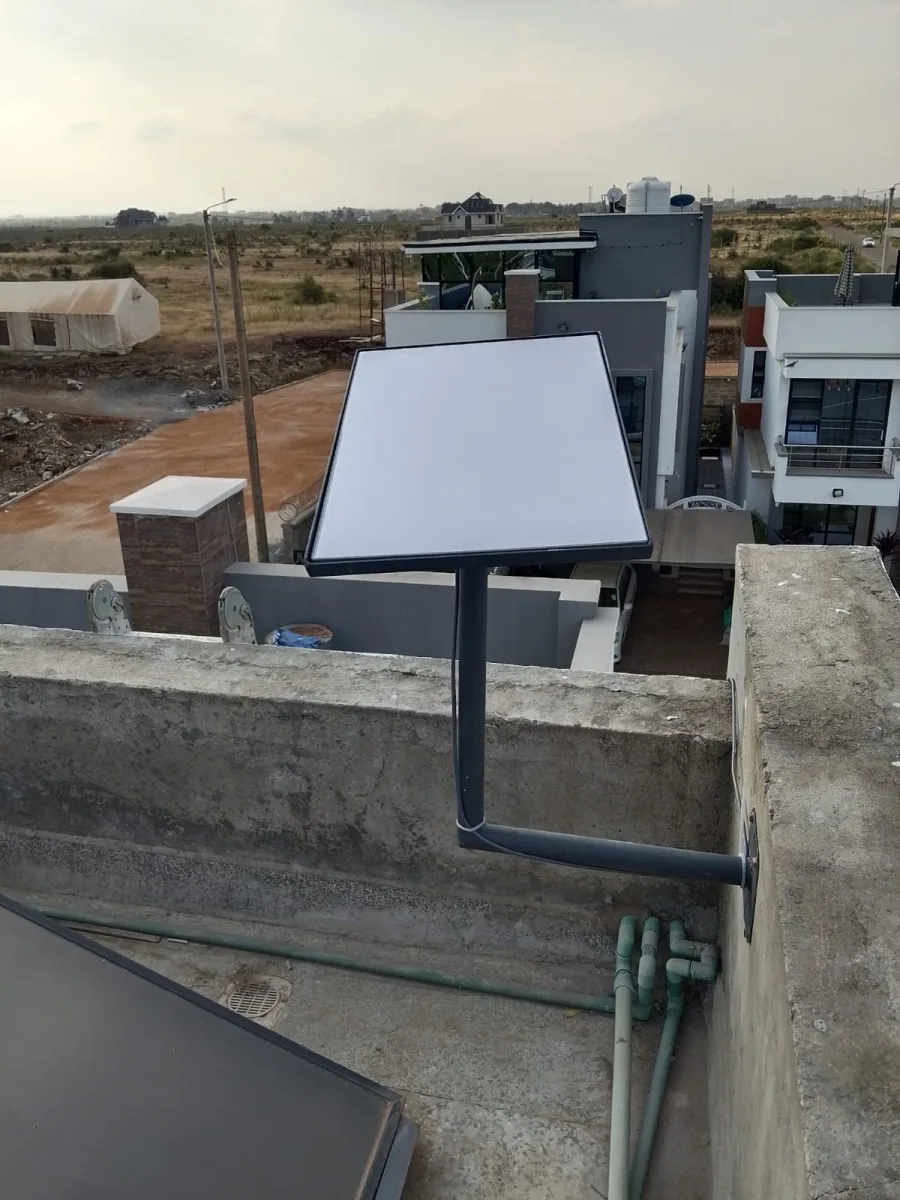
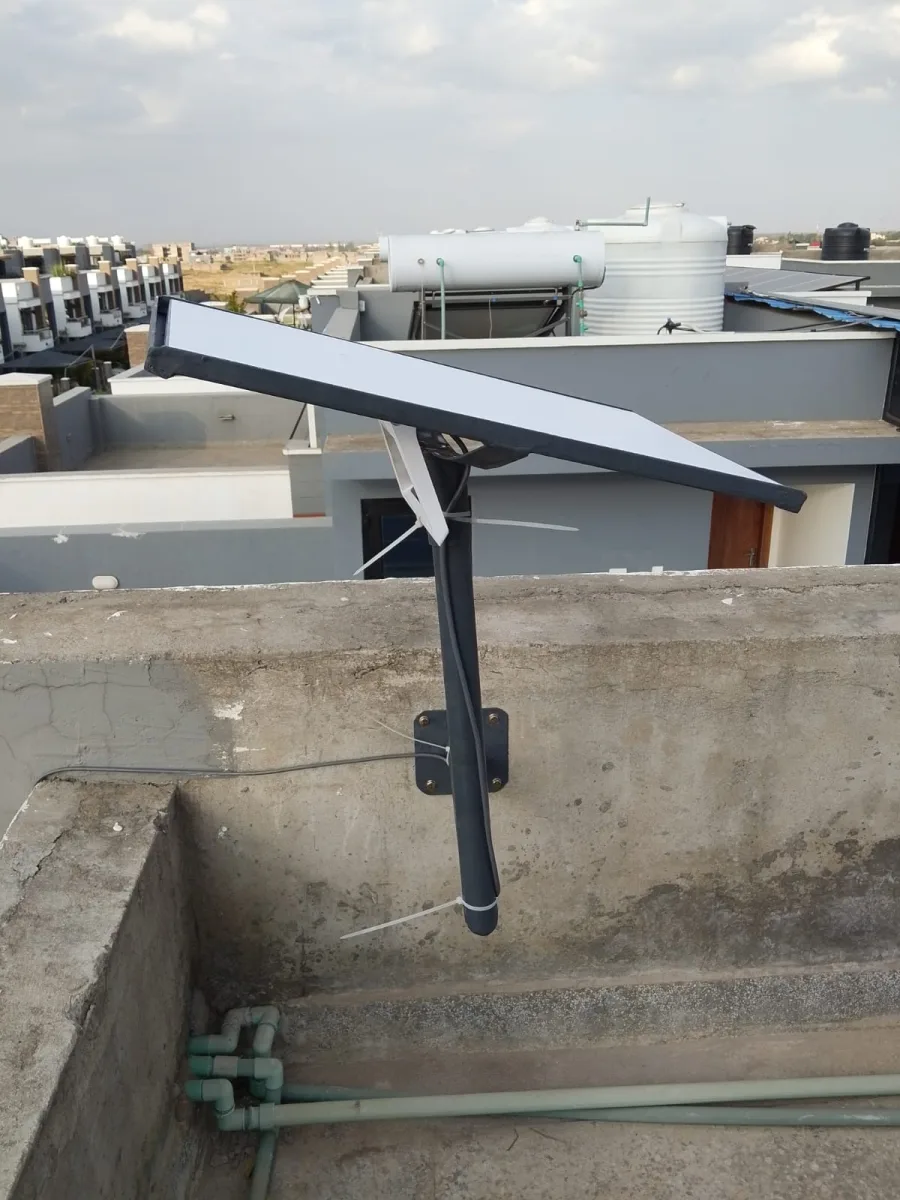
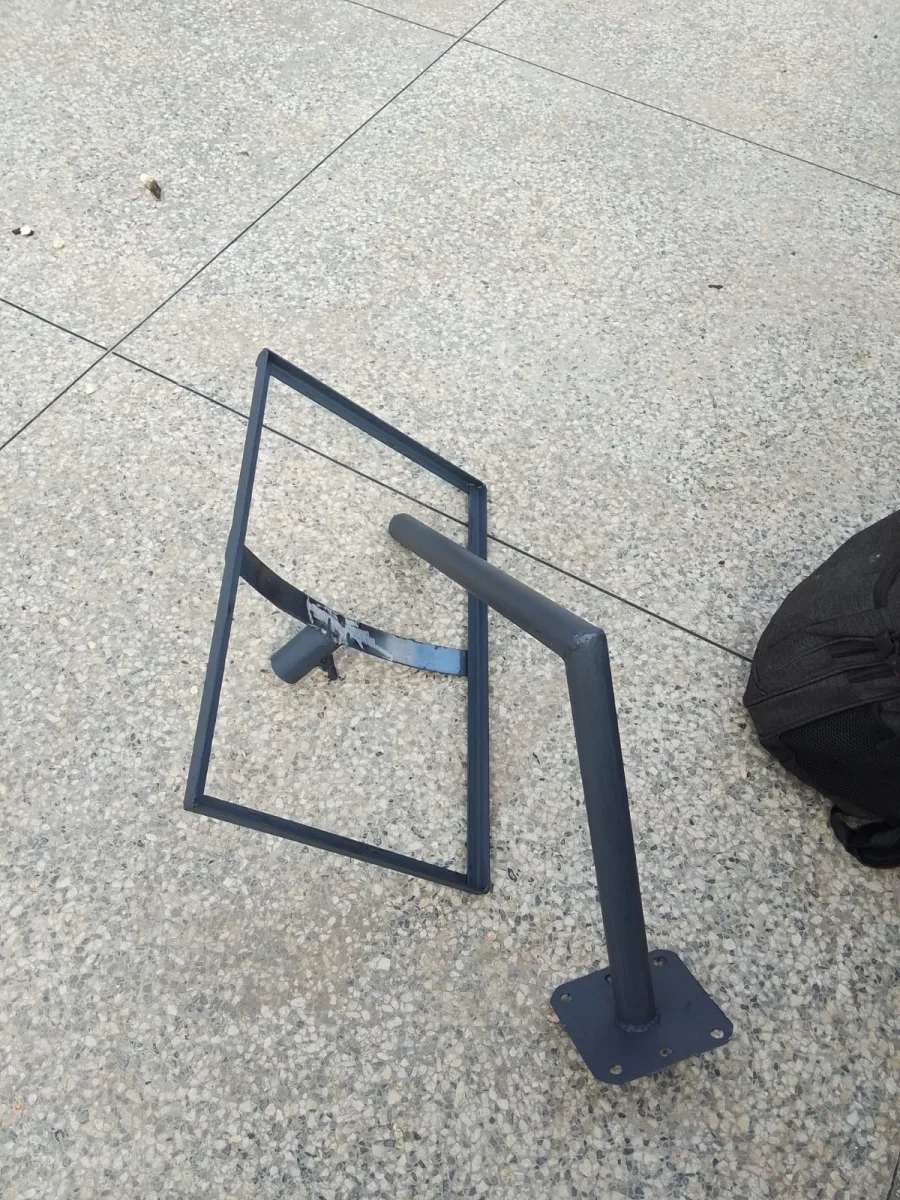
Starlink Gen 3 Mounting Stand is a more specific and better keyword because many customers now search for accessories compatible with the newer Starlink Standard / Gen 3 / V3 dish. For Spacekits.co.ke, you can target this keyword as a product/service page or blog.
Talk to Spacekits
Need Starlink help for your home or business?
Talk to Spacekits before you buy or book installation. We help with kit supply, mounting, activation, router placement, WiFi coverage, and written quotes.
Order directly from Spacekits
Buy the Starlink Gen 3 Mounting Stand online in Kenya
Ready to buy? Spacekits has a dedicated product page for the Starlink Gen 3 Mounting Stand where you can view the product, confirm availability, and place your order request directly. The listing currently shows the mounting stand at KSh 6,000, with WhatsApp support available before checkout.
Starlink’s current Standard kit includes a detachable kickstand for quick setup, but permanent installations often need a stronger elevated mount such as a roof, wall, or pole mounting solution. Starlink also notes that mounts and cable routing accessories are intended for more permanent elevated installation.
Starlink Gen 3 Mounting Stand in Kenya
Looking for a Starlink Gen 3 mounting stand in Kenya? Spacekits.co.ke provides strong, secure, and professional mounting solutions for the newer Starlink Gen 3 / Standard dish. Whether you need a rooftop mount, wall mount, pole mount, balcony stand, or custom fabricated Starlink stand, we help you install your Starlink dish in the best position for stable internet performance.
The Starlink Gen 3 dish is designed for fast satellite internet, but its performance depends heavily on correct placement. If the dish is placed too low, blocked by trees, or installed on a weak stand, you may experience unstable internet, obstruction warnings, slow speeds, or frequent disconnections.
That is why a proper Starlink Gen 3 mounting stand is important.
Why You Need a Starlink Gen 3 Mounting Stand
The Starlink Gen 3 kit can be used with its kickstand for quick setup, but for long-term use, a stronger mount is better. A good mounting stand helps you:
- Raise the dish above trees, roofs, and nearby buildings.
- Keep the Starlink dish stable during wind and rain.
- Improve connection reliability by reducing obstructions.
- Protect the dish from being knocked, moved, or damaged.
- Create a neat and professional installation.
- Support home, office, school, hotel, and rural installations.
Best Starlink Gen 3 Mounting Options
1. Starlink Gen 3 Roof Mounting Stand
A roof mounting stand is ideal for homes and businesses where the roof offers a clear sky view. It is one of the best options for residential Starlink installation in Kenya.
2. Starlink Gen 3 Pole Mount
A pole mount is recommended where trees, walls, or nearby buildings block the dish. It raises the Starlink Gen 3 dish higher for better satellite visibility.
3. Starlink Gen 3 Wall Mount
A wall mount is suitable for buildings where roof installation is difficult or where an external wall provides better positioning.
4. Starlink Gen 3 Balcony Stand
For apartments, a balcony stand can work if the balcony has an open sky view. If the balcony is blocked by another building, a rooftop or wall installation may be better.
5. Custom Starlink Gen 3 Mounting Stand
Some properties need a custom stand, especially mabati roofs, rural homes, lodges, schools, farms, and commercial buildings. Spacekits can help recommend the right custom mounting solution.
Starlink Gen 3 Mounting Stand Installation in Kenya
At Spacekits.co.ke, we help customers install Starlink Gen 3 mounting stands professionally. Our service can include:
- Site assessment.
- Obstruction checking.
- Roof, wall, or pole mounting.
- Cable routing.
- Router placement.
- Wi-Fi setup guidance.
- Starlink relocation.
- Home and business installation.
Starlink Gen 3 Mounting Stand Price in Kenya
The price of a Starlink Gen 3 mounting stand in Kenya depends on the type of stand, height, material, roof type, location, and installation complexity.
A simple wall or roof mount may cost less than a tall pole mount or custom fabricated stand. For the best price, contact Spacekits and request a quote based on your location and installation needs.
Buy Starlink Gen 3 Mounting Stand from Spacekits
Spacekits.co.ke offers Starlink mounting stands, installation, accessories, and setup support for customers across Kenya. Whether you already have the Starlink Gen 3 kit or you want a complete installation package, we can help you choose the right mounting solution.
Call/WhatsApp: +254 725 345 345
Website: https://spacekits.co.ke
Email: support@spacekits.co.ke
Service Areas: Nairobi and across Kenya
A Starlink Gen 3 mounting stand is one of the most important accessories for anyone using the newer Starlink Standard / Gen 3 dish in Kenya. Many customers buy Starlink expecting fast and stable internet, but after setup, they may notice obstruction warnings, unstable speeds, buffering, or frequent disconnections. In many cases, the problem is not the Starlink dish itself. The real issue is poor mounting.
Starlink needs a clear view of the sky to connect properly to satellites. If the dish is placed too low, blocked by trees, hidden behind a roof edge, or installed on a weak stand, the connection may not perform well. That is why choosing the right Starlink Gen 3 mounting stand in Kenya is very important.
At Spacekits.co.ke, we help customers install Starlink Gen 3 dishes professionally using strong roof mounts, pole mounts, wall mounts, balcony mounts, and custom fabricated mounting stands. Whether you need Starlink for your home, office, hotel, school, farm, apartment, shop, lodge, or business, the right mounting stand can help you enjoy a more stable and reliable connection.
What Is a Starlink Gen 3 Mounting Stand?
A Starlink Gen 3 mounting stand is a support structure used to hold the Starlink Gen 3 dish in a safe and elevated position. The purpose of the stand is to keep the dish stable while giving it a clear view of the sky.
The Gen 3 Starlink dish is different from older Starlink versions because it uses a newer design and may require compatible mounting accessories or adapters depending on the installation method. The basic kickstand may work for temporary placement, but for permanent use, most homes and businesses need a stronger mounting solution.
A proper Starlink Gen 3 mounting stand can be installed on:
- Rooftops
- Walls
- Poles
- Balconies
- Flat roofs
- Mabati roofs
- Ground poles
- Custom support structures
The goal is to mount the dish where there is less obstruction and more stability.
Why Starlink Gen 3 Needs a Proper Mounting Stand
The Starlink Gen 3 dish can deliver reliable internet when installed correctly, but mounting plays a major role in performance. A poor installation can cause many avoidable problems.
1. Better Sky Visibility
The most important reason for installing a Starlink Gen 3 mounting stand is to give the dish a better view of the sky. If trees, buildings, walls, water tanks, or roof edges block the dish, the connection may drop.
A mounting stand raises the dish above these obstructions.
2. Reduced Obstruction Warnings
Many Starlink users see obstruction alerts in the Starlink app. This usually means the dish is not in the best position. A proper roof, pole, or wall mounting stand can help reduce these warnings.
3. Stable Internet Connection
When the dish is mounted properly, it remains firm even during wind or rain. This helps reduce movement and improves connection stability.
4. Professional and Permanent Installation
The Gen 3 kickstand may be fine for testing, but permanent installation needs a secure stand. A professional mounting stand makes the setup safer and neater.
5. Protection from Damage
A dish placed on the ground can be stepped on, moved, knocked, or exposed to unnecessary risk. A mounted dish is safer and less likely to be damaged.
6. Better for Homes and Businesses
For homes, a proper mount supports streaming, online classes, remote work, and video calls. For businesses, it supports payments, emails, bookings, CCTV, POS systems, and customer Wi-Fi.
Common Problems Caused by Poor Starlink Gen 3 Mounting
Many people think slow Starlink internet means the service is bad. However, poor mounting can create serious performance problems.
Frequent Disconnections
If the dish is partly blocked, internet may disconnect repeatedly. This can affect video calls, online meetings, gaming, streaming, and business systems.
Slow Speeds
Obstructions can reduce performance. The dish may struggle to maintain a stable connection, leading to slower browsing and downloads.
Buffering During Streaming
Streaming platforms like YouTube, Netflix, Showmax, and live TV may buffer if the dish keeps losing signal.
Poor Video Calls
Remote workers and online students need stable internet. Poor mounting can cause Zoom, Google Meet, or Teams calls to freeze.
Dish Movement During Wind
A weak mounting stand can shake or move. This affects signal stability and may damage the dish over time.
Cable Damage
Poor installation can leave cables exposed to sun, rain, sharp edges, children, pets, or accidental pulling.
Unsafe Installation
A badly mounted dish can fall, damage roofing, or become unsafe during strong wind.
Best Starlink Gen 3 Mounting Stand Options in Kenya
Different buildings need different mounting solutions. The best option depends on your roof type, surrounding environment, and installation goal.
1. Starlink Gen 3 Roof Mounting Stand
A roof mount is one of the most common options for Starlink installation in Kenya. Most homes and businesses get better sky visibility from the rooftop.
A roof mounting stand is ideal for:
- Residential homes
- Offices
- Shops
- Schools
- Apartments
- Hotels
- Churches
- Clinics
- Rural homes
- Lodges
- Farms
The advantage of a roof mount is that it raises the dish above many common obstructions. However, roof installation must be done carefully to avoid leaks, weak fixing, or cable damage.
For mabati roofs, the installer must identify strong support points and seal any drilled areas properly. For concrete roofs, the stand must be fixed firmly using suitable bolts and brackets.
2. Starlink Gen 3 Pole Mount
A Starlink Gen 3 pole mount is ideal when the dish needs extra height. This is common in areas with trees, tall walls, nearby houses, or uneven terrain.
Pole mounts are popular in:
- Rural homes
- Farms
- Lodges
- Schools
- Camps
- Remote offices
- Construction sites
- Large compounds
A pole mount can be fixed on the roof or installed from the ground. The height depends on the level of obstruction around the property.
A good pole mount should be strong, straight, rust-resistant, and firmly supported. If the pole is too weak, it may shake during wind and affect the dish.
3. Starlink Gen 3 Wall Mount
A wall mount is suitable when roof access is difficult or when an external wall provides a better location. It is also useful for apartments, townhouses, and office buildings.
A wall mount can work well if:
- The wall is strong enough.
- The dish has a clear sky view.
- Cable routing is easy.
- The mount is fixed securely.
- The location is safe from tampering.
Wall mounts are neat and can be less invasive than roof mounts. However, they must be installed at the correct height and angle.
4. Starlink Gen 3 Balcony Mount
A balcony mount can work for apartment users, but it depends on the balcony direction and nearby obstructions.
A balcony installation may be suitable if:
- The balcony has a wide open sky view.
- There are no tall buildings directly blocking the dish.
- The mount can be safely secured.
- The cable can be routed neatly indoors.
- The landlord or building management allows it.
If the balcony is blocked by another apartment block, a rooftop installation may be better.
5. Starlink Gen 3 Ground Pole Mount
A ground pole mount is installed directly into the ground. This is useful where roof installation is not possible or where the best sky view is away from the building.
Ground pole mounts are suitable for:
- Farms
- Open compounds
- Remote homes
- Lodges
- Campsites
- Schools
- Construction sites
The pole should be firmly installed to avoid shaking. In windy areas, extra support may be needed.
6. Custom Starlink Gen 3 Mounting Stand
Some buildings need a custom solution. A standard roof or wall mount may not be enough, especially for unusual roof designs, high obstruction areas, or business installations.
A custom Starlink Gen 3 mounting stand may be needed for:
- Tall mabati roofs
- Flat commercial roofs
- Hotels
- Schools
- Apartment buildings
- Remote lodges
- Large compounds
- Areas with many trees
- Special wall structures
At Spacekits.co.ke, we can help recommend the best mounting approach after checking your site.
Starlink Gen 3 Mounting Stand for Homes
Home users need Starlink for many everyday activities. A good mounting stand helps the whole family enjoy better internet.
Starlink at home can support:
- YouTube and Netflix streaming
- Online classes
- Remote work
- WhatsApp calls
- Zoom meetings
- Gaming
- Smart TVs
- CCTV viewing
- General browsing
- Family Wi-Fi sharing
For homes, the best mounting option is usually a roof mount, wall mount, or pole mount. The right choice depends on the location of trees, roof height, and available cable route.
If your home is surrounded by trees, a taller pole may be needed. If your roof is open and high, a roof mount may work perfectly.
Starlink Gen 3 Mounting Stand for Businesses
Business internet must be stable. If your connection keeps dropping, you can lose customers, sales, communication, and productivity.
A proper Starlink Gen 3 mounting stand is important for:
- Offices
- Retail shops
- Restaurants
- Hotels
- Pharmacies
- Clinics
- Warehouses
- Cyber cafes
- Schools
- Churches
- Airbnb properties
- Construction sites
- Farms
- Lodges
Business Starlink installation should be professional. The dish should be mounted securely, the cable should be protected, and the router should be positioned properly.
For larger spaces, you may also need access points, mesh Wi-Fi, or structured network cabling.
Starlink Gen 3 Mounting Stand for Rural Areas
Starlink is very useful in rural Kenya because many areas do not have reliable fiber internet. However, rural installations often need better mounting because of trees, open wind, and large compounds.
A rural Starlink Gen 3 installation may require:
- Tall pole mounting
- Ground pole mounting
- Roof pole mounting
- Custom fabricated stand
- Cable protection
- Wi-Fi extension
- Power backup
For farms, Starlink can support farm management systems, CCTV, online communication, digital records, and smart agriculture tools.
For schools, it can support e-learning, administration, online exams, and research.
For lodges, it can support guest Wi-Fi, bookings, payments, and staff communication.
Starlink Gen 3 Mounting Stand for Nairobi
In Nairobi, Starlink users often face obstruction from apartments, tall buildings, trees, and neighboring structures. A professional mounting stand can help position the dish correctly.
Spacekits can help customers in areas such as:
- Westlands
- Kilimani
- Kileleshwa
- Lavington
- Karen
- Lang’ata
- Runda
- Gigiri
- South B
- South C
- Embakasi
- Kasarani
- Ruaka
- Ruiru
- Syokimau
- Kitengela
- Thika Road
- Ngong Road
In apartments, the best option may be a rooftop or wall mount. For standalone homes, a roof or pole mount may be ideal.
Starlink Gen 3 Mounting Stand for Kiambu
Kiambu has many homes, estates, farms, and apartments where Starlink can work well with proper installation.
Common areas include:
- Ruiru
- Juja
- Thika
- Kiambu Town
- Kikuyu
- Limuru
- Githunguri
- Banana
- Tigoni
- Kabete
Many Kiambu homes have trees and large compounds, so pole mounting may be useful in some locations. For estates and apartments, roof mounting may be the best option.
Starlink Gen 3 Mounting Stand Across Kenya
Spacekits can help with Starlink Gen 3 mounting solutions across Kenya. Customers outside Nairobi may need Starlink because fiber internet is unavailable, unstable, or expensive to install.
Starlink mounting services may be useful in:
- Nakuru
- Naivasha
- Eldoret
- Kisumu
- Mombasa
- Machakos
- Kajiado
- Meru
- Nyeri
- Nanyuki
- Narok
- Kisii
- Kakamega
- Kericho
- Kilifi
- Malindi
- Diani
- Garissa
- Laikipia
- Samburu
- Turkana
For remote areas, a strong pole or custom mounting stand is often recommended.
Starlink Gen 3 Mounting Stand for Mabati Roofs
Many Kenyan homes use mabati roofs. A Starlink Gen 3 mounting stand can be installed on a mabati roof, but the work must be done carefully.
The installer should check:
- The strength of the roof structure
- Support points under the mabati
- Safe drilling points
- Waterproof sealing
- Wind exposure
- Cable entry route
- Roof angle
- Access safety
Poor installation on a mabati roof can cause leaks, shaking, rust, or damage. That is why professional installation is recommended.
Starlink Gen 3 Mounting Stand for Flat Roofs
Flat roofs are often easier to work with because they provide stable access and more placement options. However, the stand still needs to be secured properly.
Flat roof mounting options include:
- Weighted base stand
- Fixed pole stand
- Concrete-mounted bracket
- Wall-edge mount
- Custom metal stand
A flat roof installation should not block water drainage. Cable routing should also be planned to avoid water damage.
Starlink Gen 3 Mounting Stand for Apartments
Apartment installation can be tricky because users may not have full control over the roof. Before installing, it is important to consider landlord or management approval.
Apartment users may need:
- Balcony mount
- Wall mount
- Shared rooftop mount
- Cable routing to the unit
- Secure dish placement
- Permission from management
If the balcony has a clear sky view, it may work. If not, rooftop installation is usually better.
Starlink Gen 3 Mounting Stand for Hotels and Airbnb
Hotels, lodges, guest houses, and Airbnb properties need reliable internet because guests expect Wi-Fi. Poor internet can lead to bad reviews and unhappy customers.
A professional Starlink Gen 3 mounting stand helps support:
- Guest Wi-Fi
- Online bookings
- POS payments
- CCTV
- Smart TVs
- Staff communication
- Reservation systems
- Remote property management
For hotels and lodges, mounting is only one part of the setup. You may also need proper Wi-Fi distribution across rooms, reception, restaurant areas, and outdoor spaces.
Starlink Gen 3 Mounting Stand for Schools and Churches
Schools and churches often serve many users in one compound. A strong Starlink Gen 3 mounting stand can help provide stable connectivity for learning, administration, live streaming, and communication.
For schools, Starlink can support:
- Online classes
- Research
- Computer labs
- Administration
- E-learning platforms
- CCTV
- Staff communication
For churches, Starlink can support:
- Livestreaming
- Online giving systems
- Office internet
- Event connectivity
- Media uploads
- Communication
The dish should be mounted in a secure location where it cannot be easily tampered with.
Starlink Gen 3 Mounting Stand for CCTV and Security
A stable internet connection is important for CCTV and security systems. If your Starlink dish is badly mounted, remote CCTV access may fail.
A good mounting stand helps support:
- CCTV remote viewing
- Wi-Fi cameras
- Smart alarms
- Gate systems
- Farm security
- Office surveillance
- Apartment security
- Hotel monitoring
For security use, the dish and cable should be installed in a protected area. Cable routing should be neat and difficult to tamper with.
Starlink Gen 3 Mounting Stand and Wi-Fi Coverage
Many customers think that once the Starlink dish is mounted properly, the entire building will automatically have strong Wi-Fi. However, dish mounting and Wi-Fi coverage are different.
The mounting stand helps the dish connect to satellites. The router distributes Wi-Fi inside the building.
If the router is placed in a poor location, some rooms may still have weak Wi-Fi.
For better Wi-Fi coverage, you may need:
- Better router placement
- Mesh Wi-Fi
- Access points
- Ethernet cabling
- Outdoor Wi-Fi units
- Network switches
- Wi-Fi coverage planning
For large homes, hotels, offices, and schools, Spacekits can help plan better internet distribution after Starlink installation.
Starlink Gen 3 Mounting Stand Installation Process
A good Starlink Gen 3 mounting installation should follow a professional process.
1. Site Survey
The installer checks your home or business location. They look at the roof, walls, trees, nearby buildings, and possible cable routes.
2. Obstruction Check
The Starlink app can help identify if the location has a clear sky view. This step helps avoid poor placement.
3. Mount Selection
The installer recommends the best mounting option, such as roof mount, pole mount, wall mount, or custom stand.
4. Secure Installation
The stand is fixed firmly to the selected location. The dish is mounted securely to reduce shaking and movement.
5. Cable Routing
The cable is routed neatly and safely from the dish to the router location.
6. Router Setup
The router is placed in a good indoor position for better Wi-Fi coverage.
7. Testing
The installer checks connection status, speed, obstruction level, and Wi-Fi performance.
Features of a Good Starlink Gen 3 Mounting Stand
A good mounting stand should not only hold the dish. It should be strong enough for long-term outdoor use.
Look for these qualities:
Strong Material
The stand should be made from strong metal that can support the dish without bending.
Rust Resistance
Since the stand is exposed to rain and moisture, it should resist rust.
Firm Base
The base should be stable and properly fixed.
Correct Height
The stand should be high enough to reduce obstructions but not unnecessarily tall.
Compatibility
The mount should fit the Starlink Gen 3 dish properly.
Weather Resistance
The stand should handle outdoor conditions such as rain, sun, and wind.
Clean Appearance
A neat installation improves the look of your home or business.
Starlink Gen 3 Mounting Stand Price in Kenya
The cost of a Starlink Gen 3 mounting stand in Kenya depends on several factors.
These include:
- Type of mount
- Height of the stand
- Material used
- Roof type
- Installation complexity
- Location
- Need for custom fabrication
- Cable routing work
- Additional accessories needed
A basic wall or roof mount may cost less than a tall pole mount or custom stand. For an accurate quote, contact Spacekits.co.ke and share your location, roof type, and installation needs.
Starlink Gen 3 Mounting Accessories
A complete installation may require more than just the stand. Depending on your setup, you may need:
- Starlink Gen 3 pipe adapter
- Wall brackets
- Pole brackets
- Cable clips
- Cable trunking
- Waterproof cable entry
- Ethernet adapter
- Mesh Wi-Fi
- Access points
- Router mount
- Surge protector
- UPS or power backup
The accessories needed depend on your property and how you want to use Starlink.
DIY vs Professional Starlink Gen 3 Installation
Some people can install Starlink themselves, especially for temporary setup. However, permanent mounting is better handled professionally.
DIY May Work If:
- You are testing the dish temporarily.
- You have a clear open space.
- You do not need roof work.
- You understand cable routing.
- You can safely mount the dish.
Professional Installation Is Better If:
- You need roof installation.
- You need a tall pole.
- You have trees around.
- You are installing for business.
- You want neat cable routing.
- You want to avoid roof damage.
- You need stable long-term performance.
- You are not sure about obstruction.
For most homes and businesses in Kenya, professional installation is the safer and better choice.
Common Starlink Gen 3 Mounting Mistakes to Avoid
Avoid these mistakes when installing your Starlink Gen 3 dish.
Installing the Dish Too Low
A low dish may be blocked by walls, trees, or roof edges.
Ignoring Obstructions
Always check for obstructions before fixing the stand permanently.
Using a Weak Stand
A weak stand can shake, bend, or fail during wind.
Poor Cable Routing
Loose or exposed cables can be damaged easily.
Mounting on Weak Roof Areas
The stand should be fixed to a strong support point.
Poor Router Placement
Even with good dish mounting, poor router placement can cause weak Wi-Fi.
No Weather Protection
Outdoor components should be installed with weather in mind.
Signs You Need a Better Starlink Gen 3 Mounting Stand
You may need a better stand if:
- Your Starlink app shows obstruction warnings.
- Internet disconnects often.
- The dish is placed on the ground.
- The dish moves during wind.
- The cable is exposed.
- Trees are near your dish.
- You recently moved the dish.
- Your current stand is rusty or weak.
- You need business-grade reliability.
If you notice these signs, contact Spacekits for inspection and support.
Why Choose Spacekits for Starlink Gen 3 Mounting Stand?
Spacekits.co.ke helps customers choose and install the right Starlink Gen 3 mounting stand in Kenya.
Here is why customers choose Spacekits:
Professional Installation
We help install your Starlink dish securely and neatly.
Mounting Solutions for Different Properties
We offer roof, pole, wall, balcony, and custom mounting options.
Home and Business Support
We support residential, commercial, institutional, and rural Starlink installations.
Better Cable Management
We help route cables neatly and safely.
Obstruction Reduction
We help choose a better position for clear sky visibility.
Kenya-Focused Support
We understand local buildings, mabati roofs, estates, apartments, and rural installations.
Direct product page for ordering
For the fastest purchase path, use the Spacekits product listing for the Starlink Gen 3 Mounting Stand. It includes the current product details, price, image, WhatsApp support, and the order request form.
Open the Starlink Gen 3 Mounting Stand listing and order here.
Buy Starlink Gen 3 Mounting Stand in Kenya
If you need a Starlink Gen 3 mounting stand in Kenya, Spacekits can help you get the right solution. Whether you already have your Starlink kit or want help with full installation, we can guide you.
You can contact Spacekits for:
- Starlink Gen 3 mounting stand
- Starlink Gen 3 roof mount
- Starlink Gen 3 pole mount
- Starlink Gen 3 wall mount
- Starlink Gen 3 balcony mount
- Starlink Gen 3 installation
- Starlink relocation
- Starlink accessories
- Starlink setup support
- Wi-Fi extension services
Frequently Asked Questions About Starlink Gen 3 Mounting Stand
1. What is a Starlink Gen 3 mounting stand?
A Starlink Gen 3 mounting stand is a support structure used to hold the Starlink Gen 3 dish in a stable and elevated position.
2. Do I need a mounting stand for Starlink Gen 3?
Yes, for permanent installation, a proper mounting stand is recommended. It helps improve stability, safety, and sky visibility.
3. Can I use the Starlink Gen 3 kickstand permanently?
The kickstand can work for quick setup or testing, but roof, wall, or pole mounting is better for long-term use.
4. What is the best Starlink Gen 3 mounting option?
The best option depends on your location. Roof mounts are common for homes, pole mounts are good for obstructed areas, and wall mounts are useful where roof access is limited.
5. Can Starlink Gen 3 be installed on a mabati roof?
Yes. Starlink Gen 3 can be mounted on a mabati roof, but the installation should be done carefully to avoid leaks and weak fixing.
6. Can Spacekits install Starlink Gen 3 mounting stands?
Yes. Spacekits.co.ke provides Starlink Gen 3 mounting stand installation and support in Kenya.
7. How much is a Starlink Gen 3 mounting stand in Kenya?
The price depends on the type of mount, height, material, roof type, and installation complexity. Contact Spacekits for a quote.
8. Can I mount Starlink Gen 3 on a pole?
Yes. A pole mount is a good option where trees or buildings block the dish.
9. Can Starlink Gen 3 be installed in apartments?
Yes, but it depends on balcony or roof access and permission from the landlord or building management.
10. Does a mounting stand improve Starlink speed?
A mounting stand does not change your Starlink package speed directly, but it can improve reliability by reducing obstruction and keeping the dish stable.
Conclusion: Get the Best Starlink Gen 3 Mounting Stand from Spacekits
A Starlink Gen 3 mounting stand is essential if you want a stable, professional, and long-lasting Starlink installation. The right stand helps your dish get a clear sky view, stay secure, avoid obstructions, and deliver more reliable internet.
Whether you need a roof mount, pole mount, wall mount, balcony mount, or custom Starlink Gen 3 stand, Spacekits.co.ke can help you choose and install the best solution.
Do not let poor mounting affect your internet experience. Get a strong and professional Starlink Gen 3 mounting stand in Kenya from Spacekits today.
Website: https://spacekits.co.ke
Call/WhatsApp: +254 725 345 345
Email: support@spacekits.co.ke
Service Areas: Nairobi and across Kenya
Need Starlink Installation or Network Optimization?
We help homes, offices, apartments, and businesses with Starlink installation, WiFi coverage improvement, and professional setup in Kenya.
Request Installation Chat on WhatsApp