



Need Starlink Installation or Network Optimization?
We help homes, offices, apartments, and businesses with Starlink installation, WiFi coverage improvement, and professional setup in Kenya.
Request Installation Chat on WhatsAppTalk to Spacekits
Need Starlink help for your home or business?
Talk to Spacekits before you buy or book installation. We help with kit supply, mounting, activation, router placement, WiFi coverage, and written quotes.
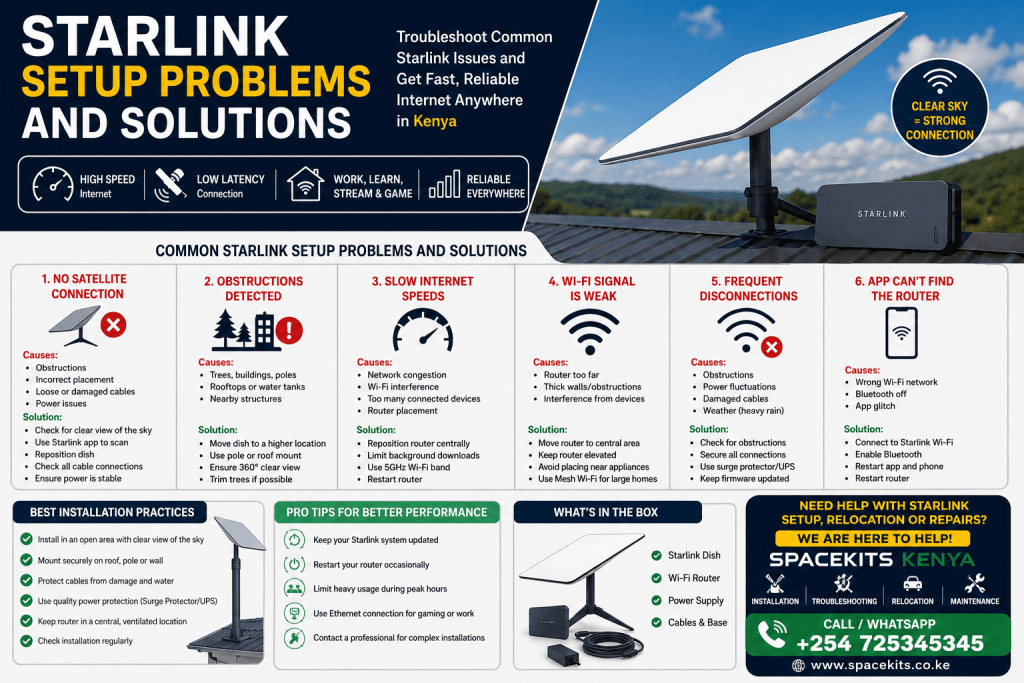
Starlink Setup Problems and Solutions – Everything You Need to Know
If you’ve recently purchased a Starlink internet kit or are planning to install one, understanding common Starlink setup problems and solutions can save you time, frustration, and money. Starlink has transformed internet connectivity across Kenya by delivering high-speed satellite internet to homes, farms, businesses, schools, construction sites, and remote locations where fiber and mobile networks struggle.
Although Starlink is designed for easy self-installation, many users encounter challenges during installation and initial configuration. Issues such as poor signal, obstructions, cable errors, router connectivity problems, incorrect dish placement, firmware update failures, and slow speeds are among the most common complaints.
Fortunately, nearly every installation issue has a practical solution. This guide explores the most frequent Starlink setup problems and solutions, explains why they occur, and provides actionable steps to restore optimal internet performance.
Whether you’re setting up Starlink for the first time or troubleshooting an existing installation, this guide will help you maximize your investment.
If you need professional Starlink installation, troubleshooting, relocation, or repair services anywhere in Kenya, contact SpaceKits Kenya.
Phone: +254 725345345
Starlink setup problems and solutions
Why Proper Starlink Setup Matters
Many users assume Starlink will work perfectly immediately after powering it on. While Starlink is remarkably user-friendly, achieving the best possible speeds requires:
- Proper dish positioning
- Correct cable installation
- Stable power supply
- Router optimization
- Minimal obstructions
- Updated firmware
- Proper network configuration
Ignoring these factors often results in poor performance that users mistakenly attribute to Starlink itself.
Proper installation ensures:
- Faster download speeds
- Better upload performance
- Lower latency
- Fewer interruptions
- Stable video conferencing
- Reliable CCTV connectivity
- Smooth online gaming
- Consistent streaming quality
Common Starlink Setup Problems and Solutions
Let’s examine the issues most Starlink users experience.
Problem 1: Starlink Cannot Find Satellites
This is one of the first Starlink setup problems and solutions new users search for.
Symptoms
- Dish keeps searching
- Setup never completes
- “Searching” message remains
- No internet connection
- App reports “Offline”
Causes
Several factors may prevent satellite acquisition:
- Trees blocking the sky
- Buildings nearby
- Incorrect installation angle
- Damaged cable
- Faulty power supply
- Dish not receiving power
Solutions
Start by checking whether the dish has a completely open view of the sky.
Use the Starlink app’s obstruction scanner before mounting.
Verify:
- Cable fully inserted
- Router powered
- Power outlet functioning
- Dish connected correctly
Sometimes waiting 20–30 minutes after powering the system allows it to complete satellite acquisition.
Starlink setup problems and solutions
Problem 2: Obstruction Errors
Among all Starlink setup problems and solutions, obstructions are by far the most common.
Common Obstructions
- Tall trees
- Water tanks
- Apartment buildings
- Chimneys
- Utility poles
- Roof edges
Even small obstructions can interrupt service.
Signs
- Frequent disconnects
- Random buffering
- Video calls dropping
- Gaming lag
- Speed fluctuations
Solutions
Raise the dish higher.
Install it:
- On a roof peak
- Pole mount
- Wall mount
- Tower
- Elevated mast
Always choose the location with the widest possible view of the sky.
Problem 3: Slow Internet Speeds
Many people search online for Starlink setup problems and solutions because speeds are slower than expected.
Possible Reasons
- Obstructions
- Wi-Fi interference
- Too many users
- Peak-hour congestion
- Old firmware
- Poor router placement
Improve Speeds
Place the router:
- Centrally
- Away from walls
- Away from microwaves
- Away from televisions
- Off the floor
Avoid placing it:
- Inside cabinets
- Under furniture
- Behind metal objects
Restart the router occasionally after firmware updates.
Starlink setup problems and solutions
Problem 4: Wi-Fi Signal Is Weak
Sometimes Starlink internet works perfectly, but Wi-Fi coverage inside the building is poor.
Symptoms
- Fast speeds near router
- Slow speeds in bedrooms
- Dead zones upstairs
- Weak signal outdoors
Solutions
Move the router to a central location.
Avoid:
- Concrete walls
- Thick stone walls
- Metal roofs
- Electrical cabinets
For large homes, install:
- Mesh Wi-Fi systems
- Additional Starlink mesh nodes
- Professional access points
Problem 5: Router Not Powering On
One of the more frustrating Starlink setup problems and solutions involves a router that refuses to start.
Possible Causes
- Loose power cable
- Power outage
- Faulty adapter
- Damaged outlet
- Internal hardware issue
Fixes
Check:
- Socket
- Extension cable
- Surge protector
- Power adapter
- Electrical breaker
Try another outlet before assuming hardware failure.
Problem 6: Cable Connection Errors
The Starlink cable carries both power and data.
A damaged cable affects the entire system.
Signs
- Frequent disconnects
- Offline status
- Intermittent internet
- Router restarting
Common Causes
- Pinched cable
- Water damage
- Animal bites
- Improper installation
- Loose connectors
Solution
Inspect the cable carefully.
Never:
- Bend sharply
- Staple tightly
- Crush under roofing sheets
Replace damaged cables immediately.
Problem 7: Dish Will Not Move
During startup, the Starlink dish automatically aligns itself.
If it remains stationary, there may be an issue.
Possible Reasons
- Mechanical fault
- No power
- Cable issue
- Firmware issue
Troubleshooting
Restart the router.
Reconnect all cables.
Wait 20 minutes.
If movement never begins, professional inspection may be required.
Problem 8: Frequent Disconnections
Intermittent internet is among the most searched Starlink setup problems and solutions.
Causes
- Obstructions
- Weak Wi-Fi
- Cable faults
- Power fluctuations
- Severe weather
- Router overheating
Solutions
Ensure:
- Stable electricity
- Proper ventilation
- Secure connections
- Updated firmware
Problem 9: Starlink App Cannot Find the Router
Without the app, managing Starlink becomes difficult.
Common Reasons
- Wrong Wi-Fi network
- Bluetooth disabled
- Router rebooting
- Phone cache issues
Fix
Restart:
- Phone
- Router
- Starlink app
Reconnect to the correct Wi-Fi network.
Problem 10: Firmware Update Problems
Firmware updates improve:
- Stability
- Speed
- Security
- Satellite communication
Sometimes updates fail.
Causes
- Interrupted power
- Weak connection
- Server delays
Solution
Leave Starlink powered overnight.
Updates typically install automatically.
Avoid unplugging the system unnecessarily.
How to Choose the Best Installation Location
Proper placement prevents many future problems.
Ideal locations include:
- Rooftops
- Elevated poles
- Steel towers
- Concrete masts
- Open compounds
Avoid:
- Dense trees
- Narrow courtyards
- Covered balconies
- Indoor installation
Indoor Router Placement Tips
Even the best satellite signal cannot overcome poor Wi-Fi placement.
Best practices include:
- Place centrally
- Keep elevated
- Avoid enclosed shelves
- Maintain airflow
- Keep away from thick concrete walls
This significantly improves wireless coverage throughout the home or office.
Weather and Starlink Performance
Many users worry that rain automatically means internet failure.
While heavy storms can temporarily reduce signal quality, Starlink is engineered to withstand normal weather conditions.
Performance may briefly decline during:
- Heavy rain
- Intense thunderstorms
- Hail
- Dense cloud cover
However, service usually resumes automatically without user intervention.
Proper installation minimizes weather-related disruptions.
Power Protection Is Essential
Power fluctuations are common in many areas of Kenya.
Protect your investment using:
- Surge protectors
- UPS backup systems
- Quality grounding
- Stable electrical wiring
Unexpected power spikes can damage networking equipment over time.
DIY Installation vs Professional Installation
Many homeowners successfully complete DIY installations. However, complex properties often require professional assistance.
Professional installation is recommended when:
- Trees surround the property
- Roof access is difficult
- Long cable routing is required
- Commercial internet is needed
- Multi-building connectivity is planned
- Elevated pole installations are necessary
Experienced installers ensure proper mounting, cable management, network optimization, and safe installation practices.
In the next part of this guide, we’ll cover advanced Starlink setup problems and solutions, including router resets, Ethernet adapter issues, mesh Wi-Fi configuration, gaming optimization, business installations, preventive maintenance, frequently asked questions, and expert tips for maximizing Starlink performance across Kenya.
Problem 11: Ethernet Adapter Not Working
Many Starlink users connect desktop computers, CCTV systems, gaming consoles, network switches, or office networks using an Ethernet adapter. If the Ethernet connection fails, it can interrupt wired internet access even when Wi-Fi continues to function.
Common Causes
- Loose Ethernet cable
- Faulty Ethernet adapter
- Damaged LAN cable
- Incorrect network settings
- Router restart required
Solutions
Start by reconnecting all cables securely. Replace damaged Ethernet cables and test with another device if possible. Restart the Starlink router after connecting the Ethernet adapter. If your office depends on wired networking, ensure all switches and routers are correctly configured.
Problem 12: Starlink Keeps Restarting
Another common Starlink setup problem is a system that keeps rebooting without warning.
Possible Causes
- Unstable power supply
- Loose power connection
- Overheating
- Faulty cable
- Hardware malfunction
How to Fix It
Inspect all power connections carefully. Use a quality surge protector or UPS to stabilize incoming power. Make sure the router has adequate ventilation and is not enclosed in a cabinet. If frequent restarts continue after checking the power source, professional diagnosis may be necessary.
Problem 13: Unable to Complete Starlink Setup
Some users find that the installation process stops midway.
Common Reasons
- Weak phone signal during setup
- Incorrect Wi-Fi connection
- Incomplete firmware initialization
- App synchronization delay
Recommended Solution
Allow the system enough time to initialize. Restart both the router and your smartphone, reconnect to the Starlink Wi-Fi network, and reopen the app. In many cases, the setup resumes automatically.
Problem 14: High Latency During Online Gaming
Gamers often search for Starlink setup problems and solutions because of lag spikes or delayed response times.
Possible Causes
- Wi-Fi interference
- Network congestion
- Peak-hour usage
- Obstructions
- Too many connected devices
Improve Gaming Performance
For the best experience:
- Use a wired Ethernet connection whenever possible.
- Pause large downloads while gaming.
- Position the router centrally.
- Minimize Wi-Fi interference.
- Limit unnecessary background traffic.
Problem 15: Video Calls Keep Freezing
Stable internet is essential for remote work, virtual meetings, and online learning.
Causes
- Temporary satellite interruptions
- Weak Wi-Fi signal
- High network usage
- Obstructions
Solutions
Move closer to the router or use a wired connection for important meetings. Ask other users to pause bandwidth-intensive activities during video calls. Ensure your Starlink dish has a clear view of the sky to reduce interruptions.
Problem 16: Smart Home Devices Won’t Connect
Some smart TVs, cameras, printers, or IoT devices may struggle to join the network.
Solutions
- Restart the smart device.
- Restart the router.
- Ensure the device supports the Wi-Fi standards being used.
- Keep the device within good Wi-Fi coverage.
- Update the device firmware if available.
Problem 17: Poor Performance in Large Homes
A single router may not provide complete coverage for large homes, offices, schools, or warehouses.
Recommended Solutions
Expand your network using:
- Mesh Wi-Fi systems
- Additional access points
- Professional network design
- Ethernet backhaul where practical
Proper network planning ensures every room enjoys strong and stable internet.
Best Practices for Starlink Installation
Following installation best practices helps avoid many common Starlink setup problems and solutions before they occur.
Choose the Right Mounting Location
Install the dish where it has the clearest possible view of the sky. Roof peaks, towers, wall mounts, and elevated poles are usually ideal.
Secure the Cabling
Keep cables protected from:
- Sharp edges
- Direct pressure
- Water pooling
- Animals
- Excessive heat
Use weather-resistant clips and conduit where appropriate.
Protect Against Power Surges
Install:
- Surge protectors
- UPS systems
- Proper grounding
This protects your Starlink equipment during power fluctuations.
Routine Starlink Maintenance
Although Starlink requires minimal maintenance, periodic checks can extend the life of your equipment.
Monthly Inspection Checklist
- Check cable condition.
- Inspect mounting brackets.
- Tighten loose hardware.
- Clean around the installation area.
- Verify the dish remains unobstructed.
Every Six Months
- Inspect outdoor cables.
- Confirm all fasteners remain secure.
- Check for new tree growth that may block the signal.
- Review Wi-Fi coverage inside the building.
Signs You Need Professional Starlink Support
While many issues are easy to fix, some require experienced technicians.
Seek professional assistance if you experience:
- Persistent “Offline” status
- Dish that never aligns
- Damaged connectors
- Water-damaged equipment
- Broken mounting hardware
- Frequent outages after troubleshooting
- Complex commercial installations
- Long-distance cable routing
- Multi-building networking
Professional support can reduce downtime and prevent further equipment damage.
Starlink Setup Tips for Homes
Residential users can maximize performance by:
- Installing the dish above surrounding obstacles.
- Positioning the router centrally.
- Protecting the system from electrical surges.
- Keeping firmware updated.
- Performing occasional inspections.
These simple practices help deliver reliable internet for streaming, remote work, online learning, and everyday browsing.
Starlink Setup Tips for Businesses
Businesses depend on reliable internet for daily operations.
Professional installation is especially valuable for:
- Offices
- Hotels
- Schools
- Hospitals
- Construction sites
- Retail stores
- Warehouses
- Farms
Business installations should include structured cable management, network optimization, and backup power planning to minimize downtime.
How to Prevent Future Starlink Setup Problems
Prevention is always easier than troubleshooting.
Here are practical ways to keep your Starlink system running efficiently:
- Install the dish correctly from the beginning.
- Avoid obstructed mounting locations.
- Protect all cables from physical damage.
- Use quality surge protection.
- Keep the router well-ventilated.
- Check the Starlink app for alerts.
- Inspect the installation periodically.
- Upgrade your internal network if your property expands.
Frequently Asked Questions About Starlink Setup Problems and Solutions
Why is my Starlink saying “Searching”?
This usually means the dish is trying to locate satellites. Obstructions, incorrect placement, or connection issues are common causes.
Why are my Starlink speeds slower than expected?
Speeds may vary because of obstructions, Wi-Fi interference, peak-hour demand, router placement, or heavy usage on your local network.
Can rain stop Starlink from working?
Heavy rain can temporarily reduce signal quality, but Starlink is designed to continue operating through most weather conditions. Service typically recovers automatically once conditions improve.
Do I need professional installation?
Not always. Many users complete installation successfully on their own. However, professional installation is recommended for difficult roofs, commercial sites, tall pole installations, complex cable routing, or properties with many obstructions.
How often should I inspect my Starlink equipment?
A visual inspection every month and a more detailed maintenance check every six months is generally sufficient.
Can I move my Starlink dish after installation?
Yes. If performance is poor because of obstructions or property changes, relocating the dish to a better position can significantly improve reliability.
Why does my internet disconnect for a few seconds?
Short interruptions are often caused by temporary obstructions, weather events, firmware updates, or brief satellite handovers. If outages become frequent, inspect the installation for cable damage or new obstructions.
Why Choose SpaceKits Kenya?
When it comes to Starlink installation and support, choosing an experienced team makes all the difference. At SpaceKits Kenya, we provide professional services designed to help customers enjoy fast, reliable satellite internet from day one.
Our services include:
- Professional Starlink installation
- Site surveys and signal assessment
- Roof, pole, and wall mounting
- Cable routing and management
- Starlink troubleshooting
- System repairs
- Dish relocation
- Network optimization
- Wi-Fi coverage improvements
- Ethernet integration
- Routine maintenance
- Business and residential installations
We serve homeowners, businesses, schools, farms, hotels, institutions, and organizations across Kenya with dependable installation and after-sales support.
Starlink setup problems and solutions
Contact SpaceKits Kenya
If you are experiencing Starlink setup problems and solutions that you cannot resolve on your own, our experienced technicians are ready to help.
Whether you need a new installation, relocation, troubleshooting, repairs, or Wi-Fi optimization, SpaceKits Kenya can ensure your Starlink system performs at its best.
Call us today: +254 725345345
Visit spacekits.co.ke to learn more about our Starlink installation, repair, and maintenance services throughout Kenya.
Expert Advice for Avoiding Starlink Setup Problems and Solutions in Kenya
Understanding Starlink setup problems and solutions is the best way to enjoy reliable satellite internet throughout Kenya. Whether you are installing Starlink in Nairobi, Mombasa, Kisumu, Nakuru, Eldoret, Thika, Nyeri, Meru, Kitale, Machakos, or remote rural locations, following proper installation procedures can prevent many common issues before they occur. Most Starlink setup problems and solutions are directly related to poor installation, incorrect dish placement, damaged cables, power fluctuations, or Wi-Fi configuration rather than faults with the Starlink system itself.
When planning your installation, always perform a site survey to identify the location with the clearest view of the sky. A professional assessment greatly reduces the likelihood of future Starlink setup problems and solutions because it ensures the satellite dish has minimal obstructions from trees, buildings, water tanks, or other structures. Even a small obstruction can affect connection stability, resulting in slower speeds, buffering, or temporary service interruptions.
Another important consideration when discussing Starlink setup problems and solutions is protecting your equipment from environmental and electrical hazards. Installing a quality surge protector and an uninterruptible power supply (UPS) helps safeguard your Starlink router and dish against voltage spikes and unexpected power outages. Regularly inspecting the installation for loose brackets, damaged cables, or new tree growth can also prevent performance issues before they become serious.
Many users searching for Starlink setup problems and solutions are actually experiencing Wi-Fi coverage limitations rather than satellite connectivity problems. Positioning the router in a central location, keeping it elevated, and avoiding thick concrete walls can significantly improve wireless performance throughout your home or business. For larger properties, adding a mesh Wi-Fi system or professionally installed access points provides consistent coverage in every room.
Businesses, schools, hospitals, farms, hotels, construction sites, and commercial offices can also benefit from professional Starlink installation. Expert technicians understand the most effective Starlink setup problems and solutions, including structured cable management, Ethernet integration, network optimization, router configuration, and long-distance cable routing. These best practices improve system reliability and reduce future maintenance costs.
At SpaceKits Kenya, we specialize in identifying and resolving all types of Starlink setup problems and solutions for residential and commercial customers. Whether you need a new installation, Starlink troubleshooting, router setup, dish relocation, Wi-Fi optimization, cable replacement, or complete network configuration, our experienced technicians deliver reliable and professional service across Kenya.
If you are searching online for dependable Starlink setup problems and solutions, don’t let recurring connectivity issues affect your productivity. Contact SpaceKits Kenya today on +254 725345345 for expert Starlink installation, troubleshooting, maintenance, repairs, and technical support. Our team is committed to providing fast, efficient, and long-lasting Starlink setup problems and solutions that keep your home or business connected with high-speed satellite internet.
Conclusion to Starlink setup problems and solutions
Starlink has transformed internet access by bringing high-speed satellite connectivity to areas where traditional broadband is unavailable or unreliable. Like any technology, however, proper installation and maintenance are essential for achieving the best possible performance.
Understanding common Starlink setup problems and solutions allows you to identify issues quickly, reduce downtime, and maintain a stable internet connection for work, learning, entertainment, and business operations. From selecting the right installation location and protecting your equipment from power surges to optimizing Wi-Fi coverage and performing routine inspections, every step contributes to a better user experience.
If you encounter persistent challenges such as obstruction errors, cable faults, router issues, or recurring connection drops, don’t let them interrupt your productivity. With professional installation and expert troubleshooting from SpaceKits Kenya, you can enjoy the full benefits of your Starlink system with confidence.
For expert Starlink installation, maintenance, relocation, repairs, and technical support anywhere in Kenya, contact SpaceKits Kenya today on +254 725345345 and let our experienced team help you stay connected.
visit spacekits.co.ke to view Starlink setup problems and solutions
Need Starlink Installation or Network Optimization?
We help homes, offices, apartments, and businesses with Starlink installation, WiFi coverage improvement, and professional setup in Kenya.
Request Installation Chat on WhatsApp