
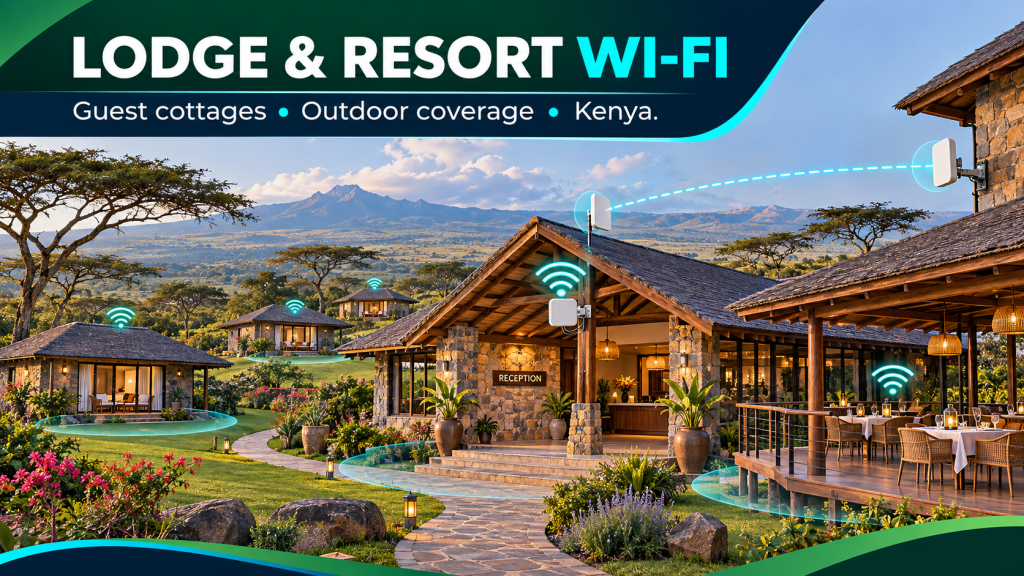
WiFi for lodges and resorts in Kenya has to work across a property that may be spread over several buildings, outdoor dining areas, reception, guest cottages, conference spaces and staff facilities. A router in the main office can provide internet at reception and still leave the far cottage without a usable connection. A booster plugged into the distant room may repeat a signal that is already too weak. The right design starts by mapping how guests and staff use the property, identifying the internet source, and choosing a practical way to carry connectivity to each required building.
This guide helps lodge owners, camp managers, resort operators and holiday-rental hosts compare WiFi options for guest rooms, cottages, tents, outdoor areas and service buildings. It explains the role of Starlink or another internet connection, when to use wired access points, mesh, outdoor equipment or a building-to-building link, how to separate guest access from operations, and what to include in a quote request. For hotels with weak room coverage, see our hotel WiFi extension guide; for recurring service issues, read hotel WiFi troubleshooting in Kenya.
Why lodges and resorts need a different WiFi design
A conventional hotel may have multiple floors connected by corridors. A lodge or safari camp may instead have a reception building, restaurant, office and a series of cottages spaced across landscaped grounds. Some resorts include a pool, event lawn, spa, conference centre, staff accommodation or gatehouse. Buildings may use stone, timber, thatch or metal roofing. These layouts affect the signal path and can make a single indoor router an unreliable way to reach every guest area.
Guests may use the internet for booking messages, maps, travel arrangements, remote work, photo sharing, video calls or streaming. Staff may need access to reservations, payments, point-of-sale devices, stock, cameras and communications. These are not all the same network requirement. Reception may need stable access to business systems, while guest areas need a simple connection process. A property-wide design should set out which buildings and spaces require guest WiFi, which are staff-only and which need service for operational equipment.
Occupancy and geography also change the demand profile. A quiet midweek visit may not reveal how the network behaves during a wedding, holiday, conference or full-house weekend. The same resort may be quiet in some areas and busy in others. A guest cottage cluster can add several simultaneous devices per room. A property that expects online meetings may need more careful planning than one offering basic messaging and browsing.
Begin by defining the experience the property wants to provide. List which guest buildings, common areas and outdoor zones should have usable service. Identify business-critical systems that must stay connected. Note which areas can tolerate limited or no guest internet, if any. This list gives a site survey a clear objective and prevents a coverage estimate from being confused with an unlimited-speed guarantee.
Map the property before choosing equipment
Draw a simple site plan showing reception, guest cottages or tents, restaurant, kitchen, bar, conference area, pool, outdoor seating, office, staff buildings, gatehouse and internet equipment. Mark approximate distances, paths, levels and any visible line of sight between structures. Use different colours to show guest coverage, staff coverage and equipment locations. Photos can help document roofs, ceilings, walls, power points, existing conduits and possible cable routes.
Note construction materials. Stone, reinforced concrete, metal sheeting, mirrors, tiled wet areas and dense landscaping can affect wireless performance. A lodge built with thick masonry has different radio conditions from timber cabins with open verandas. A courtyard can reflect or block signals differently from an open field. A map does not replace a technical survey, but it helps the installer understand the layout and ask better questions.
Mark current complaints precisely. “The WiFi is bad” is less useful than “cottages 6–9 lose connection after guests close the doors” or “the restaurant works but the conference room slows when an event begins.” Record the time, number of users if known, device type, connection method and recent changes such as new construction, landscaping, a moved router or cable work. These details can reveal a pattern and inform a better design.
Identify the existing network path. Where does the internet service enter the property? Which router distributes it? Are there managed or unmanaged switches? Are any access points already installed? Is there Ethernet cabling between buildings? Are the access points powered locally or by Power over Ethernet? Label known equipment and cables where possible, but do not open live electrical enclosures or climb to roof-mounted units without qualified staff.
Choose the internet source and local WiFi separately
The internet service is the connection between the property and the wider internet. The local WiFi network distributes that connection to guest rooms and shared areas. A resort may use fibre, fixed wireless, mobile broadband or Starlink depending on what is available and suitable at its location. The internet source can be strong while local WiFi coverage remains poor. Conversely, every room may show a strong WiFi signal while the upstream internet service is constrained or unavailable.
If the property already has an internet service, test it near the router and compare that result with guest areas. If connection near the router is good but cottages are weak, the local distribution design may be the issue. If wired and wireless devices near the router are both slow, investigate the internet service, router status, occupancy or upstream limitations before installing more access points. Keep these fault types separate in the incident record.
Starlink can serve as an internet source where the service and account plan suit the property, but the dish and router do not automatically provide whole-resort WiFi. The dish needs suitable sky visibility and safe mounting. The router needs a distribution path to the guest buildings, which may involve Ethernet, access points, mesh or an outdoor bridge. Check the Starlink hardware generation and router model before planning ports, adapters or wired backhaul; models differ.
Where a Starlink dish is used, place it where it has a suitable sky view and a protected cable route. Keep the installation accessible for maintenance without exposing guest areas to trip hazards or unsecured wiring. Confirm how power interruptions are handled and whether any backup power is required for business-critical systems. Do not assume a consumer WiFi extender will solve a problem caused by obstruction, upstream service limits or poor placement of the dish.
Extenders and repeaters: when they can help
A WiFi extender receives an existing wireless signal and retransmits it into a nearby weak area. It can work for one small office, staff room or guest room close to the main building when the source signal remains strong at the extender’s location. Some devices also provide an access-point mode, where the connection back to the router is made over Ethernet. A wired connection often makes positioning easier because the access point does not need to depend on a distant wireless signal.
The main placement rule is that the extender needs a healthy source signal. If it is installed in a cottage where the original network cannot reach, it may simply broadcast a weak or unstable connection. Place it between the source and the coverage gap, then test from the actual guest locations. Doors, walls, roof materials, distance and other wireless networks can change the result.
Each wireless hop uses airtime. Performance can depend on the extender’s radios, frequency bands, signal quality, channel conditions and the number of active clients. Do not assume all extenders halve speed or that a model’s coverage number will match a stone cottage in a Kenyan lodge. Confirm whether the proposed device can handle the intended network name, security settings, number of guests and the backhaul method.
Several standalone repeaters scattered across a property can create confusing network names, poor roaming and difficult support. Guests may remain connected to a distant device, move between networks manually or report that login works in one building but not another. If a property has several guest structures, compare a coordinated access-point or mesh design rather than adding devices one by one after complaints.
Mesh WiFi for connected guest buildings
Mesh WiFi uses multiple nodes that coordinate to distribute coverage. It can suit a compact lodge, apartment resort or guesthouse where buildings are close enough and the layout supports a reliable node-to-node connection. Guests may use a single network name, while devices connect to nearby nodes; roaming still depends on the client device and system configuration.
Before selecting mesh, learn whether nodes communicate wirelessly or by Ethernet. Wireless backhaul is convenient when cable routes are difficult, but distance, foliage, walls and interference affect the path. Ethernet backhaul can provide a more predictable connection if existing cabling or a suitable route is available. A mesh set designed for a home may not provide the management, guest controls, user capacity or outdoor ratings a commercial lodge needs.
Ask about supported node counts, guest-network isolation, network management, VLAN support if required, access control, firmware support, warranty and whether extra nodes can be added. Confirm that the system can work with the existing router and internet source. Make sure staff know how to check node status and contact support without changing network settings at random.
Mesh is not a synonym for “WiFi everywhere.” A cluster of cottages separated by dense vegetation or a hill may not be suited to ordinary indoor mesh nodes. Outdoor-rated equipment or point-to-point links between buildings may be needed to carry a stable connection. Have the installer state which buildings the design covers and how it will be tested.
Wired access points for reliable room coverage
A wired access point connects to the network over Ethernet and broadcasts WiFi near the guests. It is a strong option when a property has multiple cottages, guest rooms, restaurant areas or offices that require stable connectivity. Access points can be placed where service is needed rather than where the main router’s wireless signal happens to reach.
Cable routes may use existing structured cabling, conduits, ceiling spaces or protected outdoor paths. A site survey should confirm route length, cable type, environmental exposure, switch capacity and how equipment will be powered. Power over Ethernet can supply compatible access points over a suitable Ethernet cable, but the switch or injector must meet the device’s requirements. Do not mix equipment based on connector appearance alone.
Placement requires planning. Too few access points may leave dead zones; too many overlapping radios may create interference. A technician should consider building materials, ceiling height, user density, neighboring networks, channel reuse and the backhaul. The final test should include guest rooms with doors closed, common areas, staff work zones and any outdoor zones included in the scope.
Wired access points can also simplify troubleshooting. If a particular cottage loses WiFi, the technician can check the access point, its Ethernet link and its switch port. A network map can show where each cable terminates, what device it serves and how it is powered. Label equipment and ports so a power interruption or replacement does not turn into guesswork.
Outdoor WiFi and detached cottages
Outdoor coverage may be needed around a pool, terrace, event lawn, garden restaurant, parking area, gatehouse or separate guest cottage. Use equipment rated for the weather exposure and mount it securely. Consider direct sunlight, rain, dust, insects, cable protection, lightning or surge exposure, power and the risk of accidental damage. An indoor plug-in extender is not designed for every outdoor location.
If a guest cottage is separate from the main lodge, compare a buried or protected Ethernet route with a point-to-point wireless bridge. A bridge uses compatible units to carry a network link between buildings, usually where there is a suitable clear path. Alignment, mounting, distance, trees, new construction, power and surge protection all matter. A bridge provides the link between buildings; the cottage may still need a local access point for guest devices.
Where cable is possible, assess the trench or conduit route, distance, building entry points and installation disruption. Fibre may be considered for longer or electrically complex routes depending on the design. A professional installer can advise on the appropriate media and protection. Avoid routing cables where vehicles, guests or maintenance equipment can damage them.
Outdoor guest WiFi should be bounded to intended areas. A strong signal that reaches beyond the property can expose credentials or invite unauthorized use. Ask how outdoor guest access remains separated from staff systems, cameras and business devices. Include security and support in the design, not only radio reach.
Starlink WiFi for lodges and camps
Operators often search for Starlink WiFi for lodges because a satellite internet connection may be relevant in locations where other services are limited or inconsistent. Availability, account terms, service performance and hardware options must be checked for the specific location and current plan. A campsite or remote lodge should confirm the service suitability before buying or mounting equipment.
Think of the connection as two layers. The dish and router provide the internet source; local network equipment distributes it through reception, restaurant, rooms, cottages and outdoor areas. A lodge may need Ethernet cabling, managed switches, access points, mesh nodes or point-to-point links to reach separate structures. A single Starlink router should not be promised to cover a large resort without a site-specific check.
Check the power path and environmental conditions. A remote property may experience power interruptions, long cable routes or limited technical support nearby. Ask how equipment will be protected, where it can be monitored, what staff should do after an outage and who is authorized to restart or reconfigure it. If backup power is needed, size it around the equipment and required run time with a qualified provider.
For guests, internet speed and availability can vary with demand, service conditions, obstructions, client devices and local network capacity. Set clear expectations and avoid advertising a guaranteed speed unless there is a suitable measured service commitment. If guests use the connection for work or events, include those needs in the network design and test under representative occupancy.
Guest WiFi, staff access and connected operations
Guest WiFi should be planned separately from staff and operational systems. Guest phones should not share unrestricted access with reservations computers, payment devices, CCTV recorders, smart locks, printers, stock systems or staff devices. Ask whether the router, switches and access points support guest isolation, separate networks, VLANs, captive portals or other controls that the property needs. The exact functions depend on the equipment and configuration.
Make the guest connection simple. Decide whether visitors join with a password, voucher, room code, portal or another method supported by the system. Train reception to explain the process and update codes when needed. Keep staff network details private and avoid printing internal credentials in a guest room. If an event or conference needs temporary access, prepare a separate process that can be ended afterwards.
Payment terminals, point-of-sale devices, cameras and booking systems may require their own network access or wired links. List these systems before equipment is installed. Some devices need stable connections or specific communication with a server. Do not move them to the guest network just because it has a strong signal. Have the provider coordinate with the system vendor when needed.
Assign responsibility for administration. Identify who owns the router or cloud-management account, how authorized staff are added or removed, how passwords are stored and who receives service alerts. When a manager leaves or a contractor changes, the property should retain control of accounts and configuration. A handover should include equipment locations, models, support contacts and a network map.
WiFi for holiday rentals and Airbnb properties
Short-stay rentals have different operational needs from a staffed resort. Guests may arrive late, connect without assistance and use several personal devices. A clear instruction card or digital check-in message can explain the correct network name, password, login portal and support contact. Do not include staff-only credentials or detailed router settings in guest instructions.
For a single cottage or Airbnb, a well-placed router or access point may be sufficient if the layout is compact and construction allows good coverage. Larger homes, multiple floors, thick walls or detached guest houses may benefit from additional wired access points or a mesh system. Test bedrooms, living areas, verandas and workspaces where guests are likely to use the service. A coverage label or product estimate is not a substitute for a practical test.
Hosts should decide how guest access is updated between bookings. A fixed password can be easy but may circulate beyond one stay. Some systems support guest credentials, captive portals or managed networks. Select a process that the host can maintain, and avoid retaining unnecessary guest browsing information. Follow the property’s privacy and security practices.
In multi-unit holiday apartments, keep each unit’s guest experience simple while protecting management equipment and neighboring guests. Shared walls and floors can create overlapping WiFi networks. A coordinated design may make more sense than each apartment adding an unplanned router or repeater. Check with the property manager before changing a shared network.
Planning WiFi for conference and event areas
A lodge that hosts meetings or events should include those spaces in its network plan. A conference room may have many devices in one area, simultaneous video calls, presentations, guest check-ins and event staff equipment. An access point that serves a quiet corridor may not be intended for a crowded meeting room. Ask about user density, internet capacity, wired connections for presenters, network credentials and event support before bookings are confirmed.
Event networks may need a temporary guest access code or a separate network, while internal payment, booking and staff systems remain protected. Confirm who distributes credentials, when they expire and who handles issues during an event. Avoid promising that all participants can stream or video-call at the same time unless the network has been designed and tested for that demand.
Before an event, test the room at a representative time and from participant seating positions. Check WiFi connection, expected presentation tools and any wired ports the venue advertises. Have a staff contact and escalation path available. If the room is a revenue-generating service, include it as a named test area in the installation quote.
Simple troubleshooting for lodge WiFi
When a guest reports a fault, record the building, room, time, device type and symptom. Ask whether other guests are affected and whether the service works near reception. Distinguish a weak signal from a failed login, slow internet everywhere or a dropped connection while walking. Check internet status at the main router if authorized, then compare it with the affected cottage or outdoor area.
Do not factory-reset a router or add a random repeater as the first response. A reset can erase guest access, business network settings, camera connections and remote support. An unplanned repeater may create overlapping network names or relay a weak source signal. Record status lights and recent power events, then follow the property’s approved recovery process.
For remote properties, keep a small incident log. Include date, affected building, occupancy or event context, equipment indicator, check performed and whether service recovered. Over time, this can show whether complaints cluster around a particular cottage, busy periods, power outages or a recent landscaping change. Share the pattern with the installer rather than sending only a general note that WiFi is poor.
For more detailed diagnostic steps, see our hotel WiFi troubleshooting guide. Though written with hotels in mind, the separation between internet-service issues, local coverage faults and login problems is useful for lodges and holiday rentals too.
What to prepare for a WiFi site survey
Prepare the property’s area, number of rooms or cottages, building types, number of floors, major guest zones and existing internet service. List router, access-point and switch models if known. Mark which buildings already have Ethernet cabling and which have power. Include any Starlink kit generation and router details, but do not send passwords in an unprotected channel.
Provide a site plan with distances and visible paths between buildings. Note trees, slopes, walls, roofs, guest paths, parking and areas where an underground cable route may be possible. Mention where drilling, trenching, visible cable or external mounting is restricted. If the property is historic or has sensitive landscaping, include the approval process before work begins.
Describe peak guest periods and operational requirements. Indicate whether guests need WiFi in bedrooms, conference spaces, restaurants, pool areas, staff accommodation or event lawns. Identify critical systems such as payments, booking platforms, CCTV and smart access. State whether the property wants equipment only, a design, cabling, configuration, installation, maintenance or ongoing monitoring.
Ask the installer to itemize the proposal by building and service: internet hardware if required, router, switches, access points, outdoor radios, bridges, cable, trench or conduit, mounts, configuration, testing, travel and support. Confirm model numbers, current stock, warranty, delivery and any limitations. Request a written quote based on the layout rather than a generic estimate for “WiFi coverage.”
Installation, testing and handover
Agree work times and affected areas before installation. If the lodge is open, coordinate with reservations and housekeeping to minimize guest disruption. Protect floors and furniture, secure work areas and keep tools and cables away from children or visitors. Confirm how any guest-facing outage will be communicated.
During installation, label access points, switches, power supplies and cable ends. Record which device serves each cottage or building, where it connects and how it is managed. Configure guest access and staff separation with the property owner or authorized administrator present. Keep a configuration backup if supported and store credentials under the property’s access policy.
Test the areas named in the agreed scope. Walk through representative cottages, reception, restaurant, event rooms, staff zones and outdoor locations. Check connection and roaming where a guest is likely to move. Verify that staff can reach required business systems and that guest devices remain separated. Record locations where performance is limited and whether further work is recommended.
Provide a handover with network map, equipment inventory, support contact, guest login instructions, administrator details and a simple recovery process. Explain which settings staff may safely change, how to check device status and how to report a fault. If ongoing maintenance is available, clarify what it covers and how requests are handled.
Compare the main design approaches
| Approach | Can suit | Check before choosing |
|---|---|---|
| Single router or access point | One compact rental or small reception area | Building layout, construction and real guest-room coverage |
| WiFi extender | One modest indoor weak area near a usable signal | Placement, source signal, client load and supported modes |
| Mesh WiFi | Compact connected buildings or apartments | Node backhaul, supported node count, management and guest access |
| Wired access points | Multiple guest rooms or public areas with cable routes | Cabling, PoE, switch capacity, placement and management |
| Outdoor access point | Terraces, pool areas, gardens or near-building outdoor spaces | Weather rating, mounting, power, surge exposure and boundaries |
| Point-to-point bridge | Detached cottages with a suitable building-to-building path | Line of sight, alignment, distance, power and endpoint WiFi |
No one category is right for every property. A small holiday rental may need only a better router location. A resort with separate cottages may combine wired access points near reception, outdoor WiFi at the restaurant and a bridge to a distant building. The best design is the one that suits the physical site, expected use, staff skills and maintenance budget.
Questions to ask before buying equipment
- Which exact rooms, cottages and public areas are included in the coverage scope?
- How will each building connect back to the internet source?
- Is the backhaul wired, mesh or point-to-point wireless, and why is it suitable here?
- Which guest access and network-separation features are included?
- How many people and devices is the proposed plan designed to support, under what usage assumptions?
- Are outdoor devices rated for the property conditions and safely mounted?
- What is the exact equipment model, stock status, warranty and support term?
- How will the installer test the cottages and outdoor zones at handover?
- Will the property receive a network map and management credentials?
- What costs are separate, such as trenching, cable work, travel or future support?
These questions make proposals easier to compare. A lower equipment price may not include cabling, outdoor mounts, configuration or testing. Another proposal may include more access points than needed. Ask for a clear design rationale and itemized costs before approving work.
Frequently asked questions
What WiFi system is best for a safari lodge?
It depends on the number of guest buildings, distance, construction, internet source and expected use. A compact lodge may suit mesh or wired access points. Separate cottages may need outdoor access points or a building link. A site survey is the right basis for choosing.
Can Starlink provide WiFi across a whole resort?
Starlink can provide the internet connection where service is suitable, but local equipment is usually needed to distribute WiFi across multiple buildings and outdoor areas. Confirm the router model, ports, layout and user demand before designing the network.
How can WiFi reach detached guest cottages?
Options include protected Ethernet cabling, fibre or a point-to-point wireless bridge, followed by an access point inside the cottage. The right choice depends on route, distance, line of sight, construction and safe mounting.
Can one WiFi extender reach several buildings?
A consumer extender is generally intended for a limited area with a usable source signal. Multiple buildings, long distances or outdoor use may call for coordinated access points, cabling or a bridge rather than an indoor repeater.
How much does lodge WiFi installation cost in Kenya?
Cost depends on property size, number of buildings, equipment, cable routes, trenching, mounting, configuration, travel and support. Request an itemized quote based on a site plan and current stock rather than relying on a generic price.
Can guest WiFi be kept separate from payment devices and cameras?
It should be included in the design. Whether guest isolation, VLANs or other separation is supported depends on the equipment and configuration. Ask the installer to document how guest access relates to operational systems.
What about WiFi for holiday rentals or Airbnb?
A single compact rental may need only reliable router placement, while a larger multi-floor home or group of units may benefit from mesh or wired access points. Provide clear guest login instructions and protect staff or management systems.
Plan WiFi for your lodge, resort or holiday rental
SpaceKits can discuss WiFi extension and connectivity options for Kenyan lodges, resorts, guest houses, camps and holiday rentals. Share the area, building layout, room count, existing internet service and the guest locations that need coverage. If Starlink is already installed, include the router generation and describe whether the connection works near the router. Ask for a property-specific recommendation, exact equipment, itemized current cost, installation scope, coverage test and support terms.
Use the SpaceKits contact page or call +254 742 648 998 to discuss a site assessment. Availability and service coverage should be confirmed for the property’s exact location before scheduling or purchasing equipment.
Reliable WiFi across a lodge is a combination of the internet source, safe cable routes, suitable radios, guest access and ongoing support. Start with a map of the guest journey, measure the actual weak areas, and choose a design staff can manage after installation. This approach gives guests clearer expectations and helps operators avoid recurring improvised fixes.
Need CCTV, WiFi or Starlink installation?
SpaceKits helps homes, offices, shops and businesses plan CCTV, extend WiFi coverage and install Starlink in Kenya. Tell us your location and property type for a practical next step.
Request a QuoteChat on WhatsApp