



Need Starlink Installation or Network Optimization?
We help homes, offices, apartments, and businesses with Starlink installation, WiFi coverage improvement, and professional setup in Kenya.
Request Installation Chat on WhatsAppStarlink Installation Ruiru: Professional Setup for Homes and Businesses
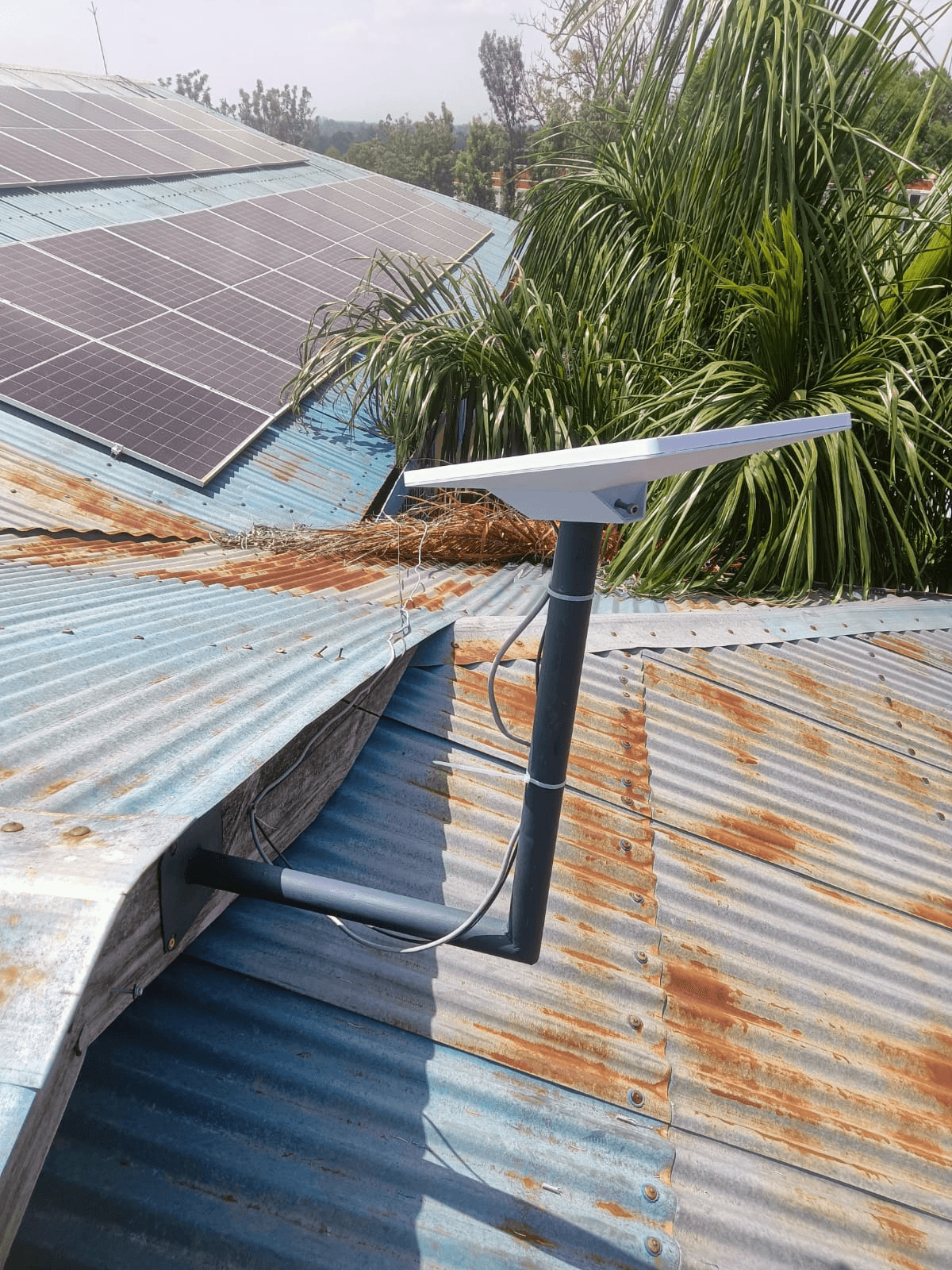
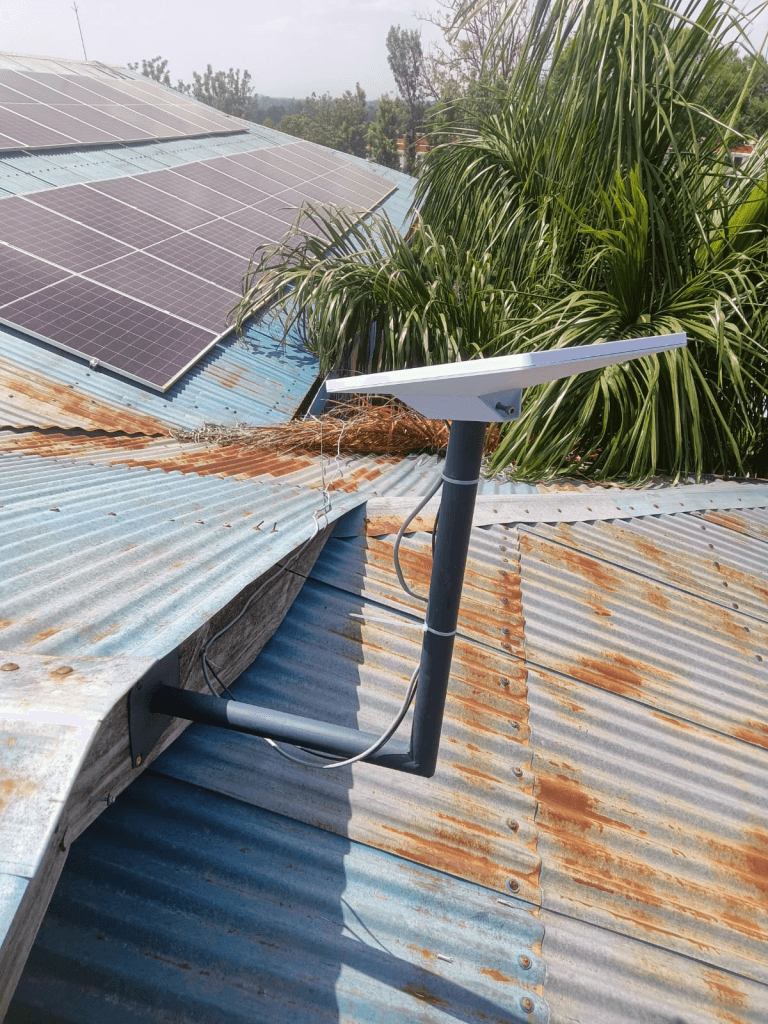
Starlink installation Ruiru is for homeowners, businesses, schools, rental properties, remote workers, and site managers who want more than a dish placed on a roof. A dependable installation needs a clear view of the sky, a secure mount, protected cable routing, correct router placement, and real connection testing before the installer leaves.
Talk to Spacekits
Need Starlink help for your home or business?
Talk to Spacekits before you buy or book installation. We help with kit supply, mounting, activation, router placement, WiFi coverage, and written quotes.
Spacekits provides professional Starlink installation across Ruiru and nearby parts of Kiambu County. The service can cover site assessment, mounting advice, dish installation, cable routing, Starlink setup, Wi-Fi configuration, performance checks, and guidance on extending coverage to additional rooms or buildings.
Need a site-specific quote? Share your Ruiru location, building type, Starlink kit model, preferred installation date, and the areas that need Wi-Fi coverage through the Spacekits contact page.
Powered by Zama Systems. Spacekits combines practical field installation with clear buyer guidance so that customers can plan the complete connection, not only the hardware purchase.
Quick Navigation
- What the installation service includes
- Areas served around Ruiru
- How the site assessment works
- Choosing the right Starlink kit
- Mounting and cable routing
- Wi-Fi coverage inside the property
- The installation process
- What affects the installation quote
- Frequently asked questions
What Professional Starlink Installation in Ruiru Includes
A good installation is planned around the property rather than treated as a standard one-size-fits-all job. A single-storey home in Membley, a shop near Ruiru town, a warehouse along the Eastern Bypass, and a multi-floor office near Tatu City can require different mounts, cable routes, router positions, and Wi-Fi equipment.
A typical Spacekits installation may include:
- Site and obstruction assessment: checking the roof, compound, balcony, pole, or wall options and identifying trees, buildings, tanks, and other objects that may interrupt the dish’s view of the sky.
- Mount selection: recommending a roof, wall, fascia, pole, or custom stand based on the structure and the kit being installed.
- Secure dish placement: fixing the Starlink dish in a stable position that is appropriate for the building and local weather exposure.
- Cable routing: planning a neat path from the outdoor unit to the indoor router while limiting sharp bends, exposed cable, water-entry risks, and unnecessary drilling.
- Router setup: powering the system, completing the initial setup, naming the network, and applying a secure Wi-Fi password.
- Connection testing: checking that the system comes online and testing practical Wi-Fi coverage in the rooms or work areas that matter.
- Handover guidance: showing the customer how to monitor the connection, identify common issues, and request support if the property needs additional coverage.
The final scope depends on the property, mounting height, cable distance, kit model, and whether extra networking work is required. These details should be confirmed before the job begins.
Areas Served Around Ruiru
Spacekits can arrange Starlink setup in Ruiru town and surrounding residential, commercial, and developing areas, subject to installer scheduling and site accessibility. Enquiries commonly come from:
- Ruiru town and the CBD area
- Membley and the Northern Bypass corridor
- Kamakis and the Eastern Bypass corridor
- Murera, Kihunguro, Gatong’ora, Gitambaya, and nearby estates
- Tatu City and surrounding developments
- Kahawa Sukari, Mwihoko, and neighbouring areas
- Homes, schools, offices, shops, farms, rental properties, and work sites in the wider Ruiru area
If the location is outside this immediate coverage area, Spacekits also supports Starlink installation across Kiambu County. Send a pin or clear location description so the team can confirm travel, access, timing, and the likely installation scope.
Why the Site Assessment Comes First
Starlink needs a wide, unobstructed view of the sky. A position that looks convenient from the ground may still be affected by a taller neighbouring building, a water tank, mature trees, roof features, or future construction. That is why the first decision should be the dish location, not where the cable is easiest to hide.
The assessment also helps answer practical questions:
- Can the dish be mounted safely on the existing roof or wall?
- Would a pole or purpose-built mounting stand give a better view?
- Where can the cable enter without creating an avoidable leak risk?
- Is the supplied cable long enough for the proposed route?
- Where should the router sit to serve the most important rooms?
- Will the property need a mesh unit, access point, or wired extension?
Customers can also review the official Starlink availability map and use Starlink’s own obstruction-checking tools before installation. Service availability and performance depend on Starlink’s network, the selected plan, local demand, weather, obstructions, and the final setup.
Choosing the Right Starlink Kit for the Property
The best installation starts with the correct hardware. A fixed home, busy office, mobile team, and temporary work site do not always need the same kit or network design.
Starlink Standard Kit Gen 3 / Version 4
The Standard kit is a practical choice for many fixed residential and business installations. Buyers who are still comparing hardware can review the Starlink Standard Kit Gen 3 Version 4 listing and the Spacekits guide on buying Starlink Gen 3 Version 4 in Kenya.
The installation plan should confirm where the dish will sit, how the cable will reach the router, how many rooms need coverage, and whether the standard indoor Wi-Fi arrangement is enough for the property.
Starlink Mini
Starlink Mini can suit compact, portable, backup, field, and lighter-use scenarios. It still needs sensible placement and a clear view of the sky. Customers comparing this option can request a Starlink Mini kit quote.
The smaller form factor does not remove the need for a secure mount or suitable power and Wi-Fi planning. If the Mini will remain outdoors or in a fixed position, an appropriate stand can improve stability and usability. See the guide to a Starlink Mini mounting stand in Kenya.
Mounting, Cable Routing, and Weather Exposure
The mount is one of the most important parts of Starlink installation Ruiru customers should compare. A weak or poorly positioned bracket can shift, vibrate, corrode, or create maintenance problems. The correct option depends on the roof material, wall strength, mounting height, nearby obstructions, and how easily the system should be accessed later.
Common mounting approaches include:
- Roof mount: useful when the roof offers the clearest view and can safely support the chosen fixing method.
- Wall mount: suitable where a strong exterior wall provides elevation and a practical cable route.
- Pole mount: useful for lifting the dish above nearby roof lines, vegetation, tanks, or boundary features.
- Custom stand: considered when the standard hardware does not suit the building or installation position.
Mounting work should avoid unnecessary damage to roofing sheets, tiles, waterproofing, electrical runs, and structural elements. Cable entry points should be neat and appropriately sealed. The cable should not be crushed, tightly bent, left loose across a walking area, or positioned where water and repeated movement can damage it.
The customer should also know how the dish can be accessed for future inspection without creating an unsafe maintenance situation. A slightly more thoughtful mounting position can reduce future repair time and cost.
Planning Wi-Fi Coverage Beyond the Starlink Dish
A successful satellite connection does not automatically guarantee strong Wi-Fi in every room. Thick walls, reinforced concrete, multiple floors, long corridors, metal structures, and detached buildings can weaken the indoor signal even when the Starlink dish itself is working correctly.
During installation, identify the rooms and devices that matter most. These may include a home office, smart television, point-of-sale desk, classroom, CCTV recorder, reception area, staff office, or an outbuilding. The router can then be placed with those priorities in mind.
Larger properties may need a mesh network, access points, Ethernet cabling, or a point-to-point link between buildings. Spacekits provides guidance on Starlink Wi-Fi extension and mesh setup in Kenya for customers whose requirements go beyond one router.
Good network planning also includes sensible security: use a strong Wi-Fi password, avoid sharing administrator access unnecessarily, separate guest access where appropriate, and position networking equipment in a ventilated, protected area.
The Spacekits Starlink Installation Process in Ruiru
- Send the location and requirements. Share the map pin, property type, kit model, number of floors or buildings, and the main rooms that need Wi-Fi.
- Confirm the proposed scope. Spacekits reviews the likely mount, cable route, installation height, access conditions, extra hardware, and travel requirements.
- Receive a quote. The quotation should distinguish the normal installation work from optional mounts, extra cable management, network extensions, transport, or specialised access equipment.
- Schedule the visit. Timing is confirmed based on installer availability, weather, site access, and whether the required accessories are ready.
- Assess and install. The installer checks the preferred position on site, agrees on any necessary adjustment, secures the dish, routes the cable, and sets up the indoor equipment.
- Test the connection. The system is brought online and tested for practical operation and Wi-Fi coverage in agreed areas.
- Complete the handover. The customer receives basic guidance on the app, router, network name, password, obstruction monitoring, and when to request additional support.
Installation time varies. A straightforward, accessible single-building setup can be faster than a high roof, long cable route, multi-building network, or installation that needs a custom mounting solution. Same-day service should only be treated as confirmed after the location, scope, accessories, and schedule are checked.
What Affects the Starlink Installation Price in Ruiru?
There is no responsible single price for every property because the work can differ substantially. A quote may be influenced by:
- the Starlink kit model and the supplied accessories
- roof type, wall material, and mounting position
- installation height and safe access requirements
- whether a standard bracket, pole, or custom stand is required
- cable length, cable protection, drilling, and entry-point sealing
- distance to the property and installer scheduling
- the number of rooms, floors, or buildings needing Wi-Fi
- mesh units, access points, switches, Ethernet cable, or other networking equipment
- existing power, network, and structural conditions at the site
For an accurate quote, send photos of the building, the proposed dish area, the room where the router may be placed, and any obstacles around the property. A short video can also help explain roof access and cable distance before the visit.
Who Uses Starlink Installation Services in Ruiru?
Homes and Apartments
Households may use Starlink for remote work, streaming, online learning, communication, cloud services, and backup connectivity. Apartments need extra care because roof and wall access may require landlord or management approval.
Businesses and Offices
Shops, offices, agencies, workshops, warehouses, and professional practices need a network plan based on staff devices, cloud applications, payment systems, customer Wi-Fi, CCTV, and uptime expectations. Business owners should discuss backup power and network redundancy if internet interruption would stop operations.
Schools and Training Centres
Learning environments may require coverage across classrooms, offices, laboratories, and staff areas. The Starlink connection is only one part of that design; access points, content controls, device policies, and secure administration may also be needed.
Rental Properties and Airbnbs
Landlords and hosts need stable placement, protected equipment, clear guest Wi-Fi arrangements, and coverage that matches the unit layout. Multi-unit properties should be assessed carefully instead of assuming one router will serve every tenant equally.
Construction, Farm, and Temporary Sites
These sites may value fast deployment and flexibility, but they still need safe placement, reliable power, equipment security, and a plan for moving or protecting the system as work progresses.
Common Installation Mistakes to Avoid
- Choosing the easiest position instead of the clearest position. Convenience does not compensate for repeated obstructions.
- Using an unstable mount. A temporary solution can shift, damage the cable, or make troubleshooting harder.
- Ignoring the indoor network. Strong Starlink service at the dish does not solve weak Wi-Fi caused by poor router placement.
- Running cable through unsafe or exposed areas. Cable damage can interrupt the entire connection.
- Drilling without planning. Poorly selected entry points can affect roofing, waterproofing, electrical wiring, or appearance.
- Skipping post-installation tests. The customer should see that the system is online and understand the coverage limitations before handover.
- Buying accessories before the site is assessed. The wrong bracket, pole length, or networking device can add cost without solving the real problem.
How to Compare Starlink Installers in Ruiru
Compare the complete service rather than only the lowest quoted figure. Ask each installer to explain the proposed dish position, mount, cable route, expected extra materials, Wi-Fi plan, testing process, and what happens if the site requires a change after inspection.
A useful quotation is specific enough to show what is included and what is optional. It should not promise guaranteed speeds, perfect coverage, or same-day completion without first understanding the property. The installer should also be willing to explain whether the customer needs the Standard kit, Starlink Mini, a stronger mount, or additional indoor networking.
For broader guidance, review the Spacekits overview of Starlink installers in Kenya and the official Starlink support centre.
Book Starlink Installation in Ruiru
To request a quote, prepare the following information:
- your exact Ruiru location or map pin
- the type of property and number of floors
- whether you already have the Starlink kit
- the kit model if known
- photos of the roof, balcony, wall, or compound
- the rooms or buildings that need Wi-Fi
- your preferred installation date
- any access, landlord, estate, or security requirements
Contact Spacekits for a Starlink installation Ruiru quote. The team can help define the installation scope, required mount, likely networking needs, and next available service window.
Frequently Asked Questions
Does Spacekits install Starlink throughout Ruiru?
Spacekits handles installation enquiries across Ruiru town and surrounding residential, commercial, and developing areas. Availability depends on the exact location, installer schedule, site access, weather, and required accessories. Send a location pin for confirmation.
How much does Starlink installation cost in Ruiru?
The price depends on the kit, roof or wall type, mounting hardware, installation height, cable route, access conditions, travel, and whether extra Wi-Fi equipment is needed. Photos and a map pin help Spacekits prepare a more accurate quote.
Can Spacekits install a kit that I already bought?
Yes, subject to confirming the kit model, completeness, condition, location, and required mounting accessories. Share photos of the kit and property before scheduling.
Can Starlink be installed on a mabati roof?
It can often be installed on or near a corrugated metal roof, but the fixing method must be chosen carefully. The installer should consider sheet condition, supporting structure, sealing, wind exposure, cable route, and safe maintenance access.
Do I need a mounting pole or stand?
Not every site needs one. A pole or stand may be recommended when it improves sky visibility, stability, clearance, or cable routing. The best choice follows the site assessment.
Will one Starlink router cover my whole house or office?
It depends on the building size, floor plan, wall materials, router position, and number of floors. Larger or divided properties may need mesh Wi-Fi, access points, or wired network extensions.
Can Starlink installation be completed on the same day?
A straightforward installation may be completed in one visit, but same-day booking and completion are not automatic. The team first needs to confirm location, schedule, site access, weather, hardware, mount, and networking requirements.
Does professional installation guarantee a specific internet speed?
No installer should guarantee a fixed speed. Professional installation aims to reduce avoidable problems related to obstruction, mounting, cabling, router placement, and setup. Actual service performance depends on Starlink’s network, plan, demand, weather, and other conditions outside the installer’s control.
Get a Reliable Starlink Setup in Ruiru
A dependable Starlink connection begins with the right kit, a clear sky view, a stable mount, protected cabling, and Wi-Fi designed for the actual property. Spacekits helps Ruiru customers bring those pieces together through practical installation planning and on-site setup.
For professional Starlink installation Ruiru service, contact Spacekits with your location, property photos, kit details, and coverage requirements.
Need Starlink Installation or Network Optimization?
We help homes, offices, apartments, and businesses with Starlink installation, WiFi coverage improvement, and professional setup in Kenya.
Request Installation Chat on WhatsApp