

Need Starlink Installation or Network Optimization?
We help homes, offices, apartments, and businesses with Starlink installation, WiFi coverage improvement, and professional setup in Kenya.
Request Installation Chat on WhatsAppExpanded 8 October 2026.
Talk to Spacekits
Need Starlink help for your home or business?
Talk to Spacekits before you buy or book installation. We help with kit supply, mounting, activation, router placement, WiFi coverage, and written quotes.
Looking for Starlink installers in Kenya? Choose a team that can explain where the dish will go, how the cable will reach the router, which rooms need Wi-Fi, and what support you will receive after installation. A useful quotation should turn those questions into a clear scope before work starts.
If you searched for “Starlink installers near me”, start with your exact location and the type of property. A nearby address alone does not tell you whether a provider can handle your roof, reach a remote site, or return for a support visit. This guide explains how to compare installers across Nairobi, Kiambu, Machakos, Laikipia and Western Kenya, and request the right setup for a home, office, farm, school or lodge.
Updated 8 October 2026.
How to choose the best Starlink installers in Kenya
The best installer for your property is the one whose skills, proposed equipment and support arrangements match the job. Ask for evidence you can assess: relevant installation photographs, an explanation of the mounting method, a written scope and a clear handover plan. Treat a claim such as “best” as a starting point for questions, rather than proof of quality.
1. Ask for examples that match your site
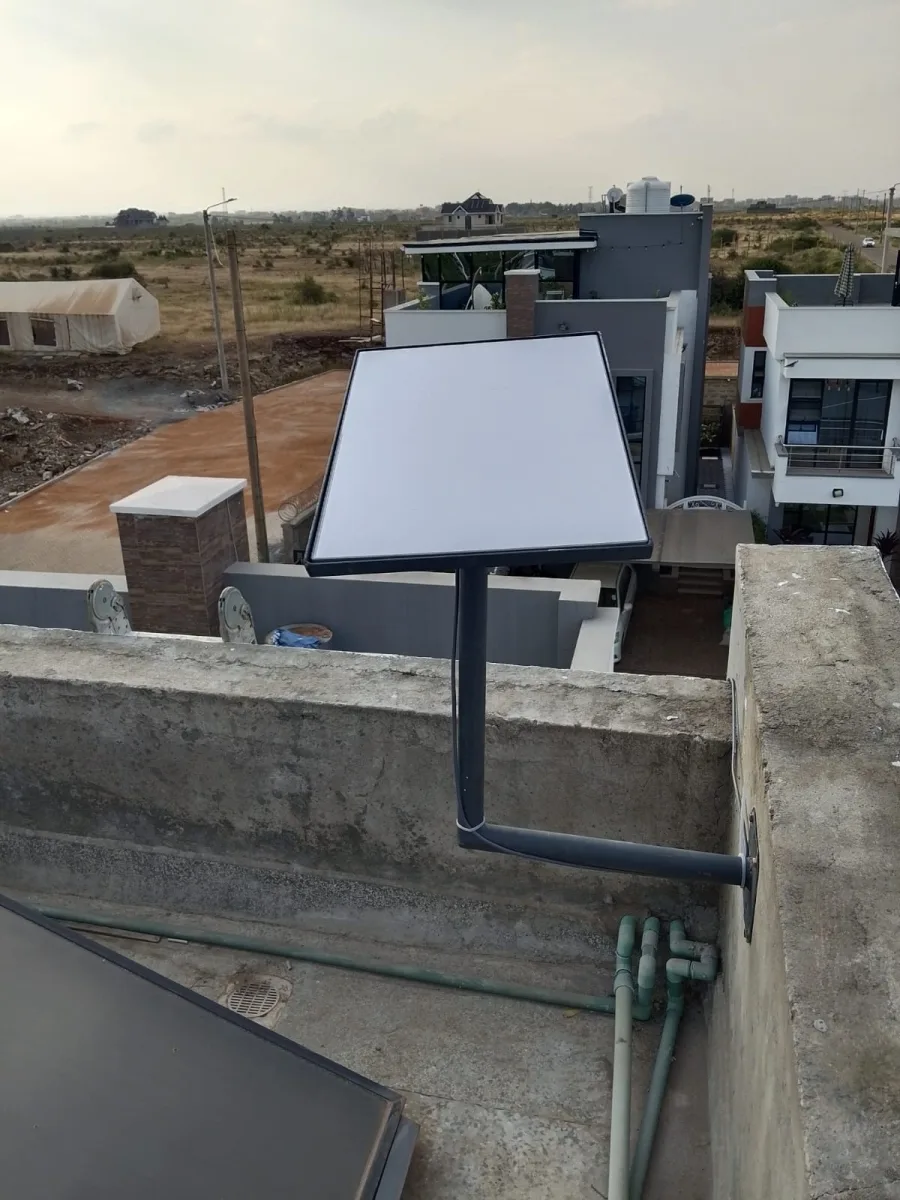
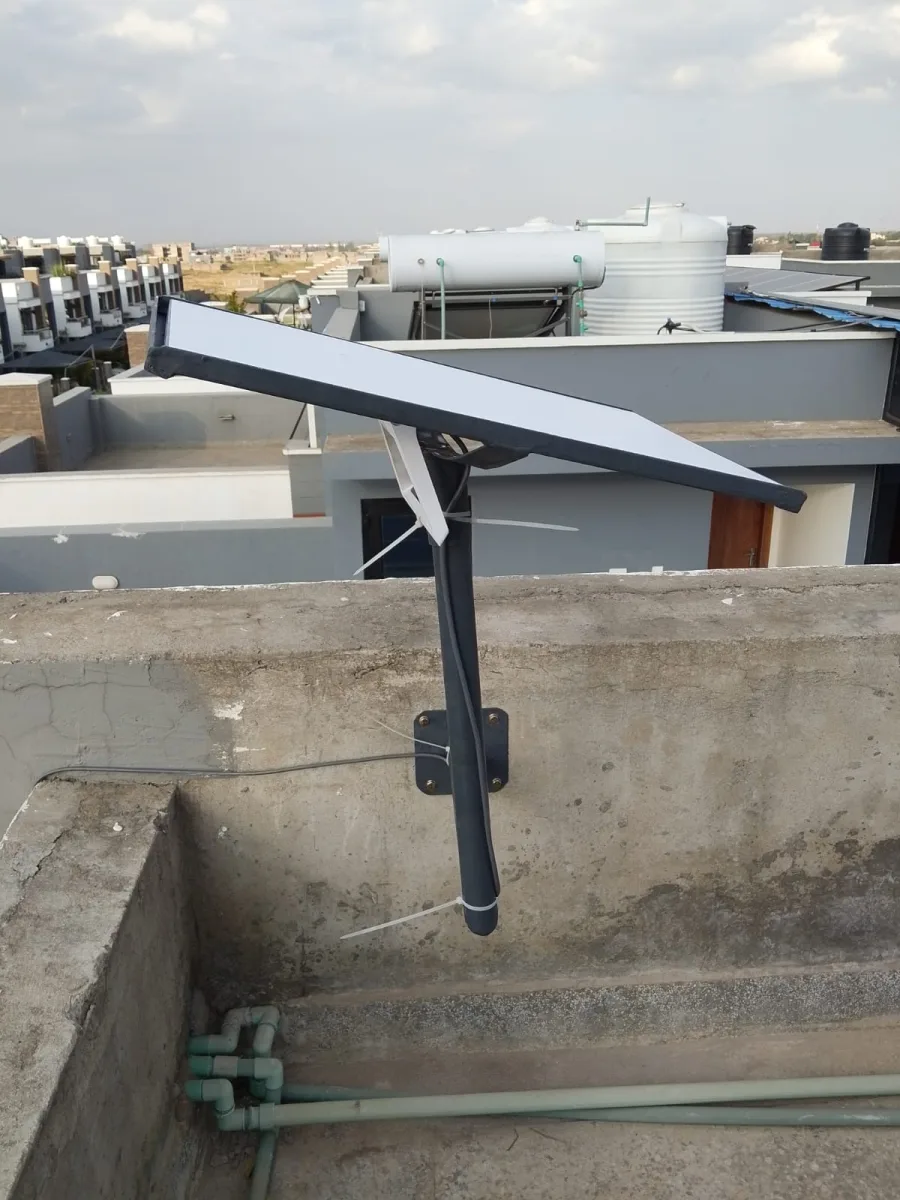
A bungalow, an apartment block and a remote lodge present different practical problems. Request customer-approved examples of work on a similar building. Look at the final mounting position, cable finishing and router location, and ask what challenge the installer had to solve. A photograph of a boxed kit does not demonstrate installation workmanship.
Where references are available, ask whether the quoted scope was clear, whether the work was completed as agreed, and how the provider handled follow-up questions. Reviews should describe a real service experience. Avoid relying on an unexplained rating or an impressive speed-test image without context.
2. Expect a site assessment before a firm installation plan
Share your county, town or nearest landmark, building type, kit model and intended router location. Photographs taken safely from the ground can help an installer identify questions that need a closer inspection. Do not climb onto a roof to obtain a quotation photo.
The assessment should consider the proposed sky view, nearby trees or structures, access to the mounting area, the cable route and the indoor equipment position. Ask the installer to explain how they will check the location using the instructions for your specific kit. Consult official Starlink Support for current equipment and setup guidance.
3. Get an explanation of the mounting and cable work
Ask which mount is proposed, why it suits the structure, and whether additional materials are included. Roof or wall work should be handled by competent people using suitable equipment. The quotation should identify any building access or property-owner permission needed before the appointment.
For the cable route, agree where it will enter the building and where equipment will sit. Ask how exposed sections and entry points will be finished. Discuss the route before work begins, especially where a long path or separate building may require a different design. Do not accept improvised wiring or unsupported equipment modifications as a shortcut.
4. Include Wi-Fi coverage in the conversation
A working internet connection beside the router does not prove that every bedroom, office or guest room has usable Wi-Fi. List the rooms and outdoor working areas that matter. Explain how many people will use the connection at the same time and what they need to do.
For a larger property, ask whether the proposed scope includes coverage testing, extra access points or a connection between buildings. These should be separately explained and quoted where needed. See Spacekits’ Wi-Fi extension and mesh setup service when the problem extends beyond installing the dish.
5. Confirm testing and support before paying for the job
Agree what completion means. Useful checks include the kit connecting, the customer’s devices joining the network, and ordinary tasks working in the agreed rooms. Record the test conditions so a result is meaningful. A single speed test cannot promise the same performance at every time of day.
Ask who to contact for a mounting issue, a Wi-Fi problem or an account question. Confirm whether follow-up visits are included, how travel is charged, and which work falls outside the installation scope. Keep that information with the invoice and handover notes.
Searching for Starlink installers near me: what to check locally
When contacting an installer, state the actual installation location rather than only the nearest large town. An estate name, access road or nearby landmark helps the provider plan the visit. For a farm or remote lodge, explain the final part of the journey and any access restrictions.
- Service area: confirm that the provider can attend your exact location.
- Travel: ask whether transport, accommodation or a second visit affects the quote.
- Appointment: agree a realistic arrival window and who will meet the team.
- Building access: arrange any caretaker, landlord or facilities approval in advance.
- Aftercare: distinguish remote troubleshooting from an on-site return visit.
Spacekits publishes installation service areas across Kenya. Share your location to confirm scheduling and scope. A listed service area does not by itself guarantee an immediate appointment.
Find Starlink installers by area: Nairobi, Kiambu, Machakos, Laikipia and Western Kenya
Use the regional guide below when requesting an installation assessment. Enquiries are welcome from estates, towns and rural locations throughout these regions, including places not individually named here. Send your county, ward or estate, nearest landmark and a location pin privately when booking. Spacekits will need to confirm access, travel costs and appointment availability for the exact property; this directory does not imply a branch or a technician permanently based in every location.
Starlink installers in Nairobi
For Nairobi enquiries, include the part of the city: Westlands, Dagoretti North, Dagoretti South, Lang’ata, Kibra, Roysambu, Kasarani, Ruaraka, Embakasi North, Embakasi South, Embakasi Central, Embakasi East, Embakasi West, Makadara, Kamukunji, Starehe or Mathare. Add the estate and building name, particularly when an address could refer to more than one property.
For an apartment or commercial building, discuss shared-roof access, permission to install equipment, the cable route to your floor and the location of your router. For a standalone home, explain which rooms, garden offices or outbuildings need coverage. An installer should assess the actual sky view and structure instead of assuming that every property within an estate needs the same mount.
Request a Nairobi installation quote and include your estate, floor or building type, and kit status.
Starlink installers in Kiambu
Send enquiries from Kiambu town, Kiambaa, Ruiru, Juja, Thika, Githunguri, Gatundu North, Gatundu South, Lari, Limuru, Kikuyu and Kabete. If you are in a smaller settlement or an estate outside a town centre, provide the nearby road or landmark as well as the county. Spacekits lists its contact base at Karuguru Plaza, Office Suite 12, Eastern Bypass, Kamaki’s, Ruiru.
For a home compound, school or farm, describe each building needing internet. A dish installation at the main house and Wi-Fi coverage at a detached office are separate requirements. For an apartment, ask who controls roof access and whether a shared cable path can be used. Clarifying these details before the visit makes the quotation more useful.
Request a Kiambu installation quote with the town, estate or rural location and the buildings to be connected.
Starlink installers in Machakos
Include whether the site is in Machakos Town, Mavoko, Masinga, Yatta, Kangundo, Kathiani, Matungulu or Mwala. For properties around Athi River or other growing residential and business areas, provide a clear landmark and property contact rather than relying on the town name alone.
A business yard may need internet at an office, store and gate; a rural home may need coverage in detached rooms. List these separately so the installer can distinguish the satellite connection from the network needed around the property. Explain site access arrangements and whether work must fit around business or school hours.
Request a Machakos installation quote and state the closest town, access details and required Wi-Fi zones.
Starlink installers in Laikipia
For Laikipia enquiries, identify the locality around Nanyuki, Nyahururu, Rumuruti, Doldol, Ol Moran or another town, village, ranch or conservancy area. Include your local administrative area where known. A familiar town name is a useful starting point, but the final distance to a remote property affects visit planning.
For a lodge, ranch or camp, describe reception, guest accommodation, staff areas and other buildings needing connectivity. Mention access permissions, who can guide the team to the site, and where indoor equipment will be kept. Ask for travel and any return-visit arrangements in writing. For power or electrical concerns, arrange an appropriate assessment rather than assuming that mounting the kit resolves the site’s power needs.
Request a Laikipia installation quote with the nearest town, property type and approximate distances between buildings.
Starlink installers in Western Kenya
This guide groups Kakamega, Bungoma, Busia and Vihiga under Western Kenya. Enquiries can include both town properties and surrounding rural locations. State the county first so similar place names or distant settlements do not lead to an incorrect travel estimate.
- Kakamega: specify the area around Kakamega town, Mumias, Butere, Khwisero, Matungu, Malava, Navakholo, Shinyalu, Ikolomani, Lugari or Likuyani, or give your nearest local landmark.
- Bungoma: identify Kanduyi, Bumula, Sirisia, Kabuchai, Mount Elgon, Webuye East, Webuye West, Tongaren or Kimilili, and provide the town or rural location, property type and access route. Schools, homes and businesses should list the actual rooms and buildings needing coverage.
- Busia: identify Bunyala, Butula, Matayos, Nambale, Samia, Teso North or Teso South, and include the town, ward or village and a site contact. Confirm transport and follow-up arrangements before setting an installation date.
- Vihiga: identify Vihiga, Sabatia, Hamisi, Luanda or Emuhaya and add the specific settlement or property landmark.
For any of these counties, agree how the finished connection will be tested, who will receive the handover, and how support will be handled after the team leaves. A single router location should not be assumed to cover a school campus or a multi-building family compound.
Request a Western Kenya installation quote with your county and exact locality. If your location is elsewhere in western Kenya, name the county in your enquiry so Spacekits can confirm the appropriate service arrangements.
Is your estate or village missing?
You do not need a separate webpage for your address to request help. Send the exact location, property type, kit model or kit requirement, and the areas needing Wi-Fi. The named places above help organise enquiries; the site assessment and confirmed quotation determine the work that can be booked.
Installation planning outside Nairobi
For underserved locations, the most useful starting point is a complete site brief. This helps avoid sending a team without the information needed to plan mounting, coverage and access. Explain whether someone will remain at the property after handover and who will manage the account.
Rural homes and farms
List the house, farm office and any other buildings that need internet. Approximate distances and a simple sketch help explain the coverage requirement. Discuss where indoor equipment can be kept and whether power interruptions affect everyday use. Any electrical assessment or power-backup work should be handled by a qualified person.
Lodges, camps and guest houses
Describe guest rooms, reception, staff areas and booking or payment tasks separately. Ask the installer to explain the proposed guest and staff network arrangement. Test from the rooms guests will use, rather than judging the whole property from reception. Plan how staff will obtain help when the person who booked the installation is away.
Schools and business premises
Identify the offices, classrooms, counters or meeting rooms that need coverage. Explain normal working hours and busy periods so the installation and testing can be organised with less disruption. Assign a staff contact to receive the handover and keep the equipment records.
What should a Starlink installation quotation include?
Compare like-for-like scopes. One price may cover mounting an existing kit, while another includes hardware, travel and a wider internal network. Ask for the following items to be separated:
- Hardware: the kit model and any accessories, or confirmation that you are supplying the kit.
- Mounting: the proposed mount, materials and agreed location.
- Cable work: the planned route, entry point and included finishing.
- Networking: router setup, coverage checks and any additional equipment.
- Travel and access: site visit charges and practical requirements.
- Testing and handover: what will be demonstrated and recorded.
- Aftercare: included support, exclusions and charges for extra work.
Keep the equipment purchase, installation fee and recurring Starlink service charges distinct. Confirm current availability and plan pricing for your location directly with Starlink. For the factors that change an installer quotation, read the Spacekits installation-cost guide.
Already own a Starlink kit?
Tell the installer before asking for a price. Provide the model and describe whether the kit is new, already working, being relocated or awaiting activation. List the components you have and mention any damage or missing parts. That prevents a supply-and-install quote being confused with an installation-only job.
If account access or a transfer is unresolved, raise it before the visit. Physical installation cannot guarantee that an account issue will be resolved. Keep account ownership and recovery details under your control, and use the official account process for account changes.
Your installation handover checklist
Before the installer leaves, work through the agreed scope together. Keep a short record that another household member or staff colleague can understand.
- Confirm the equipment installed and the agreed mounting and cable route.
- Check the connection and everyday tasks in the rooms included in the scope.
- Record any areas needing additional coverage work.
- Confirm who controls the service account and who holds the Wi-Fi details.
- Keep approved installation photos, the itemised invoice and support contact.
- Write down unfinished items and the agreed next step.
Request a Spacekits installation assessment
Spacekits offers Starlink equipment, installation and Wi-Fi support for homes, businesses and remote sites. Review the Starlink installation service and send a brief describing your property. Ask for installation examples relevant to your job and a written quotation before committing.
You can use this message: “I need Starlink installation in [county and town]. The property is a [home, office, farm, school or lodge]. I [own a kit / need a kit]. The rooms or buildings needing Wi-Fi are [details]. Please confirm the site assessment, installation scope, travel charges and available appointment dates.”
Request a written installation quote or contact Spacekits on WhatsApp. You can also call +254 725 345 345.
Frequently asked questions
How do I find the best Starlink installer near me?
Confirm service to your location, ask for comparable installation examples, and compare written scopes. Prioritise a clear mounting plan, coverage testing and an aftercare contact. Proximity is useful, but it should be considered alongside the team’s suitability for your property.
Can an installer guarantee a specific internet speed?
An installer can test the completed setup and report the result under the test conditions. Treat a promise of a fixed speed at all times cautiously. Ask which parts of performance relate to the local Wi-Fi setup and which depend on the service.
Does installation include internet in every room?
Only if the agreed scope covers those rooms and the necessary network design. Ask for coverage requirements to be written into the quote. Additional buildings or difficult indoor layouts may need separately quoted equipment.
Is Spacekits Starlink’s official customer support?
No. Spacekits is an independent equipment reseller and installation service provider, not Starlink or SpaceX. Use official Starlink channels for account and service matters, and confirm with Spacekits what local installation or troubleshooting assistance it can provide.
Interview an installer using your property brief
A useful provider conversation starts with your requirement and then tests how clearly the provider responds. Send a short description of the property, kit status, essential rooms and ordinary activities. Ask the installer to explain the next step. A response that identifies missing information and relevant assessment questions can be more useful than an immediate universal price.
Listen for an explanation tied to your building. If every answer is a broad claim about speed or nationwide coverage, return to the practical questions: where will equipment sit, which rooms are included, what approval is needed and how will completion be demonstrated? The provider should be able to distinguish confirmed facts from assumptions that require inspection.
Ask who will attend and how responsibilities are handled. The person selling the service may not perform every part of the work. That is not necessarily a problem, but the customer should know who is responsible for the installation, supplied equipment and follow-up. Keep the answer with the written quotation.
Evaluate photographs and examples in context
An installation photograph can show that equipment was present at a property, but it cannot prove every aspect of performance or suitability. Ask what the example demonstrates and whether it resembles your building type. A provider should use customer-approved material and avoid exposing private access details or personal information merely to strengthen a sales claim.
Look for a coherent explanation of the job: the customer’s requirement, the proposed arrangement and the checks used at completion. The value lies in understanding the provider’s approach. Do not infer that a similar-looking roof means the same materials or position will suit your premises.
For references or reviews, focus on the service experience described. Was the scope understandable? Were changes explained? Did the customer know how to obtain support? A rating without context is less informative than a specific account of how the provider handled the work. Treat unverified superlatives as claims to examine rather than evidence.
Use a simple comparison record
Create a page with your essential requirements down one side and each proposal beside them. For every requirement, record included, excluded or provisional. This exposes gaps without requiring a complicated scoring system. If one provider includes indoor coverage and another only mounts the kit, the difference becomes visible before the totals distract from it.
Add rows for survey arrangements, travel, property approval, account ownership and acceptance tests. Note who must act before the installation can proceed. A cheaper proposal may still be appropriate if its narrower scope matches what you need; the problem is buying it under the assumption that it includes more.
Keep a short decision note explaining why you chose the provider. For an organisation, this helps the next responsible person understand the purchase. For a household, it provides a reference if the scope later changes. The note should be based on the proposal and evidence, not a promise of guaranteed rankings or permanent service performance.
Choose the right scope for the first phase
A large property does not always need every building connected immediately. Identify the most important location and ask whether it can form a useful first phase. Record later requirements separately. This can make a project manageable while keeping the future plan visible.
Each phase needs its own completion criteria. An office connection should be tested at the office; a later guest-building extension should be tested there when installed. Avoid describing the first stage as whole-property coverage merely because the long-term intention is broader.
Ask whether decisions made now affect the later phase and which assumptions remain open. The provider can explain what is sensible to prepare, but should not guarantee an unassessed future design. A clear staged plan is more useful than buying unspecified extra equipment in the hope it will suit whatever comes next.
Manage changes without losing the original agreement
When the inspection reveals a different route or the customer requests another room, record the change. State why it is needed, what work is proposed and any effect on price or timing. Identify the person who can approve it. This keeps a reasonable adjustment from becoming a disputed memory of a telephone conversation.
If the owner is away, give the on-site representative clear authority. Someone responsible for opening the property may not be authorised to approve additional equipment. The provider should know how to reach the decision maker and what work can proceed if that person is unavailable.
At handover, compare the work with the final agreed scope. Keep the revised document and any deferred items together. This gives support or a future installer an accurate picture of what exists and what remains optional.
Recognise the boundaries of an installation service
Physical installation, the satellite service account, indoor networking and business applications can involve different responsibilities. Ask the provider to explain the boundary of the offer. An installer may help with setup without becoming the official account-support channel or the maintainer of every application used at the property.
Keep control of login and recovery information. Complete sensitive account steps yourself through the appropriate process. A technician can explain what is needed without receiving unrestricted long-term access to personal or organisational accounts.
For specialist equipment, ask its supplier to define the network requirement and acceptance test. Do not assume that a working internet connection certifies unrelated systems. Clear boundaries make the overall project easier to coordinate and reduce the risk of an important task falling between providers.
Check the handover from the user’s perspective
The customer should be able to explain what was installed, which locations were tested and where to obtain help. If only the technician understands the arrangement, the handover is incomplete as an operational process even when the equipment connects.
Use representative devices and ordinary activities. Record relevant conditions and any limitation. A one-time measurement is evidence about that test, not a permanent promise. If an essential activity cannot be tested, mark it as unverified and agree a follow-up rather than treating the absence of a test as success.
Keep records concise enough to be useful. An equipment list, final scope, support contacts and outstanding items often provide more practical value than a long sales document. Store credentials securely and separately from the general record.
Review the installation when the requirement changes
A new work room, additional building or different business application may change the original requirement. Return to the scope and ask what needs assessment. The earlier installation may still be working as agreed while no longer meeting the expanded need.
Record significant equipment moves and changes by other providers. If a problem develops, this history helps support understand what differs from the handover arrangement. Avoid making multiple unrecorded changes in response to a vague symptom.
Keep contact information current when employees or property representatives change. The installation should remain understandable beyond the person who arranged it. This is particularly important for remote properties where the owner and everyday users are not the same people.
Make the final choice on a defined result
The best Starlink installer for your job is the provider who can demonstrate a suitable approach to the actual property, explain the work and document completion. That assessment combines relevant evidence, a clear quotation, competent execution and understandable support responsibilities. No single slogan or price replaces those elements.
For a SpaceKits enquiry, send the county, property type, kit status and required locations, then ask for the assessment and written scope. Use the regional guides to organise the location details. The objective is a connection that serves the agreed activities and leaves you with the information needed to operate and maintain it responsibly.
Keep a short record of unanswered questions
Before choosing a provider, write down any question that remains unresolved. It may concern roof approval, a room that has not been assessed, an accessory whose compatibility is uncertain or a support responsibility that has not been explained. Ask the provider to answer those points in the proposal rather than allowing them to disappear inside a general assurance.
Some questions can only be answered during a survey. That is acceptable when the proposal states the dependency and explains what happens next. The customer should understand which decisions are firm and which remain provisional. This is particularly helpful when comparing providers who have inspected different amounts of information.
At the final review, check the list again. Close the questions that have been resolved and carry any remaining limitation into the handover notes. This simple habit keeps attention on the practical outcome and prevents a long buying conversation from ending without answers to the issues that mattered most at the beginning.
Before you confirm the booking
Read the final proposal once more as the person who will use the connection every day. Can you identify your essential room, the activity that will be tested and the person responsible for support? If the answer is clear, the purchase is grounded in an understandable result. If it is not, ask for that detail before the appointment. The most useful installation agreement is one that both customer and provider can explain in ordinary language and check against the work actually completed at the property.
Need Starlink Installation or Network Optimization?
We help homes, offices, apartments, and businesses with Starlink installation, WiFi coverage improvement, and professional setup in Kenya.
Request Installation Chat on WhatsApp